(No.YA098) 1-29
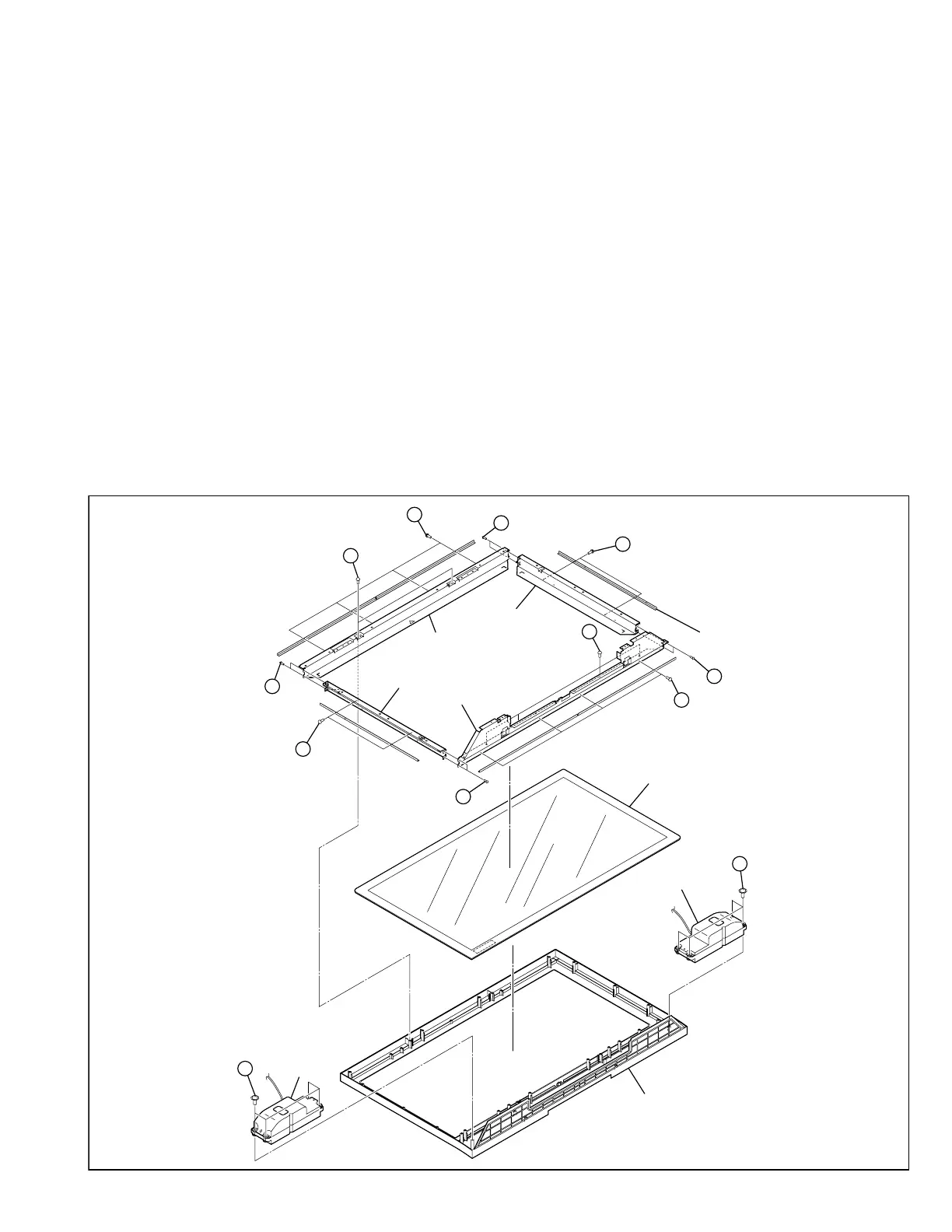
3.2.20 REMOVING THE SPEAKER (Fig.10)
• Remove the REAR COVER
• Remove the CENTER COVER.
• Remove the CHASSIS SHIELD COVER.
• Remove the TERMINAL COVER.
• Remove the MAIN BASE, CHASSIS BASE and AUDIO PWB
BASE (with each PWB affixed on the MAIN BASE, CHASSIS
BASE and AUDIO PWB BASE).
(1) Remove the 4 screws [AB], and remove the SPEAKER.
(2) Follow the same steps when removing the other hand
SPEAKER.
CAUTION:
• Please do not disassembly the SPEAKER.
3.2.21 REMOVING THE FRONT PANEL AND THE FRONT FILTER
(Fig.10)
• Remove the REAR COVER
• Remove the CENTER COVER.
• Remove the CHASSIS SHIELD COVER.
• Remove the TERMINAL COVER.
• Remove the MAIN BASE, CHASSIS BASE and AUDIO PWB
BASE (with each PWB affixed on the MAIN BASE, CHASSIS
BASE and AUDIO PWB BASE).
• Remove the PDP UNIT.
(1) Remove the 6 screws [AC].
(2) Lift the FRAME BRACKETS and FRONT FILTER upright
and remove it with enough care not to damage the FRONT
FILTER.
(3) Remove the FRONT PANEL.
(4) Remove the 12 screws [AD], and remove the FILTER
BRACKET.
(5) Remove the FRONT FILTER.
3.2.22 REMOVING THE TOP FRAME, BOTTOM FRAME AND SIDE
FRAME (Fig.10)
• Remove the REAR COVER
• Remove the CENTER COVER.
• Remove the CHASSIS SHIELD COVER.
• Remove the TERMINAL COVER.
• Remove the MAIN BASE, CHASSIS BASE and AUDIO PWB
BASE (with each PWB affixed on the MAIN BASE, CHASSIS
BASE and AUDIO PWB BASE).
• Remove the PDP UNIT.
• Remove the FRONT FILTER.
(1) Remove the 8 screws [AE], and remove the TOP FRAME,
BOTTOM FRAME and SIDE FRAME.
AB
FRONT PANEL
(x4)
AB
(x4)
AD
(x4)
AD
(x4)
AE
(x2)
AE
(x2)
AE
AD
(x2)
AE
(x2)
AC
(x2)
AC
(x4)
(x2)
AD
(x2)
FRONT FILTER
SIDE FRAME
SIDE FRAME
TOP FRAME
BOTTOM FRAME
SPEAKER
SPEAKER
FILTER
BRACKET
Fig. 10


 To Next Page