1-34 (No.YA098)
Fig.3
S001 PREPATE 0
PAL50 FULL STD M
(5) ITEM NO.
(1) SIGNAL (3) PICTURE MODE
(2) SCREEN SIZE / MULTI PICTURE
(4) COLOUR TEMP.
(6) SETTING VALUE
4.4.5 SETTING OF THE SERVICE MENUS
4.4.5.1 [1.ADJUST]
[Do not change setting values of items that are not included in
the “ADJUSTMENT PROCEDURE”. They are fixed values]
Set output data of the port of the video, audio, panel control, drive
and main CPU setting.
(1) SIGNAL
The signal displayed on the screen is displayed.
PAL50 : PAL50Hz (Composite / S-video)
PAL60 : PAL60Hz (Composite / S-video)
SECAM : SECAM
NTSC3 : NTSC3.58
NTSC4 : NTSC4.43
525I : 525i (Component)
525P : 525p
625I : 625i (Component)
625P : 625p
750P : 750p
1125I5 : 1125i 50Hz
1125I6 : 1125i 60Hz
PCVGA : PC (VGA)
(2) SCREEN SIZE / MULTI PICTURE
State of the SCREEN SIZE or MULTI PICTURE is displayed.
• SCREEN SIZE
FULL : FULL
PANO : PANORAMIC
1609 : 16:9 ZOOM
1609S : 16:9 ZOOM SUBTITLE
1409 : 14:9 ZOOM
REGU : REGULAR
• MULTI PICTURE
M2 : 2 pictures
M12 : 12 pictures
(6) SETTING VALUE
The SETTING VALUE is displayed.
• [Function (/)] key
For scrolling up / down the setting values.
→→
→→
→ S001...
↔↔
↔↔
↔ T001...
↔↔
↔↔
↔ P001...
↔↔
↔↔
↔ D001...
↔↔
↔↔
↔ Z001...
←←
←←
←
4.4.3 HOW TO EXIT THE SERVICE MENU MODE
Press the [MENU] key to exit the Service Menu mode.
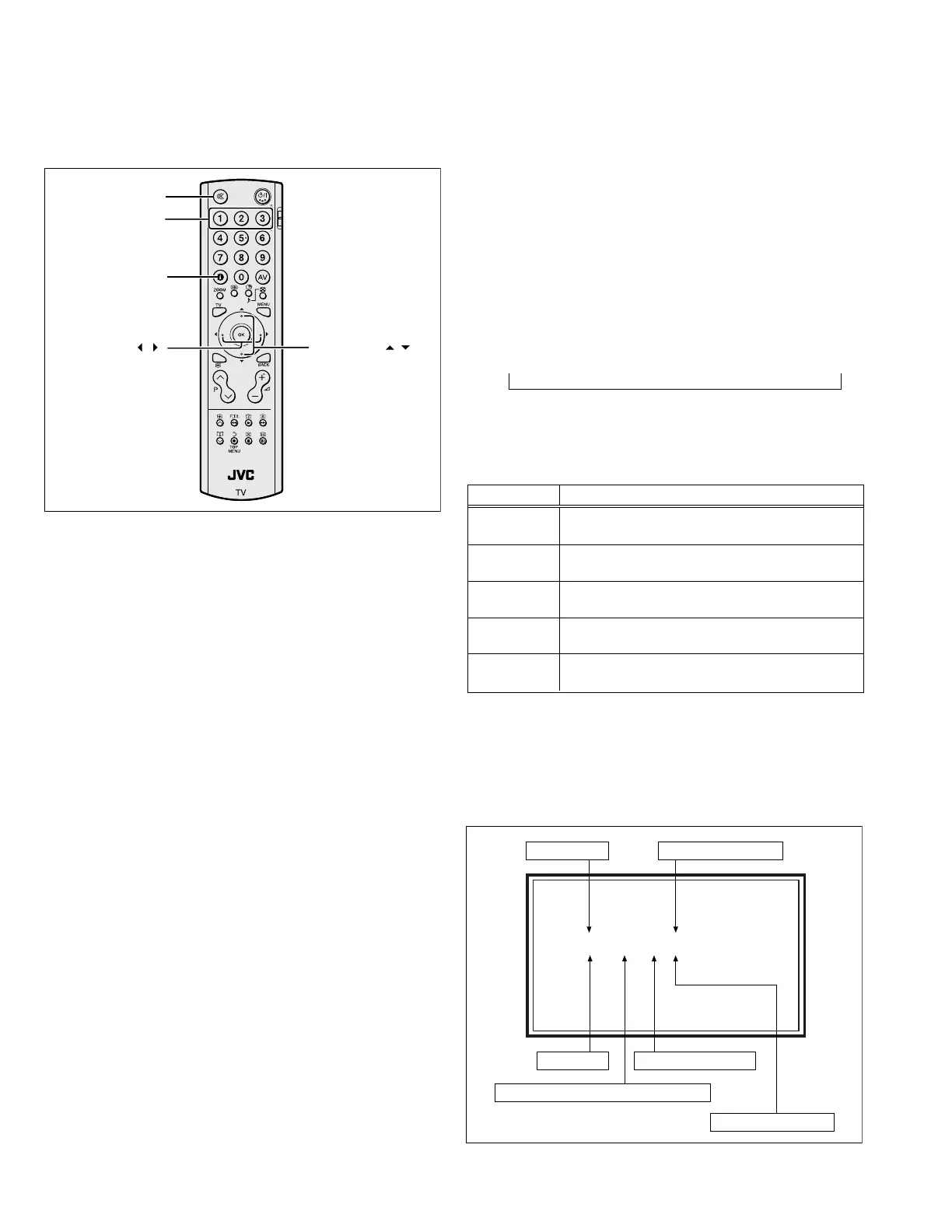
4.4.4 SERVICE CONTROL KEY LAYOUT ON THE REMOTE
CONTROL UNIT
INFOMATION
FUNCTION /
1~3
MUTING
FUNCTION /
Fig.2
(3) PICTURE MODE
The PICTURE MODE is displayed.
STD : STANDARD
BRI : BRIGHT
SOFT : SOFT
GAME : GAME
(4) COLOUR TEMP.
The COLOUR TEMP. is displayed.
H : WARM
M : NORMAL
L : COOL
(5) ITEM NO.
The ITEM NO. is displayed.
• [Function (/)] key
For scrolling up / down the setting items.
4.4.5.2 [2.SELF CHECK]
[Refer to “SECTION 5 TROUBLESHOOTING” (page 1-47)]
4.4.5.3 [3.I2C STOP]
[Setting for this item is not required in servicing]
Item No. Setting items
S001~S039 This item adjusts the setting values of the video
circuit.
T001~T010 This item adjusts the setting values of the
audio circuit.
P001~P010 This item adjusts the setting values of the
panel control circuit.
D001~D187 This item adjusts the setting values of the drive
circuit.
Z001~Z010 This item adjusts the setting values of the main
CPU circuit.


 To Next Page