62
Detailed setting
A maximum of 16 characters can be set for the title.
It is permanently displayed on the bottom left of the screen.
The display position can be set for RM-P2580.
(A Page 38 [POS.TITLE LOC.])
䡵 Preparation
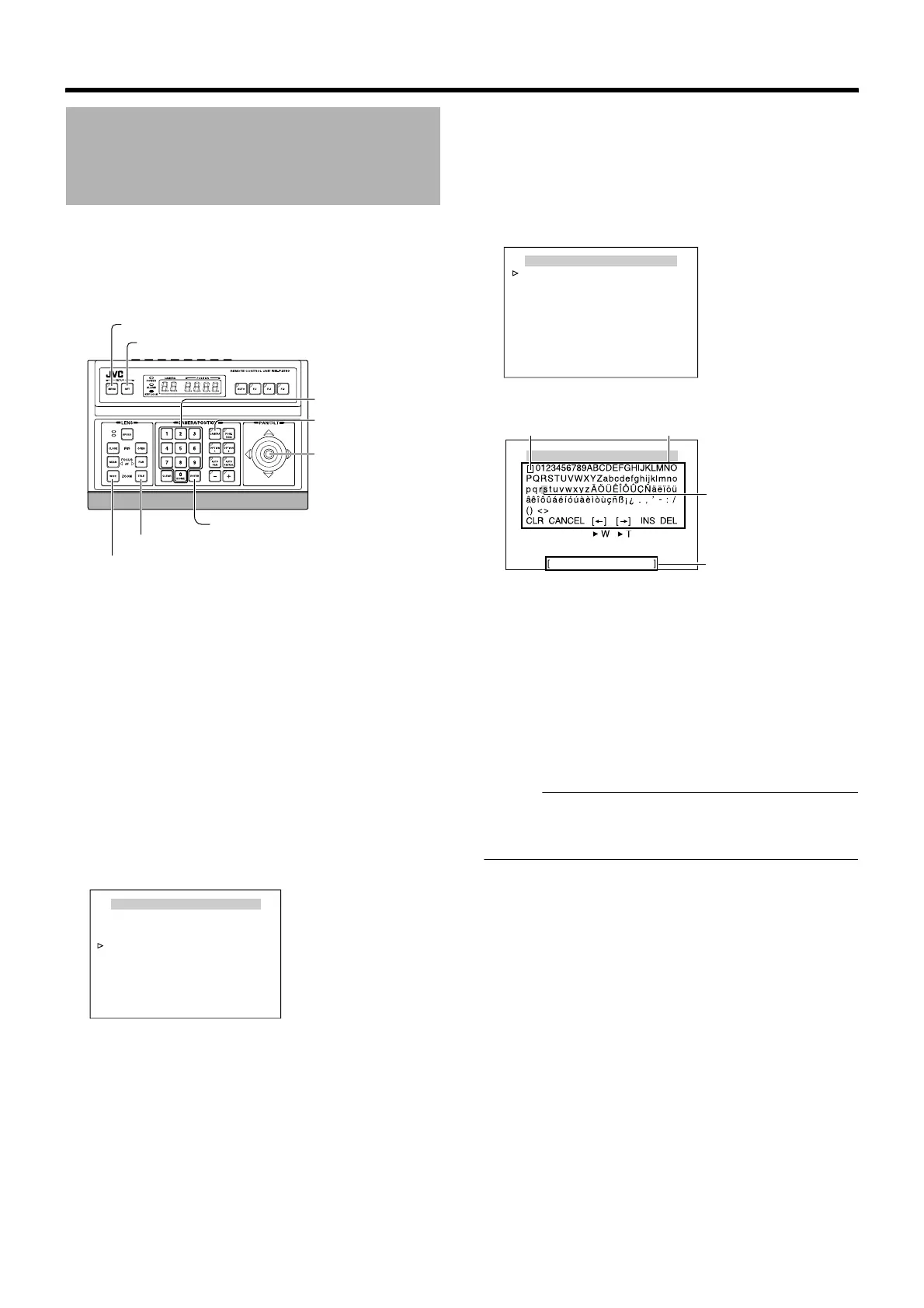
1
Select a camera (
A
RM-P2580 Instruction Manual)
● [CAMERA] button B Numeric keypad (camera number)
B [ENTER] button
● Images from the selected camera are output.
2 Display the [MENU] screen (A Page 34)
● The [MENU] screen is displayed.
3 Select the [CAMERA TITLE/ALARM] screen
● Shift up and down the [PAN/TILT] lever, move the
cursor (Z) to the [CAMERA TITLE/ALARM] item and
press the [SET] button.
● The [CAMERA TITLE/ALARM] screen is displayed.
䡵 Setting
1
Check that the cursor (
Z
) is at [CAM.TITLE EDIT..] and
press the [SET] button
● The [CAM.TITLE EDIT] screen is displayed.
● The first character from the character area flashes on
and off and is ready for input.
2 Shift the [PAN/TILT] lever up/down/left/right and
select the first character from the character area
● The selected character is displayed flashing on and off.
3 Press the [SET] button
● The first character of the title is confirmed and the
second character is ready for input.
Memo :
● Press the [WIDE] button to move the cursor position of the
title input area to the left. Press the [TELE] button to move
it to the right. This is used to modify the configured title.
4 Repeat steps 2 and 3
● Enter the entire camera title.
5 Press the [MENU] button
● The new camera title is saved and the top menu screen
is displayed.
● To set multiple camera titles, repeat steps from
Preparation to Setting.
Camera Title Setting
[MENU] button
[SET] button
[CAMERA] button
[PAN/TILT] Lever
Numeric keypad
[ENTER] button
[TELE] button
[WIDE] button
MENU
LANGUAGE ENGLISH
CAMERA FUNCTION1..
CAMERA FUNCTION2..
CAMERA TITLE/ALARM..
CAMERA ALC..
CAMERA VIDEO..
AUTO PAN/PATROL/TRACE..
POS.FUNCTION SET..
FACTORY SETTINGS..
<
MENU
>
EXIT
<
SET
>
SUB MENU
[MENU] screen
CAMERA TITLE / ALARM
CAM.TITLE EDIT..
AREA DISPLAY OFF
ALM. TITLE SIZE DOUBLE
ALM. TITLE COLOUR WHITE
ALARM TITLE EDIT..
ALARM INPUT..
ALARM OUTPUT..
<
MENU
>
RETURN
<
SET
>
SUB MENU
[CAMERA TITLE/ALARM] screen
CAMERA TITLE EDIT
<
MENU
>
RETURN
<
SET
>
CHAR .SET
[CAM.TITLE EDIT] screen
Space Character area
Blinking
Title input area



 To Next Page