Design and Function
4 --- 26
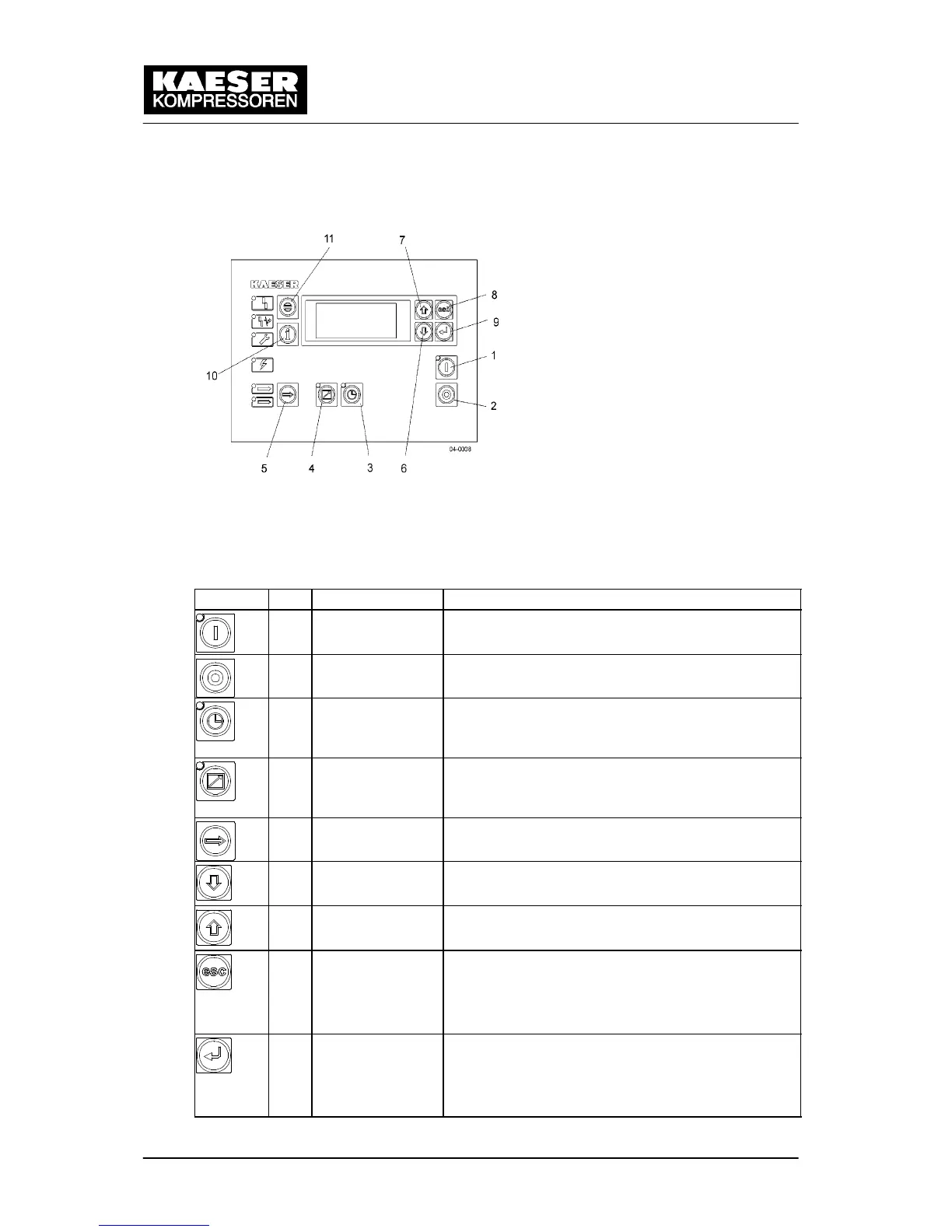
4.5 SIGMA CONTROL Keys and Indicators
Fig. 7 SIGMA CONTROL keys
Symbol
Item Description Function
1 ON (I) Switch the machine on.
Programmed operating mode is active.
2 OFF (0) Switch the machine off.
3 Operating mode:
Clock
Switching clock---control on and off.
The LED lights when the machine is under clock
control.
4 Operating mode:
Remote control
Switching remote control on and off.
The LED illuminates when the machine is under re-
mote control.
5 Operating mode:
LOAD / IDLE
Toggles the machine between LOAD and IDLE.
6 Arrow key Scrolls down menu.
Reduces a parameter value.
7 Arrow key Scrolls menu up.
Increases a parameter value.
8 Escape Returns to the next higher menu level.
Exits the edit mode without saving.
Returns to the main menu when held down at least
10 seconds.
9 Return/enter/save
key
Only affects the message in the third line of the dis-
play (12).
Returns to the selected submenu.
Saves and leaves the edit mode.


 To Next Page
 Loading...