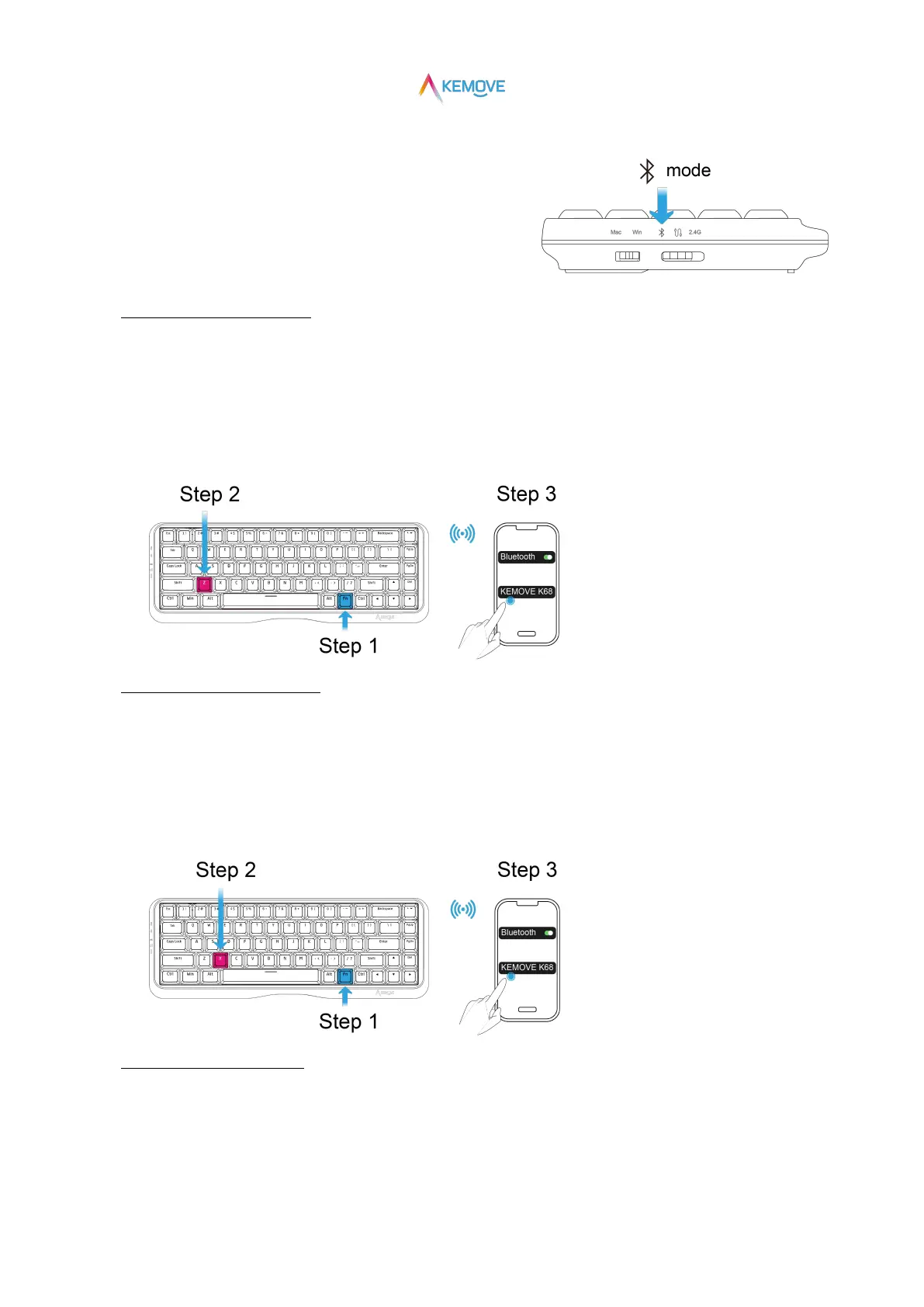
3)Bluetooth mode、Power on/Auto sleep
①Enter "Bluetooth" and power on:
·Three mode switches switch to "Bluetooth mode" (at this time, it is on);
②Keyboard connects three different sets of devices:
·Connect the first Bluetooth device:
·Step 1:Press Fn;
·Step 2:Keep Fn pressed, and then press the Z key (press and hold for 3S at the same time),
the red and blue lights of the Z key flash alternately, that is, enter the pairing state;
·Step 3:Click "kemove K68" on the Bluetooth device to connect successfully;
·Connect a second Bluetooth device:
·Step 1:Press Fn;
·Step 2:Keep Fn pressed, and then press the X key (press and hold for 3S at the same time),
the red and blue lights of the X key flash alternately, that is, enter the pairing state;
·Step 3:Click "kemove K68" on the Bluetooth device to connect successfully;
·Connect a third Bluetooth device:
·Step 1:Press Fn;
·Step 2:Keep Fn pressed, and then press the C key (press and hold for 3S at the same time),
the red and blue lights of the C key flash alternately, that is, enter the pairing state;


 To Next Page