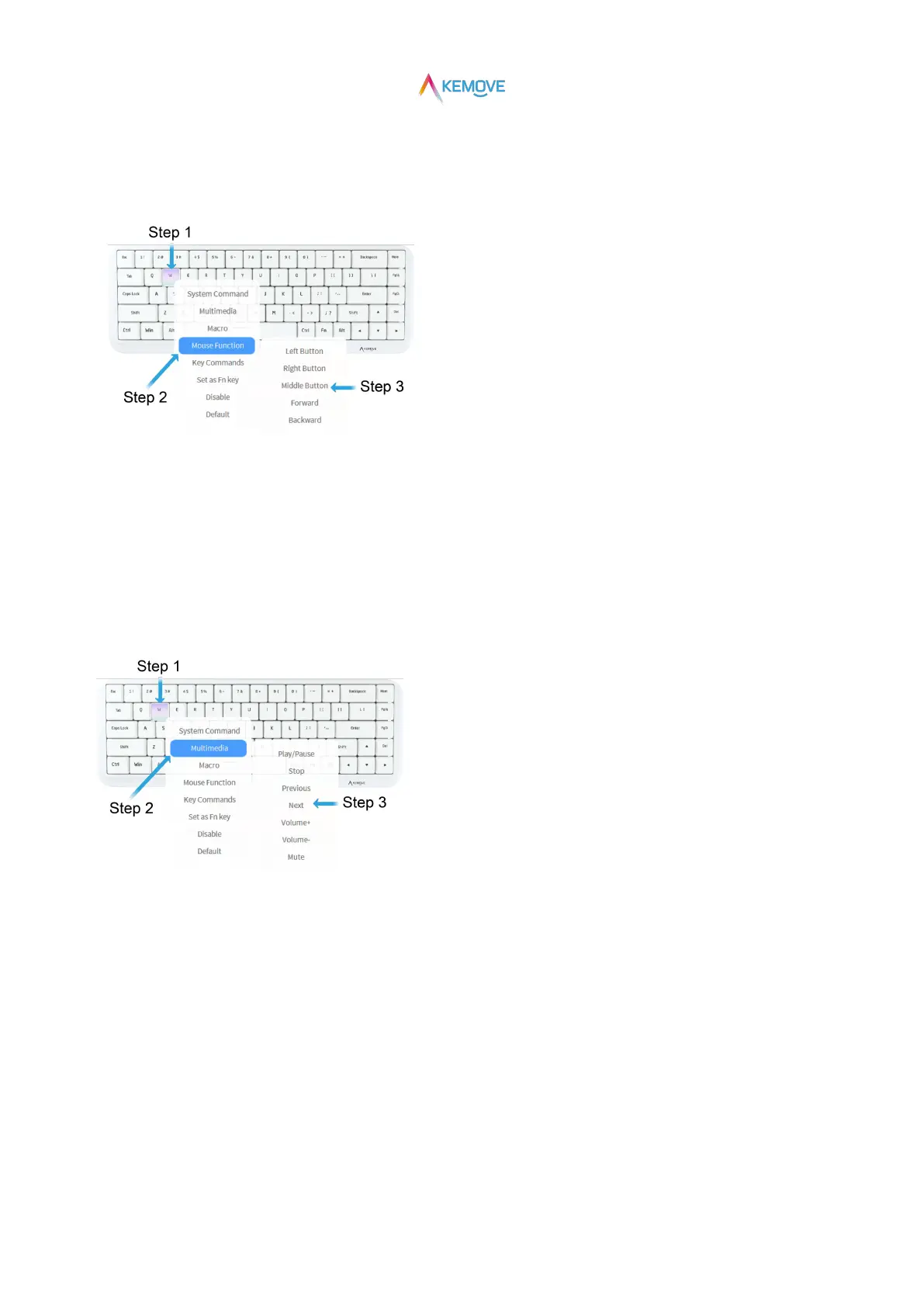
·Step 2: click with the left mouse button to pop up the secondary page and move to the "Mouse Function" position;
·Step 3: automatically pop up the "mouse" operation functions. Click the required function with the left mouse button, and the setting is
successful.
6.4)Key Set: Multimedia
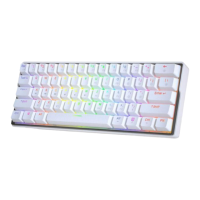
·Step 1: when the mouse moves to any key position, it will change color and prompt to select;
·Step 2: click with the left mouse button to pop up the secondary page and move to the "Multimedia" position;
·Step 3: automatically pop up the "Multimedia" operation functions. Click the required function with the left mouse button, and the
setting is successful.
6.5)Key Set: System Commands
·Step 1: when the mouse moves to any key position, it will change color and prompt to select;
·Step 2: click with the left mouse button to pop up the secondary page and move to the "System Commands" position;
·Step 3: automatically pop up the "System Commands" operation functions. Click the required function with the left mouse button, and
the setting is successful.


 To Next Page