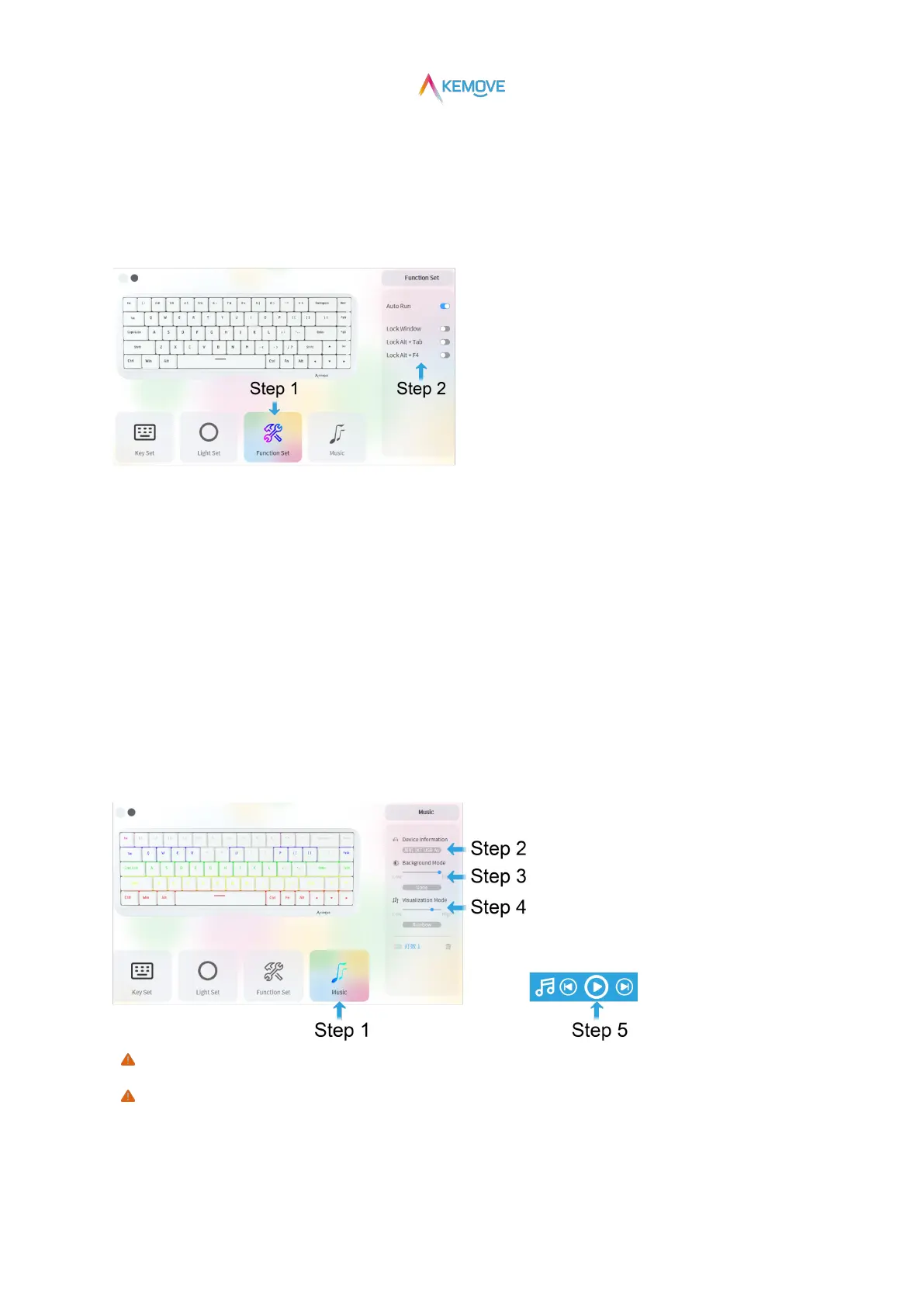
8)Function Set
·Step 1: select the "Function Set" module;
·Step 2: on the right side of the drive interface, there are switch buttons with "Auto Run" and multiple "Lock" functions;Click the switch
button of the function according to the demand, and it turns blue, which means that it is successfully opened;
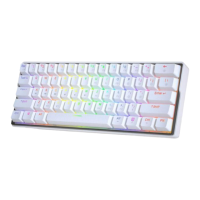
9)Music
·Step 1: select the "Music" module;
·Step 2: select the sound card currently used by the computer in "Device Information" on the right side of the drive interface;
·Step 3: in the "Background Mode" on the right side of the driving interface, you can change the background brightness and
background color of the light rhythm;
·Step 4: in the "Visualization Mode" on the right side of the driving interface, you can change the amplitude frequency and amplitude
color of the light rhythm;
·Step 5: the computer plays music, and the keyboard light moves synchronously with the music rhythm;
( Only under the "Music" module can the keyboard light move synchronously with the music rhythm);
( If the sound card in "Device Information" is inconsistent with the sound card currently used by the computer, the keyboard light
cannot generate rhythm);


 To Next Page