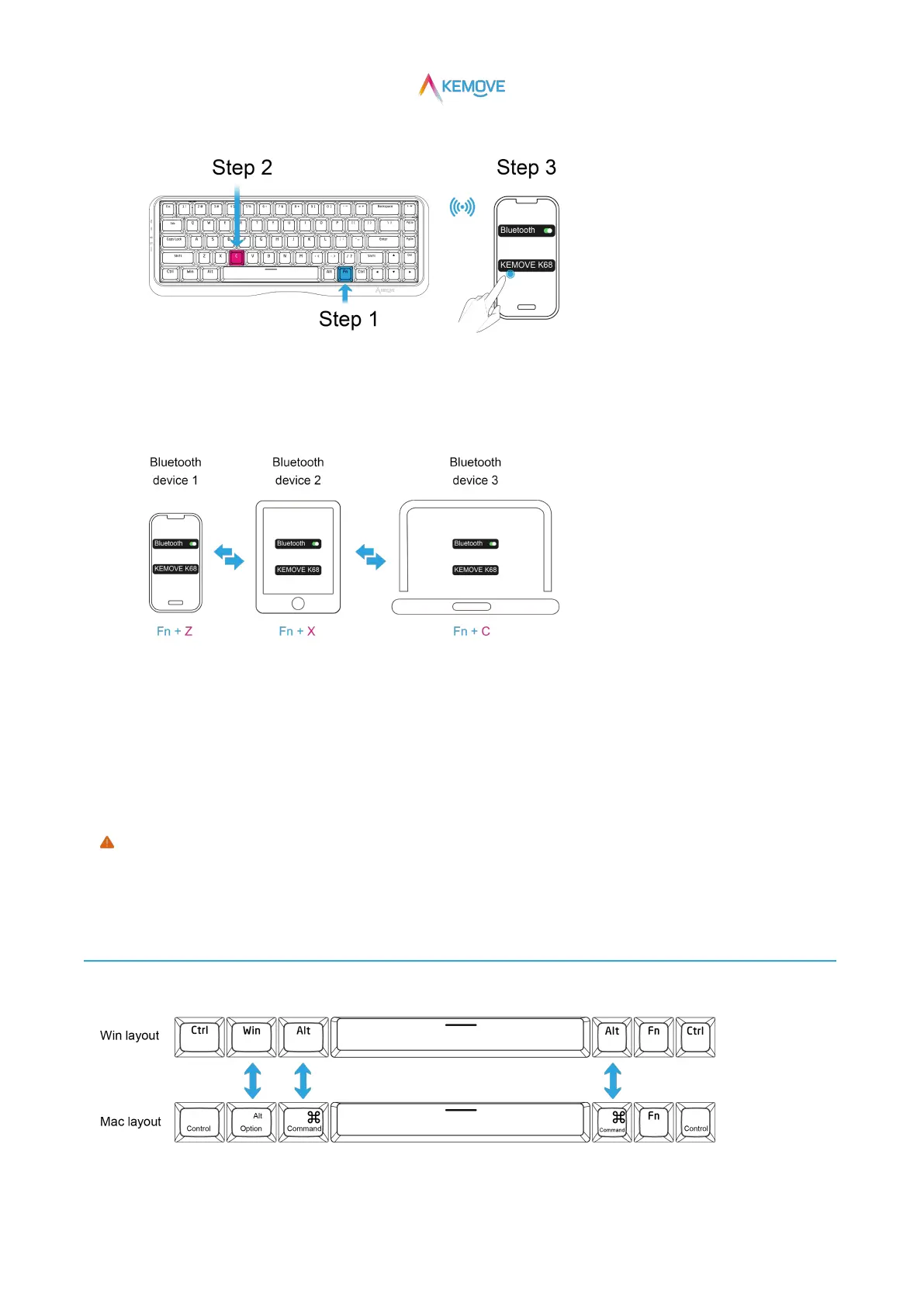
·Step 3:Click "kemove K68" on the Bluetooth device to connect successfully;
③Quickly switch Bluetooth devices:
·For successfully paired bluetooth devices, simply press Fn+Z、Fn+X、Fn+C once to quickly connect back
(that is, you can quickly switch and connect Bluetooth devices through these three groups of keys)
④Auto sleep and disconnect:
· If no operation is performed, the backlight will go out and sleep automatically after 5 minutes by default.;
·If no operation is performed, Bluetooth will disconnected after 30 minutes (you can press fn+z/ x/ c once to quickly wake up and
connect back).
Only when the three mode switches are switched to the required mode can the mode be used normally (for example, in the
"wired mode", the Bluetooth device cannot be connected through the fn+z, fn+x, fn+c combination keys).
3、Mac/Win switch
·Mac/Win toggle switch to toggle keyboard system layout.


 To Next Page