Disc
25English
Disc
(DDX9020DABS / DDX920WDABS / DDX8020S / DDX820WS)
Playing a disc
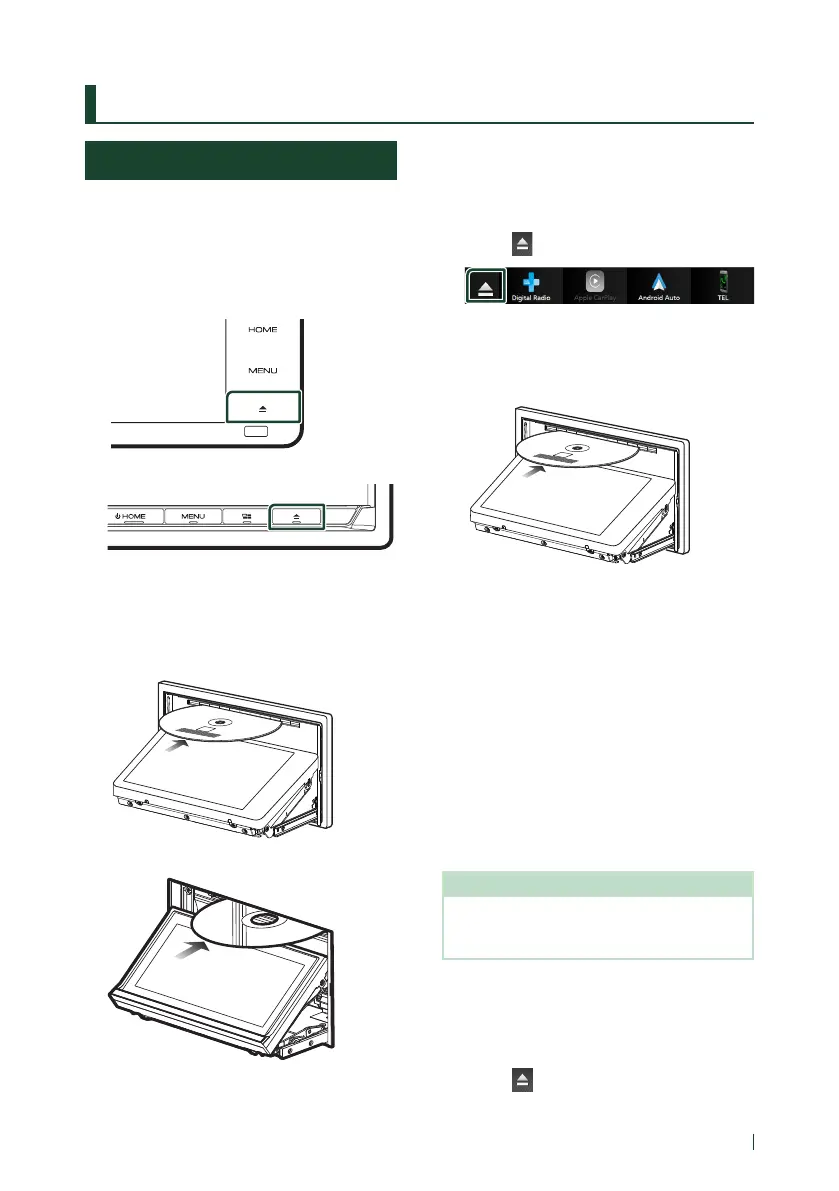
Ñ Insert a disc
Except DDX820WS
1
Press the [G] button.
DDX920WDABS
DDX9020DABS / DDX8020S
2
Touch [DISC EJECT].
The panel opens.
3
Insert the disc into the slot.
DDX920WDABS
DDX9020DABS / DDX8020S
The panel closes automatically.
The unit loads the disc and playback starts.
DDX820WS
1
Press the [MENU] button.
Popup menu appears.
2
Touch [ ].
3
Touch [DISC EJECT].
The panel opens.
4
Insert the disc into the slot.
The panel closes automatically.
The unit loads the disc and playback starts.
Ñ Eject a disc
DDX9020DABS / DDX920WDABS /
DDX8020S
1
Press the [G] button.
2
Touch [DISC EJECT].
When removing a disc, pull it horizontally.
3
Press the [G] button.
The panel closes.
NOTE
• To forcibly eject the disc, press and hold the
[G] button for 2 seconds and then touch [DISC
EJECT] after the message is displayed.
DDX820WS
1
Press the [MENU] button.
Popup menu appears.
2
Touch [ ].


 To Next Page
 Loading...



