Controlling Audio
78
Controlling Audio
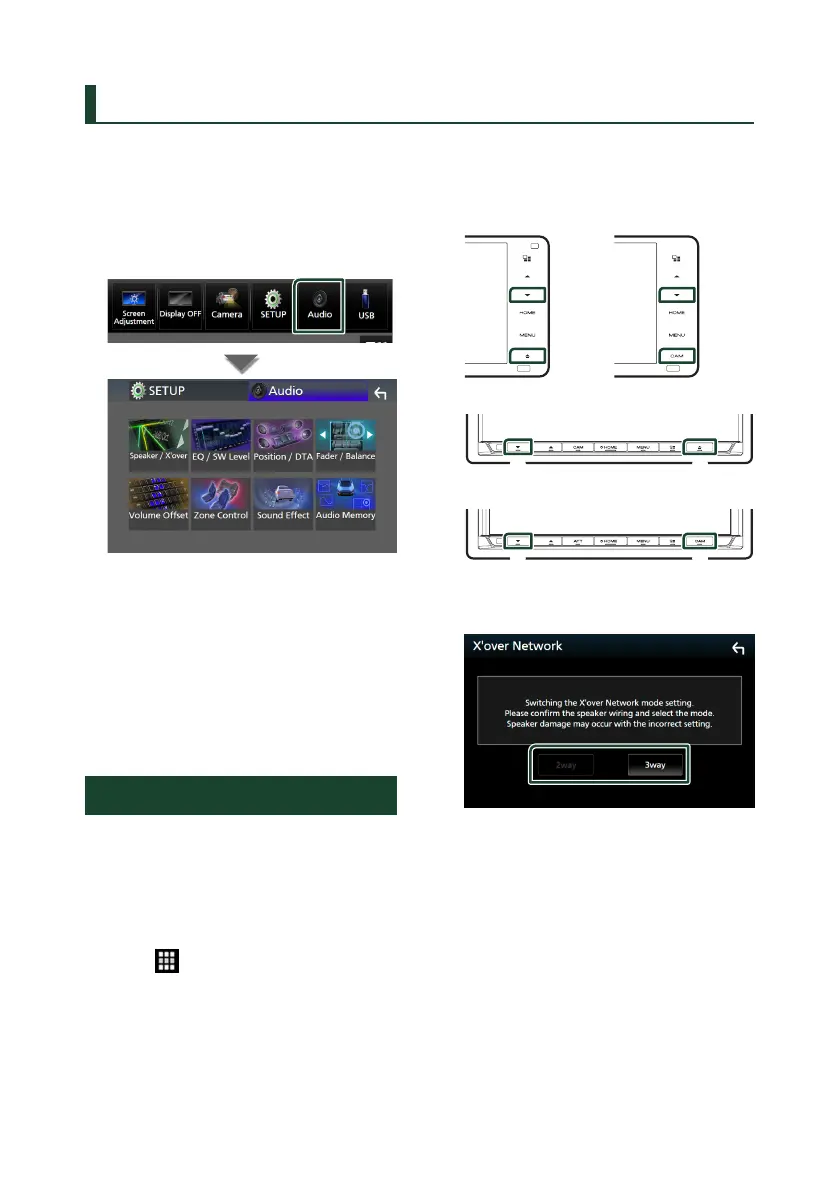
You can adjust various settings such as audio
balance or subwoofer level.
1
Press the [MENU] button.
Popup menu appears.
2
Touch [Audio].
See the following section for each setting.
• Set up Speaker / X’over (P.79)
• Controlling EQ / SW Level (P.81)
• Set Position / DTA (P.85)
• Controlling Fader / Balance (P.81)
• Set Volume Offset (P.82)
• Performing Zone Control (P.83)
• Set Sound Effect (P.84)
• Use Audio Memory (P.86)
3-way speaker system setup
Select the appropriate crossover network
mode for the speaker system used (2-way or
3-way speaker system).
1
Press the [HOME] button.
HOME screen appears.
2
Touch [ ].
Source selection screen appears.
3
Touch [STANDBY].
4
Press the button 1 followed by the
button 2 for 1 second at the same time.
DDX920WDABS /
DDX820WS DMX820WS
1
2
2
1
DDX9020DABS / DDX8020S
2 1
DMX8520DABS / DMX8020S
1 2
Speaker system select screen appears.
5
Select the crossover network mode.
A confirmation screen appears.
6
Touch [Ye s].


 To Next Page
 Loading...




