Controlling Audio
85English
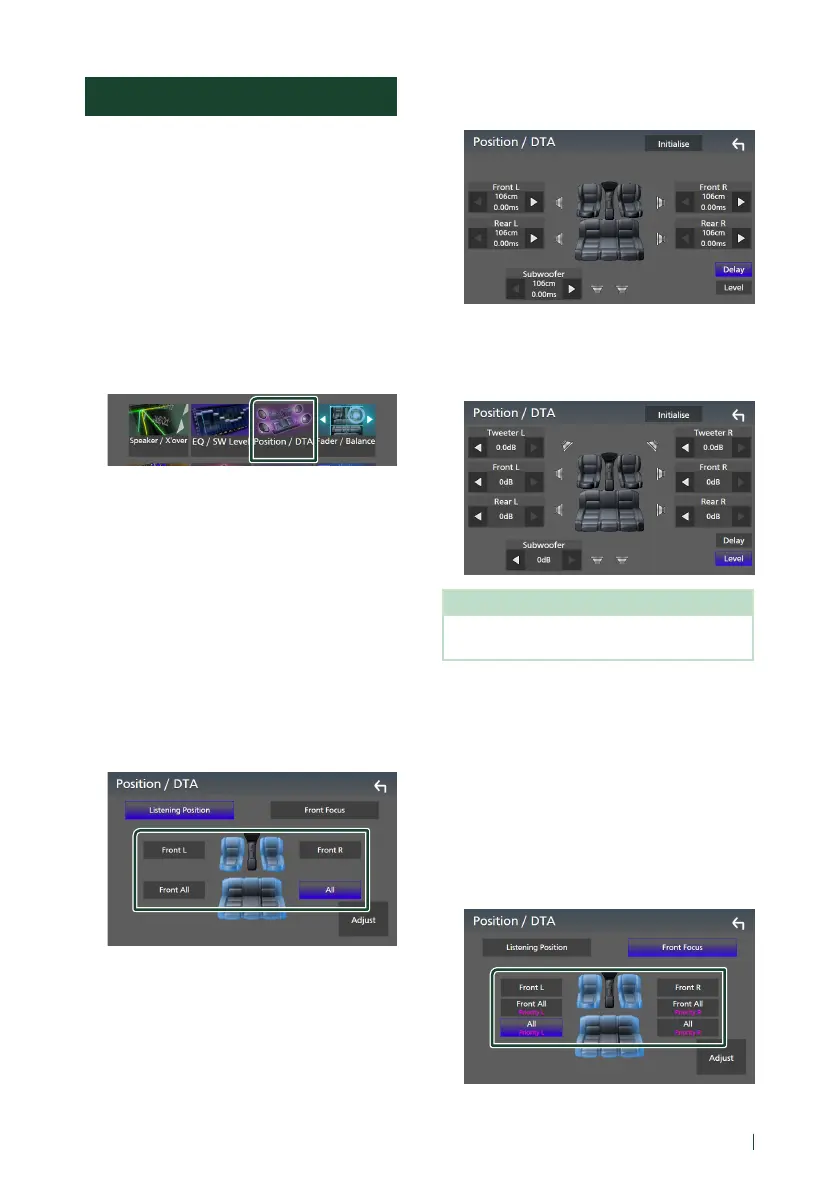
Listening Position / DTA
Listening Position / DTA allows you to improve
the sound field depending on the position of
the seat you sit.
Listening Position / DTA allows you to set
“Listening Position” and “Front Focus”. You
cannot set both at the same time.
1
Press the [MENU] button.
Popup menu appears.
2
Touch [Audio].
Audio screen appears.
3
Touch [Position / DTA].
• Set up Listening Position (P.85)
• Set up Front Focus (P.85)
Ñ Listening Position
Adjust the sound delay time so that the
sounds from different speakers arrive at the
listener sitting on the selected seat at the
same time.
1
Touch [Listening Position] on the Position
/ DTA screen.
2
Select a listening position from [Front R]
(Right front), [Front L] (Left front),
[Front All] (All front), and [All].
Position DTA control
You can fine-adjust your listening position.
1
Touch [Adjust].
2
Touch [Delay].
3
Touch [T] or [U] to adjust the delay time of
the selected speaker.
4
Touch [Level].
5
Touch [T] or [U] to adjust the sound level
of the selected speaker.
NOTE
• To initialize the Delay and Level settings, touch
[Initialise] and [YES] on the confirmation screen.
Ñ Front Focus
You can focus the imaginary sound image on
the front of the selected seat.
1
Touch [Front Focus] in the Position / DTA
screen.
2
Select a front focus position.
For [Front All] and [All], select Priority L or R
depending on which side you want to put
the imaginary sound image.


 To Next Page
 Loading...



