Basic Operations
8
Basic Operations
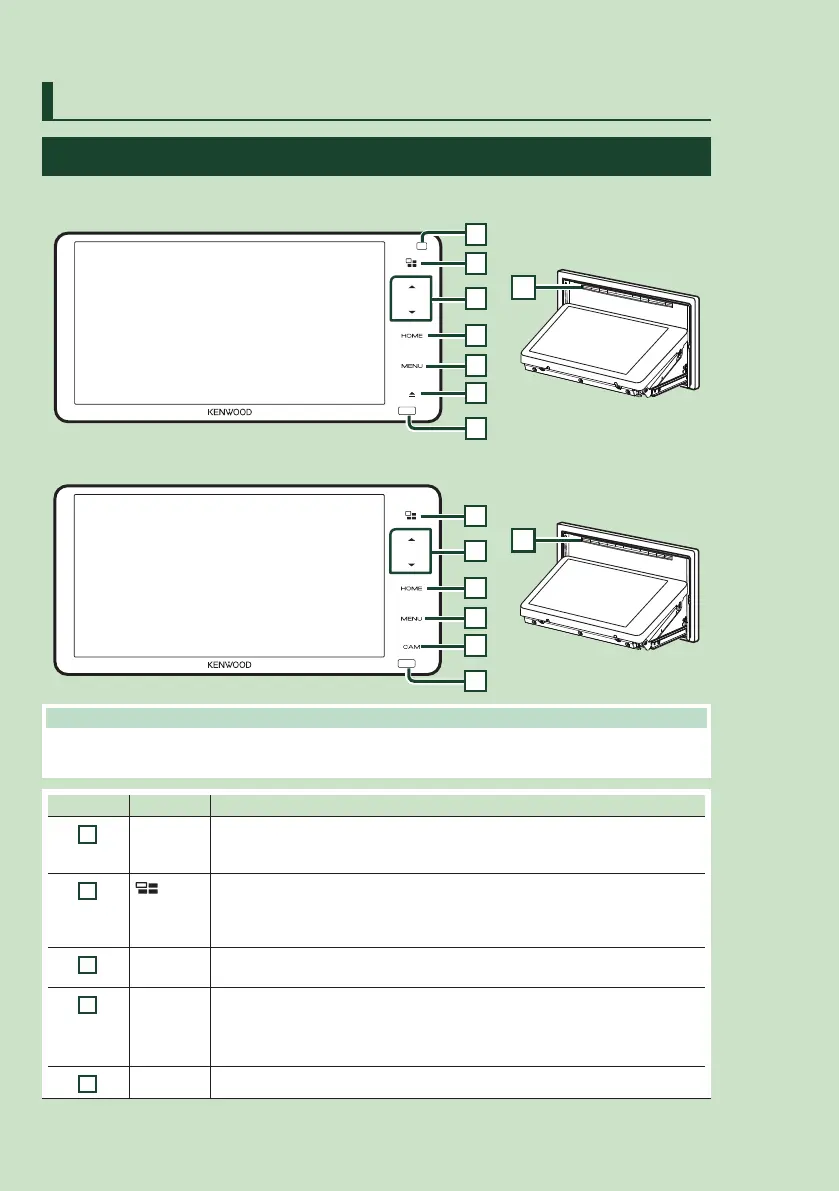
Functions of the Buttons on the Front Panel
DDX920WDABS
1
2
4
5
6
7
3
9
DDX820WS / DMX820WS
9
2
4
5
8
7
3
NOTE
• The panels shown in this manual are examples used to provide clear explanations of the operations. For this
reason, they may be different from the actual panels.
Number Name Motion
1
Gesture
control
sensor
• A sensor which detects motions of your hand. (P.15) (DDX920WDABS only)
2
• Displays the APP (Apple CarPlay/Android Auto/Wireless Mirroring) screen.
• Pressing and holding displays the Voice Recognition screen (P.61).
• When neither Apple CarPlay, Android Auto, nor a Bluetooth Hands-Free phone is
connected, pressing and holding displays Bluetooth pairing waiting dialog. ( P.54)
3
S, R
(Volume)
• Adjusts volume.
The volume will go up until 15 when you keep pressing R. (P.13)
4
HOME • Displays the HOME screen (P.16).
• Pressing for 1 second turns the AV off.* (Touch the display to turn on the screen.)
* Turns off the screen and audio. Interrupts from incoming hands-free calls, rear camera
views and so on are functional, though.
5
MENU • Displays the popup menu screen.



 To Next Page
 Loading...



