Bluetooth Control
57English
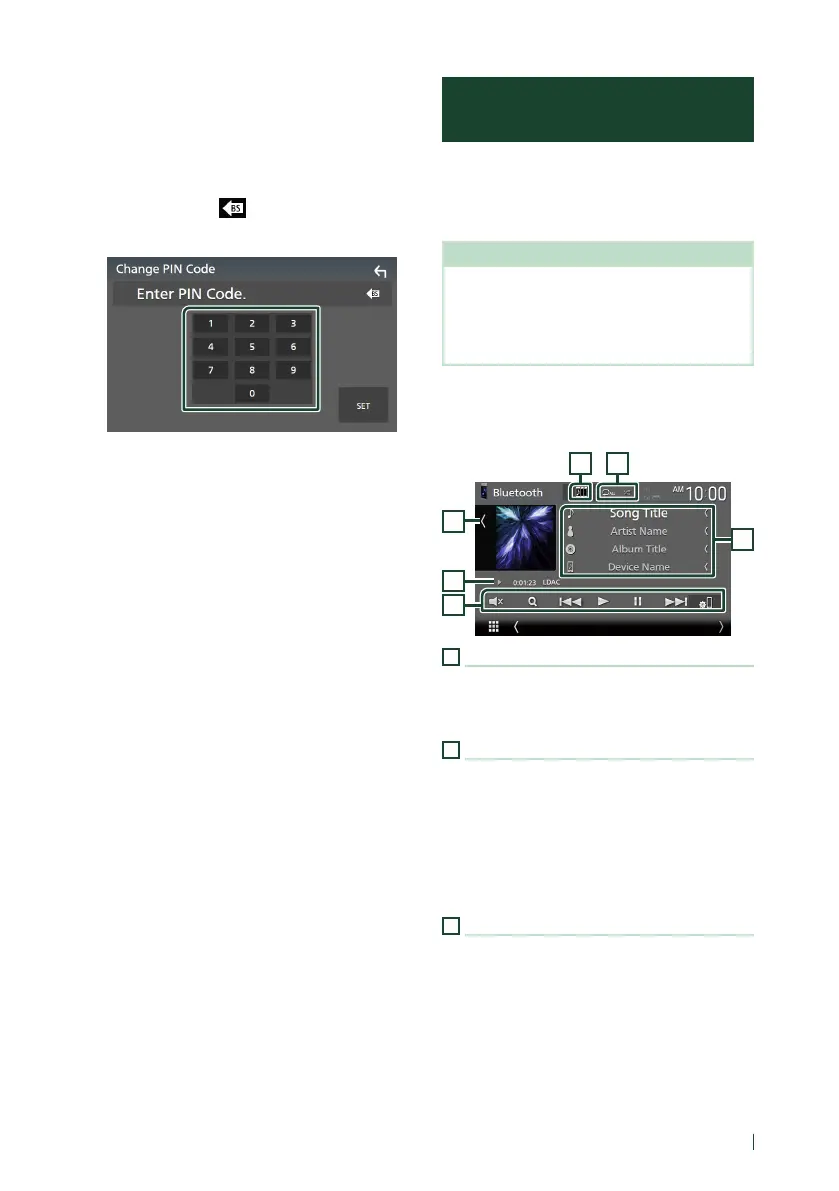
Ñ Change the PIN Code
1
Touch [PIN Code] on the Bluetooth Setup
screen.
Change PIN Code screen appears.
2
Touch and hold [ ].
3
Input the PIN Code.
4
Touch [SET].
Playing the Bluetooth Audio
Device
Most function can be controlled from the
source control screen.
To select Bluetooth source, touch [Bluetooth]
icon on the source selection screen. (P.17)
NOTE
• The Bluetooth audio source is disabled while
using Apple CarPlay.
• The Bluetooth audio source is disabled when
the device set as Audio(A2DP)/App(SPP) is using
Android Auto.
Ñ Bluetooth basic operation
Control screen
3
2
1
6
54
1
Artwork/VU meter
• Displays/hides artwork area.
• Touch to switch between the artwork and VU
meter.
2
Play mode indicator/Playing time
D, H: Current play mode indicator
Meanings of individual icons are as follows:
D (play), B (fast forward), A (fast backward),
H (pause), I (stop).
LDAC (DDX9020DABS / DDX920WDABS /
DMX8520DABS): Indicates that an LDAC-
compatible device is connected.
3
Operation keys *
• [1]:
Searches for a file. See File search (P.59).
• [E] [F]: Searches for the previous/next
content.
Touch and hold to fast forward or fast
backward. (It will be cancelled automatically
after about 50 seconds.)
• [D]: Plays.
• [H]: Pauses.


 To Next Page
 Loading...




