●Error code indication
●Motor-output indication (optional)
●Pedaling frequency indication (optional)
●The remaining range indication (optional)
●Various parameters settings (e.g., wheel size, speed-limited, battery level bar, Assist
level, controller limited current, max speed, password enable, etc.)
●Recover default settings
◆
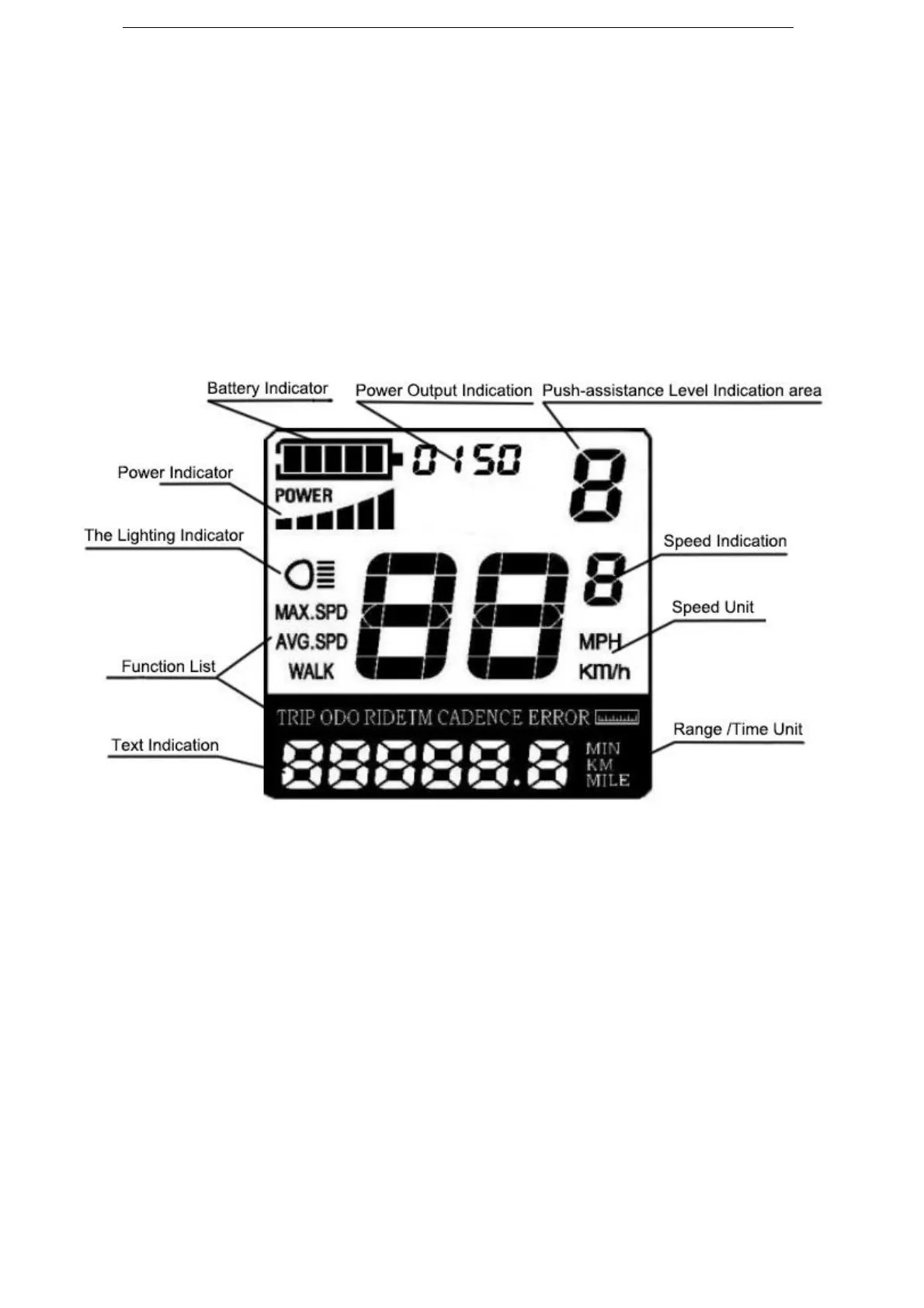
Functional Area Distribution
Functional Area Distribution
General Operation
◆
Switching the E-bike System On/Off
Press the power button to switch on the E-bike system. Hold the power button for 2s, the
E-bike system will be switched off.
When E-bike system is switched off, the leakage current is less than 1μA.
▉ When the E-bike is parked for more than 10 minutes, E-bike system will be switched off
automatically.
◆
Display Interface
After switching on the E-bike system, the display will show Speed and Total Distance.
Pressing the “i” button will show more riding data as follows: Current Speed (Km/h) → Avg.
Speed (Km/h) → Max. Speed (Km/h) → Trip Distance (Km) → Total Distance (Km) → Trip
Time (Min.).



 To Next Page