Service 6
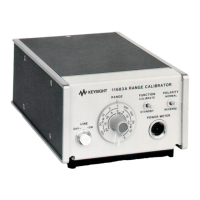
Keysight 11683A Operating and Service Manual 43
Repair
The repair information includes instructions for removing and installing the A3 Sampling Gate
Assembly, and proper installation of the A3A1 Board.
Disassembly of A3 sampling gate assembly
1 Remove the top, bottom, and side covers of the 11683A.
2 Remove the right-sideframe which is adjacent to A2 and A3 assemblies after removing five
6-32 x 1/4" flat head machine screws.
3 Remove the RANGE switch knob after loosening the socket set screws. Remove the 3/
8-32 x 7 /16" hex nut from the RANGE switch; remove the RANGE SWITCH.
4 Remove the 1/2-32 knurled nut on the LINE switch and lift the A3 Assembly, which is attached
only by the orange wire, from the 11683A chassis.
5 To remove the A3 Assembly plastic covers, insert the blade of a screwdriver into the seam on
each side of the bulkhead feedthrough. Gently twist until the covers snap apart. Remove the
covers and the magnetic shields.
6 Remove the two 0-80 x 0.312" flat-head machine screws which attach the sub-panel to the
upper chassis.
7 Remove the two 0-80 x 0.188" socket cap screws which secure the feedthrough endbell to the
upper chassis. Loosen the lower cap screws and remove the upper chassis.
8 To reassemble the A3 Assembly follow the preceeding instructions in reverse order.
A3A 1 assembly installation
The relative position of the installed circuit board and some components on the board are critical
for proper operation.
1 Place the circuit board in the correct position and insert four 0-80 x 0.188" socket cap screws.
2 Center the circuit board so there is equal air gap between each side and the chassis. Tighten
the cap screws.
3 Bend the 100 μF capacitor, A3A1C6, so it touches A3A1Q1. Position A3A1C1 and A3A1C3 so
they touch A3A1C6.



 To Next Page