60 N5186A MXG and X-Series SA Measurement Guide
5G New Radio (NR) Measurements
5G Waveform, EVM, and ACP Analysis
5G Waveform, EVM, and ACP Analysis
The MXG enables 5G testing with a low error vector magnitude (EVM). The
MXG has extremely good EVM at high power levels. However, not all signal
analyzers can capture this low value. We will use the X-Series signal analyzer
with the 5G NR X-Series application and the VSA software to observe EVM and
adjacent channel power (ACP).
Setting Up Triggers on the Signal Analyzer using 5G NR Mode
Setting Up Triggers on the X-Series Signal Analyzer
Using the graphical user interface
1. On the signal analyzer, select Mode/Meas > 5G NR & V2X mode.
2. Select Mode Preset to set 5G NR mode to a known state.
3. Select Mode/Meas > 5G NR V2X Mode > Modulation Analysis
Measurement.
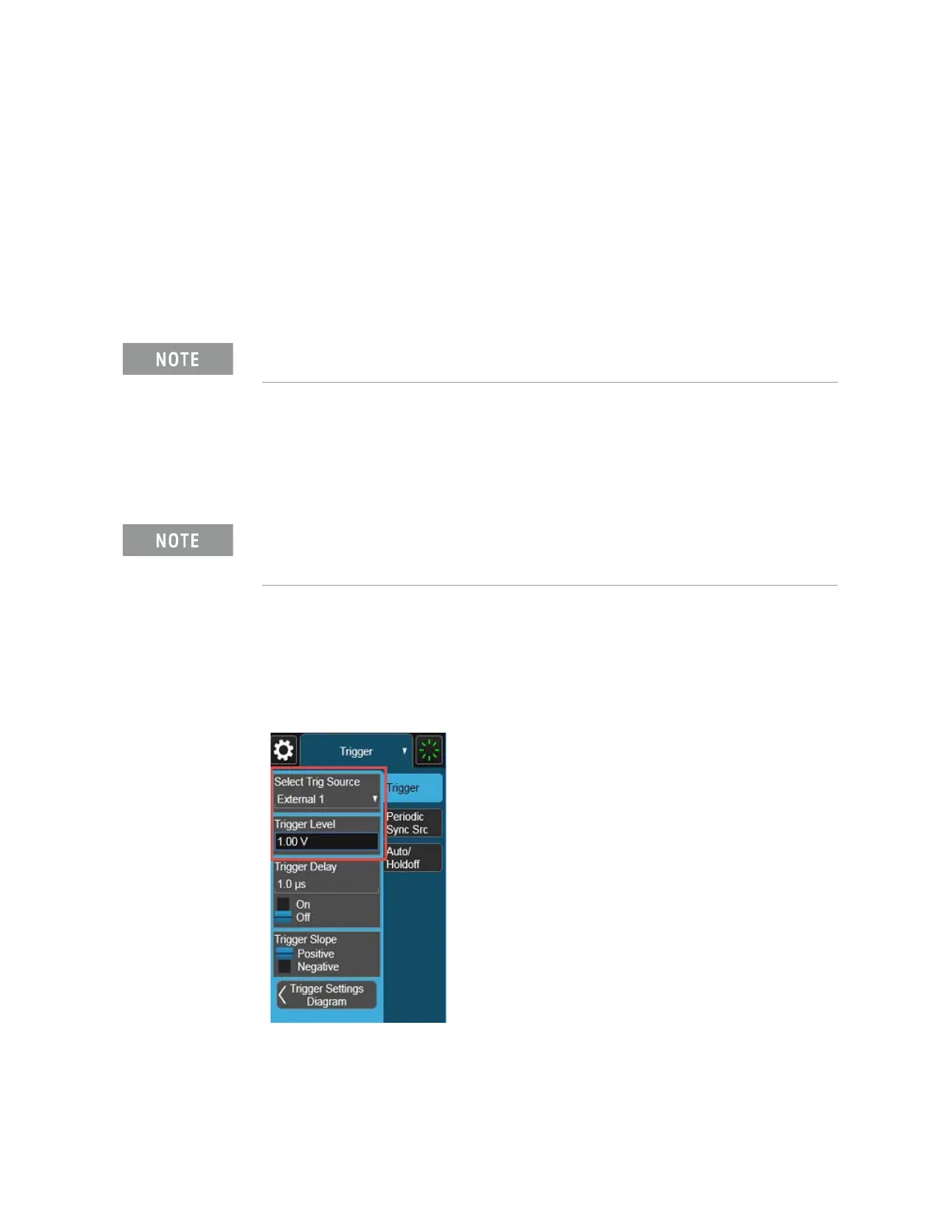
4. From the Menu Panel (on the top right of the display), select Trigger and
set Select Trigger Source to External 1 and Trigger Level to 1 V.
Refer to
“Equipment Setup” on page 9 for connecting the instruments.
If accessing the instrument via a Remote Desktop connection, select the
Screen tab (at the top of the display) to open the
Mode/Measurement/View Selector window.



 To Next Page