EasyManua.ls Logo

Kia Stinger - Navigation Route Options; All Available Routes

Kia Stinger
60 pages
Print Icon
To Next Page IconTo Next Page
To Previous Page IconTo Previous Page
Loading...
51
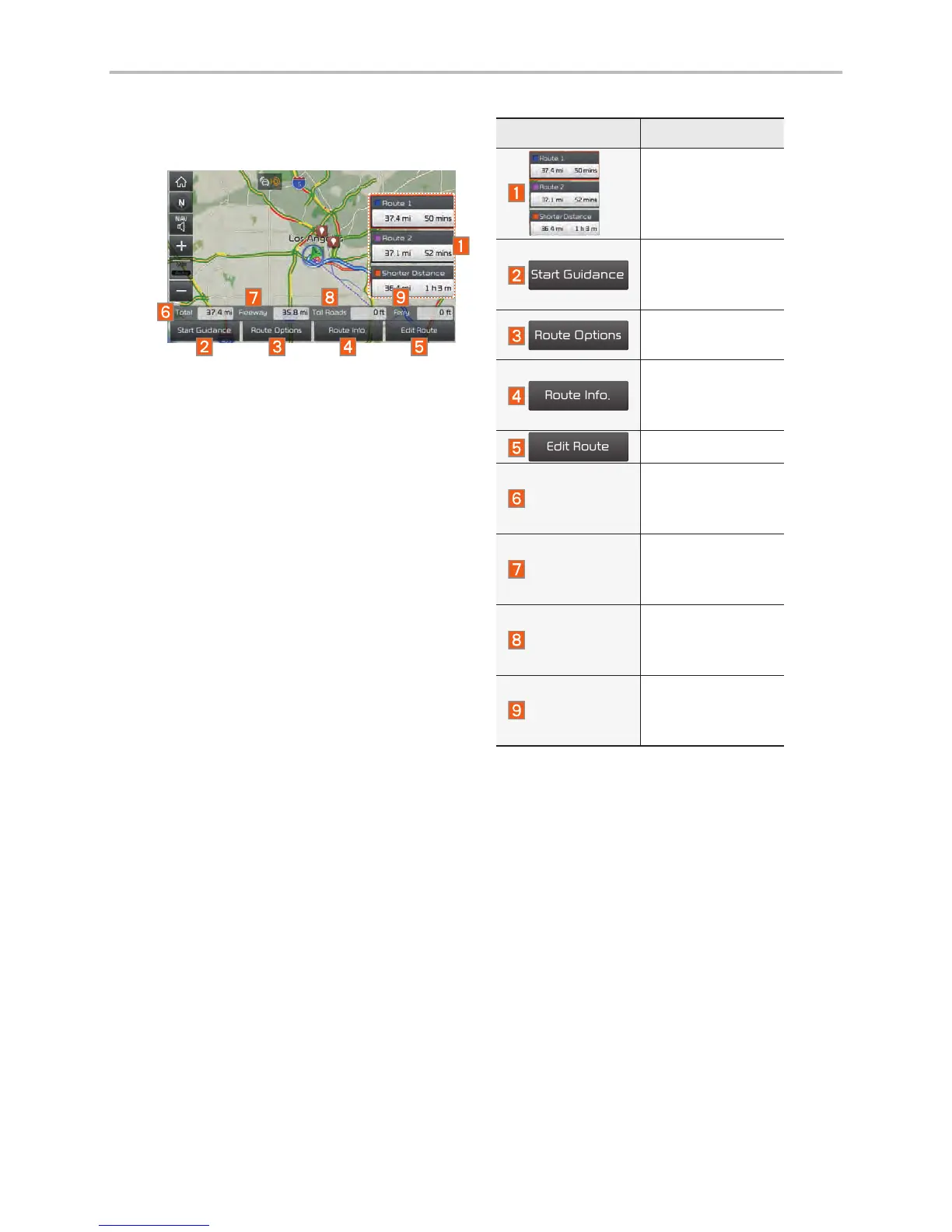
All Routes
Three routing options are displayed
based on real time traffic information
and traffic pattern information and
shorter distance.
Route 1: Select the best route
based on combine real-time traffic
information and traffic pattern data
on the map.
Route 2: Select the best route
based on real-time traffic informa-
tion.
Shorter Distance: Select short
distance, regardless of how fast or
slow progress will be calculated.
Name Description
Display total
distance, travel
time. Select the
desired route.

Start Guidance
Start the guid-
ance with the
route.
Route Options
Change the
route option.
Route Info.
You can check
route informa-
tion.
Edit Route
Edit the route.
Total
Display total
distance of the
route.
Freeway
Display length of
freeway on the
route.
Toll Roads
Display length of
toll road on the
route.
Ferry
Display length of
Ferry route on
the route.

Other manuals for Kia Stinger

Related product manuals