KIC 2000 v2.4.0.x
KIC 2000 User Manual 35
Select Thermocouples and Start Profile
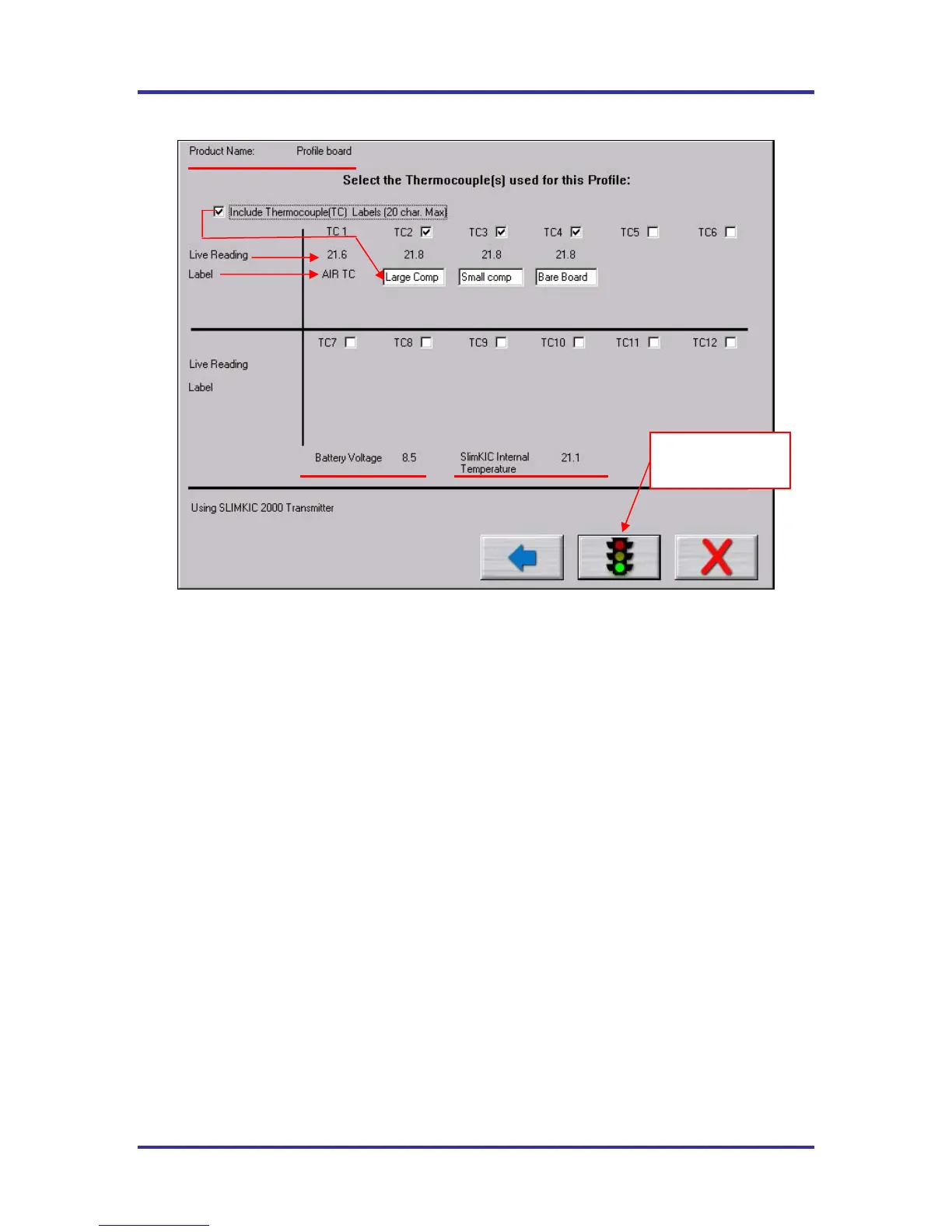
Figure 55: Run a Profile screen #7 – Select TC’s
Include Thermocouple (TC) Labels (20 char. Max) – Checking this will display a field below each TC
that is checked. Up to 20 characters can be used to describe the placement or location of that TC.
TC Number Check Box – Place a check next to each TC channel that is going to be used for this profile.
TC number 1 is always used for the AIR TC. You must have at least one other TC being used.
Live Reading – When the SlimKIC 2000 or KIC Explorer are on and either plugged into the download
cable for data logging or transmitting to the receiver which is plugged in, you will see live temperature
updates for the TC’s plugged into the KIC Profiler. The TC checkbox must be checked as well to get the
temperature updates. If you do not see live temperature readings recheck all the cable and or computer
connections.
Battery Voltage – This displays a live reading of the SlimKIC 2000 or KIC Explorer battery voltage. The
software will recognize if your battery voltage is too low and not allow you to start a profile until you have
a battery with enough voltage to complete the profile.
SlimKIC 2000/KIC Explorer Internal Temperature – This displays the internal temperature of the
SlimKIC 2000 or KIC Explorer profilers. If the temperature is too high to complete the profile and stay
under the maximum temperature rating for the unit, it will not allow you to start the profile. You must wait
until the KIC Profiler is cool enough. The software will let you know what temperature you will have to
drop below.
If the selected Process Window has Separate Specs for TC’s, then the user must return to the Process
Window-Edit Specs screen in order select/deselect TC’s or change their text labels.
Buttons
Back (Arrow) This button takes you back to the previous screen.
Start Profile (Green Traffic Light) Select this button to start the profile.
Cancel (Red X) Button cancels the profile.
Select this button
to start a profile.



 To Next Page