KIC 2000 v2.4.0.x
46 KIC 2000 User Manual
Upon Exiting the Graph screen
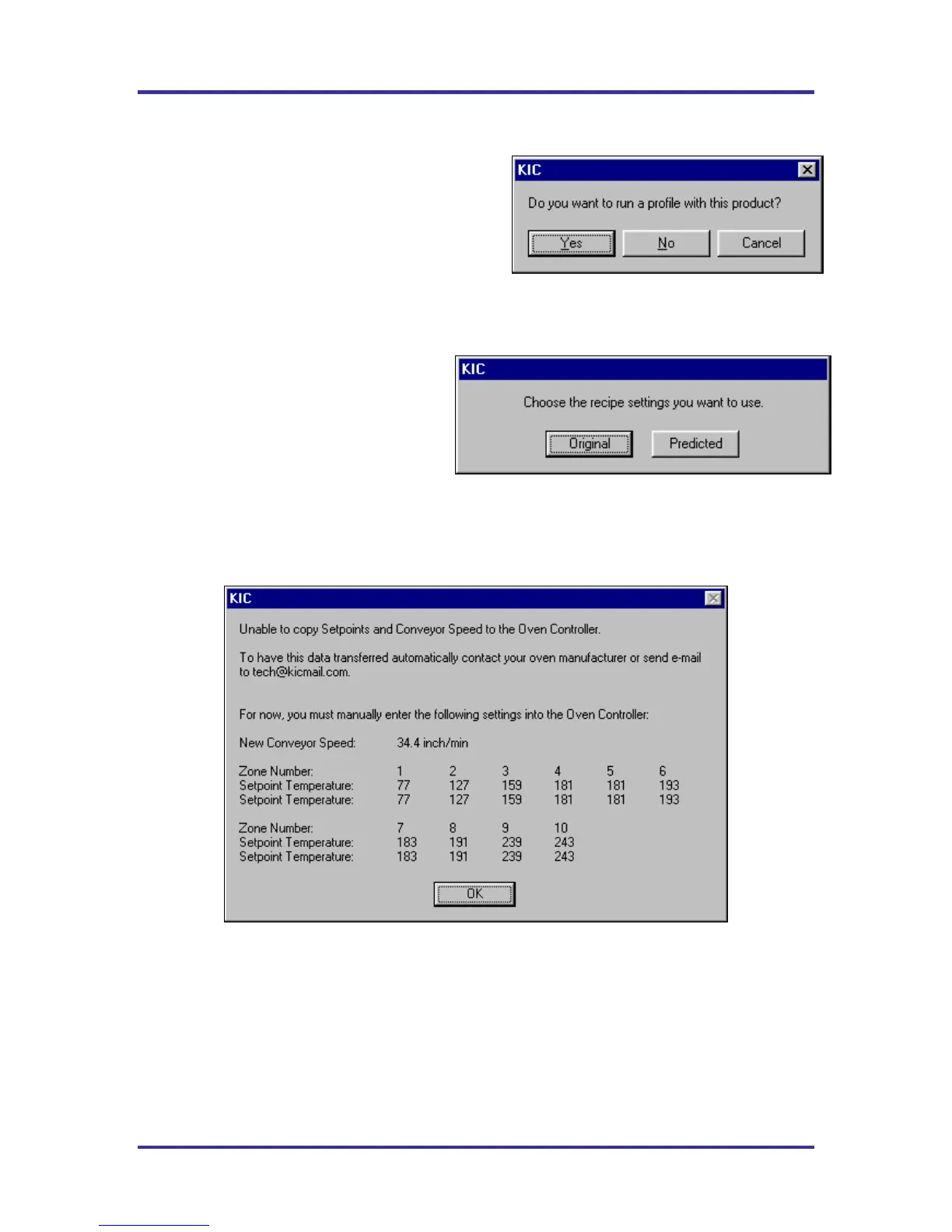
Do you wan to run another profile with this product?
See Figure 74.
If you select No, you will be returned to the KIC 2000
main screen or the Profile Explorer if the profile was
originally opened from there.
If you select Yes, you will need to choose from the
Original, or Predicted recipe settings. See Figure 75.
Original – The same recipe settings used when
this profile was originally run.
Predicted - The recipe settings as predicted by
the Navigator option, or a standard prediction
manually input by the user.
For both the original and predicted recipe
settings, the software will automatically send
the selected recipe information to the oven controller. If there is no communication between the KIC 2000
software and the Oven controller, the KIC 2000 will display a dialog box showing the recipe information.
The user must manually enter this recipe information in the oven control software. See Figure 76.
Figure 76
KIC 2000 software will automatically apply the changes to the Run a Profile –Enter Set points screen. You
will exit to the Run a Profile –Enter Set points screen. If you are running on the oven controller PC, and
the oven is compatible with the KIC 2000 software the oven recipe will automatically be updated.
Figure 74
Figure 75



 To Next Page