KIC 2000 v2.4.0.x
18 KIC 2000 User Manual
Global Preferences
Global Tab
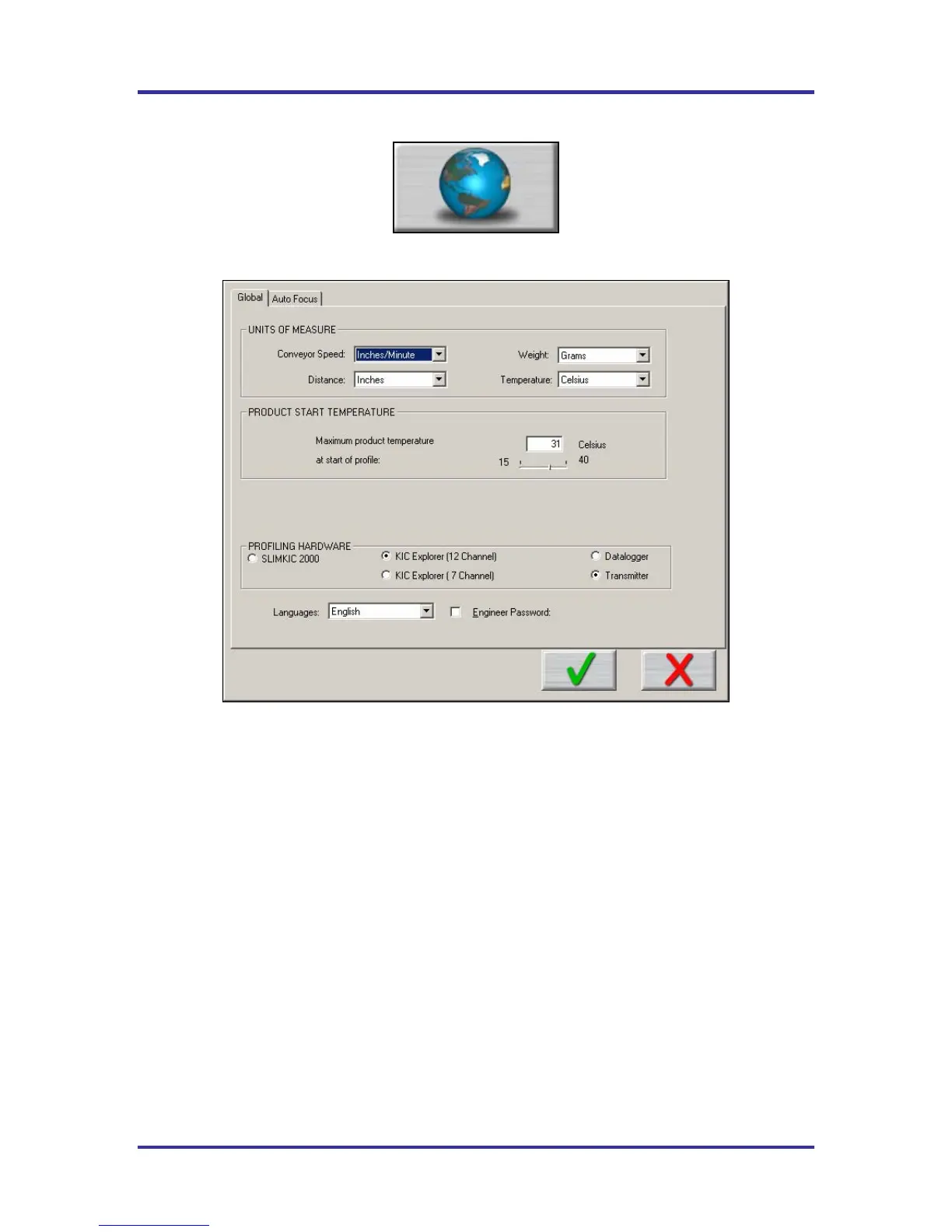
Figure 25: Global Preferences
• Units of Measure – There are two drop down menus to choose units for Conveyor Speed and
Distance, and weight. (Weight is Auto-Focus Specific)
• Product Start Temperature – The temperature of all the thermocouples attached to the product and
SlimKIC 2000 must be below this temperature to start a profile. This will insure that a profile is not
started while the board is still to hot. Input value in the field or use Slider bar.
• Profiling Hardware –Select SlimKIC 2000 or KIC Explorer 12, or 7 channel model. The
SlimKIC 2000 or KIC Explorer you purchased will be either a Transmitter capable or Data log
capable. Select the appropriate option.
• If you are running on an oven with communication compatibility with the KIC 2000 software, there
will also be a field to input the oven name. This oven name will be saved with the profile and can be
sorted on in the Profile Explorer.
• Languages – Select the language that you wish to run the software. See important information about
Languages on page 2.
• Engineer Password – By checking this and entering a password you can control access to certain
menus in the KIC 2000 software. See Figure 26.



 To Next Page