TOS5051A/5050A 4-3
Chap.4
Description of Front and Rear Panel Items
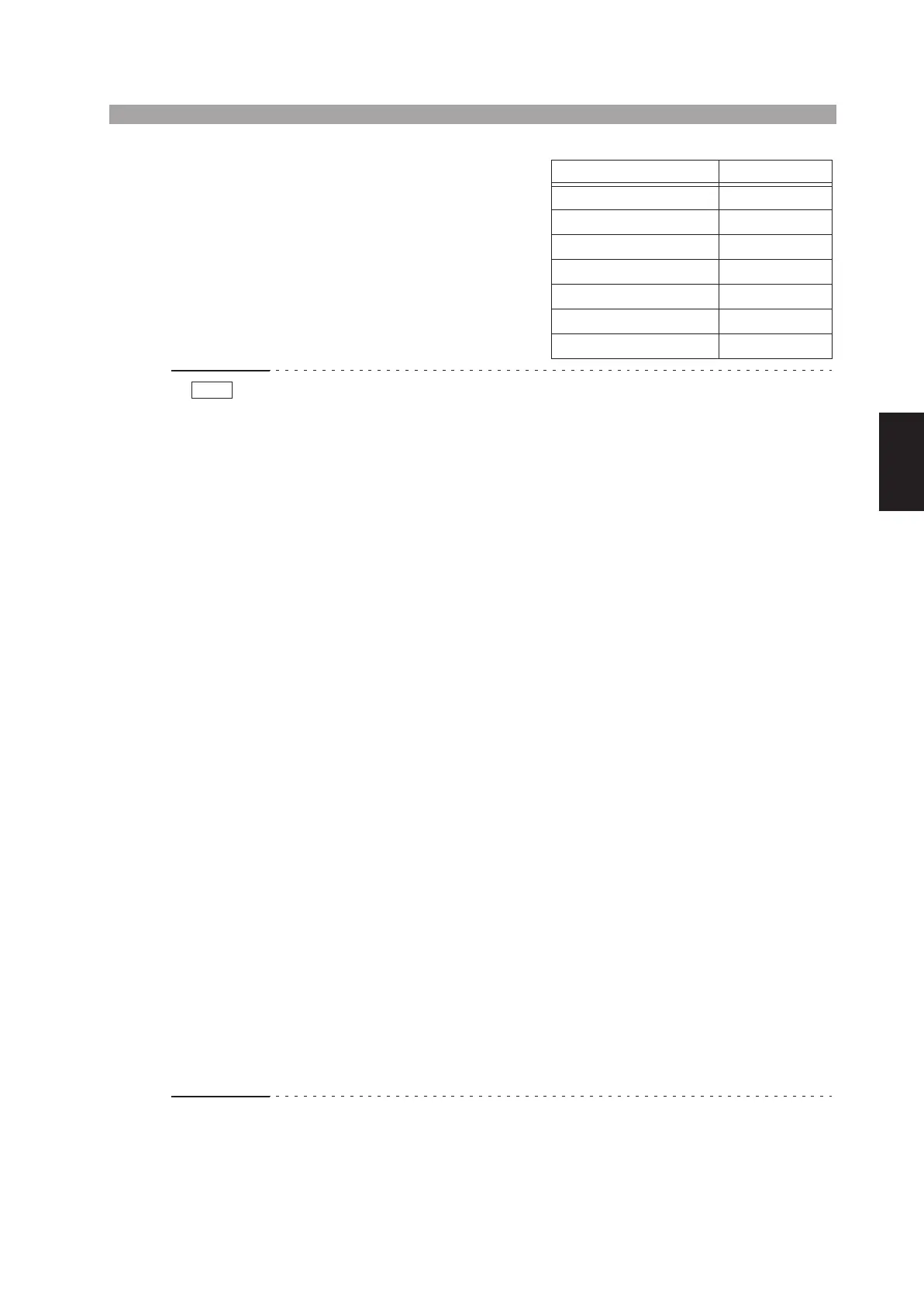
By pressing the POWER switch while
holding down the SHIFT key, you can
initialize the test conditions to the ini-
tial setup (factory default setup) as
shown to the right. If you do, the test
conditions that existed when you
turned OFF the POWER switch last
time are lost.
• Be sure to read Chapter 3 “Handling Precautions” (Page 3-1) of this manual
before you start using the tester.
• Before turning ON the POWER switch, be sure that the TEST VOLTAGE control
is at the fully counterclockwise position (“0” position).
• When you turn OFF the POWER switch immediately after you have changed the
upper cutoff current, lower cutoff current or test time, no setting value may be
stored. Wait for five seconds or more after the setting change, and then turn OFF
the POWER switch.
• Normally, when you turn ON the POWER switch, the TESTER enters the
READY state (“READY” is lit). However, the lamp will not light up in the follow-
ing cases:
1. The tester is in the PROTECTION status (“PROTECTION” is lit).
(a) The interlock pins of the SIGNAL I/O connector on the rear panel are open.
In this case, clear the interlock signal, reset the PROTECTION status with the
STOP switch, and then start operating the tester. (For details, refer to section
6.3.3, “Interlock Function.”)
(b) The high voltage supply section is overheated during the DC test (TOS5051A
only).
In this case, wait until the tester cools off, reset the PROTECTION status with
the STOP switch, and then start operating the tester.
2. The lower cutoff current setting is higher than the upper cutoff current
setting and the lower pass/fail judgment function is ON.
In this case, make the lower cutoff current setting lower than the upper cutoff
current or turn OFF the lower pass/fail judgment function and then start oper-
ating the tester.
3. The POWER switch is turned ON when the TEST VOLTAGE switch is
caught between two range positions.
The test voltage range message shows a blinking “0 kV” to notify that the set-
ting has not been confirmed (in addition, if the TOS5051A is in the middle of
switching between AC and DC, both “AC” and “DC” light up simultaneously).
Because the setting has not been confirmed, “READY” turns off to notify that
the tester is not in the READY status.
In this case, turn the TEST VOLTAGE switch accurately to the desired range
position and then start operating the tester.
Item Initial setup data
Upper cutoff current 0.2 mA
Lower cutoff current 0.1 mA
Lower pass/fail judgment OFF
Test period 0.5 s
Timer function ON
Keylock function OFF
Talk mode 0
NOTE



 To Next Page