36 Panel Operations TOS8030
Test voltage (Continued)
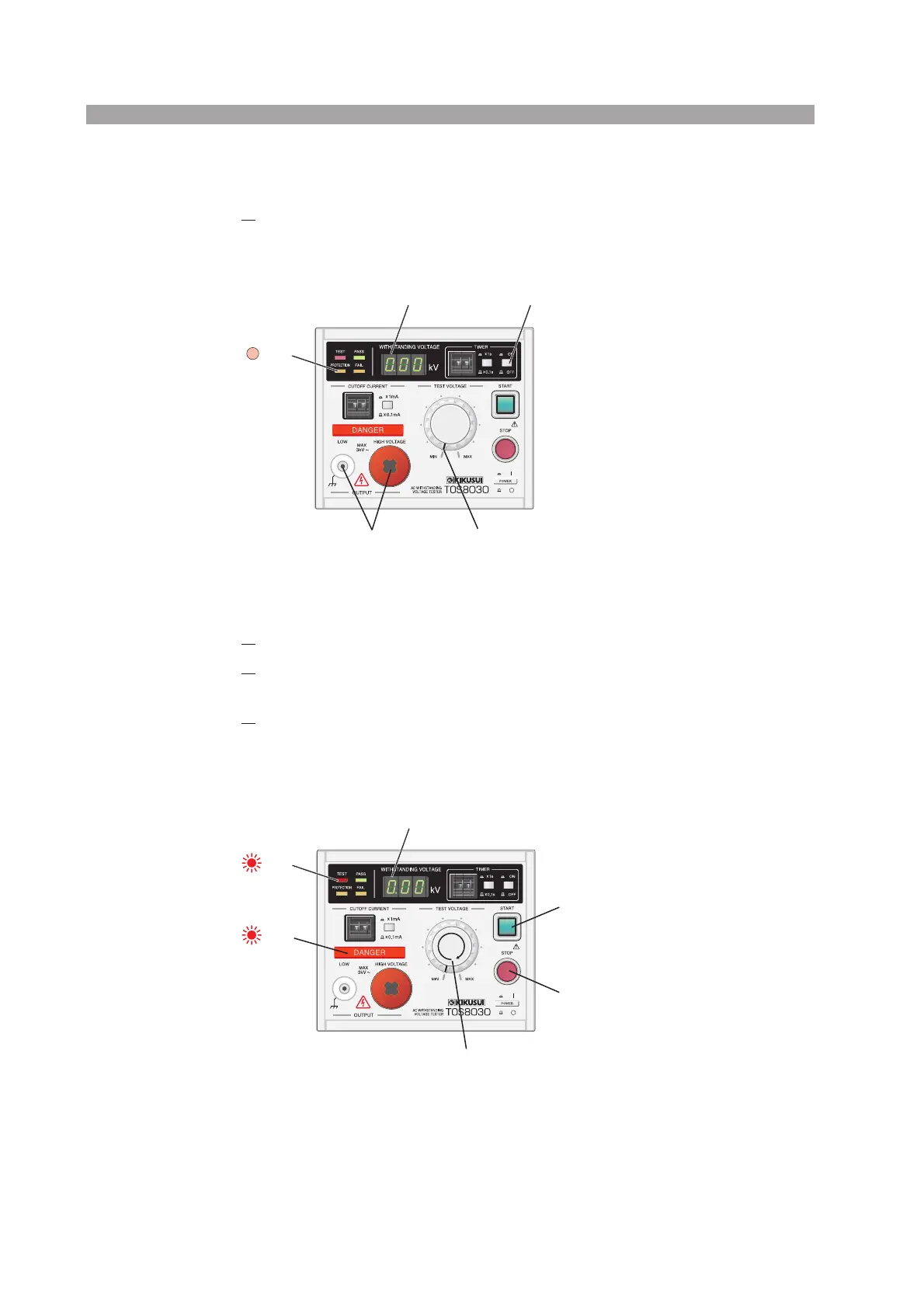
1. Bring the tester to the state shown in Fig. 5-8.
If the PROTECTION lamp is lit, press the STOP switch to cancel PROTEC-
TION.
Fig. 5-8 Preparing for Test Voltage Setup
2.
Press the START switch.
3.
Monitoring the indication on the voltmeter, gradually turn the TEST
VOLTAGE knob clockwise to set the test voltage.
4.
Press the STOP switch to shut off the output.
If timer was changed in step 1 to set the test voltage, return the settings to their orig-
inal values.
Fig. 5-9 Setting the Test Voltage
Out
TIMER OFF
Displays “0.00”.
Do not connect
a test lead to these
connectors.
Turn the knob all the way counterclockwise
(to the MIN position)
Lit
Lit
Adjust the voltage to a desired value (from 0.05 kV to 3.00 kV).
Turn the knob slowly clockwise.
Press the START switch
to start test voltage setting.
Press the STOP switch
to finish test voltage setting.



 To Next Page