7. Alarm / relay settings
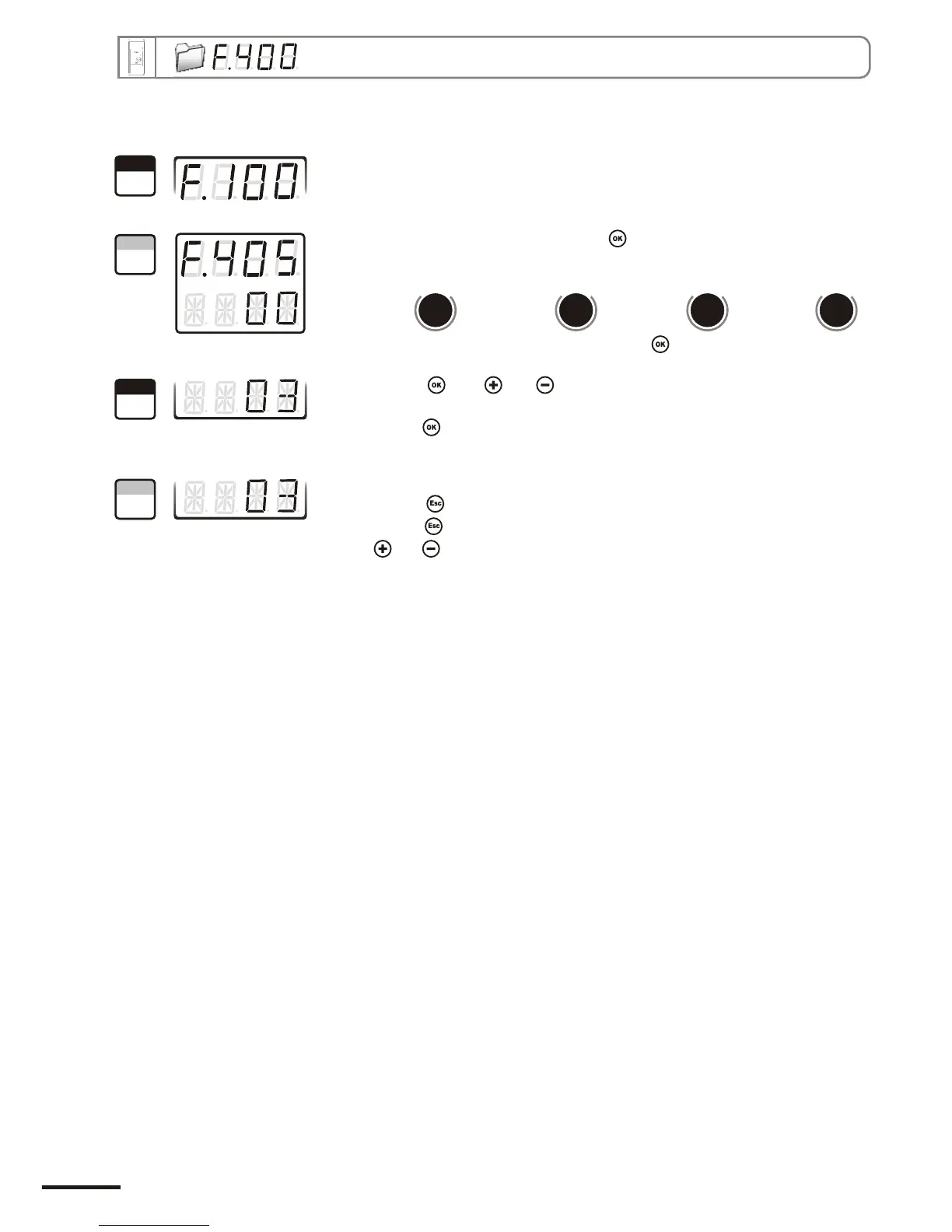
Go into configuration mode (see page 5). The folder number displayed
corresponds to the last configuration folder used.
Select the folder “400” and validate with .
Valider avec .With and keys, set the required time-delay: from 00 to
60 seconds. If you do not need the time-delay, enter 00..
Validate with .
The cursor > returns to sub-folders line.
• press twice to return to reading mode.
• press once to return to another folder selection.
• with and keys , you can choose another sub-folder from the folder 400.
7.f.2 - Time-delay
“405” “409” “413” “417”
Alarm 1 Alarm 2 Relay 1 Relay 2
Select sub-folder
and validate with .
d
b
u
o
s
M
810
d
b
u
o
s
M
818
d
b
u
o
s
M
826
d
b
u
o
s
M
834
1
Step
2
Step
3
Step
4
Step
Page 18
CPE 300 transmitter configuration via remote control / Modbus


 To Next Page