1
Step
2
Step
3
Step
4
Step
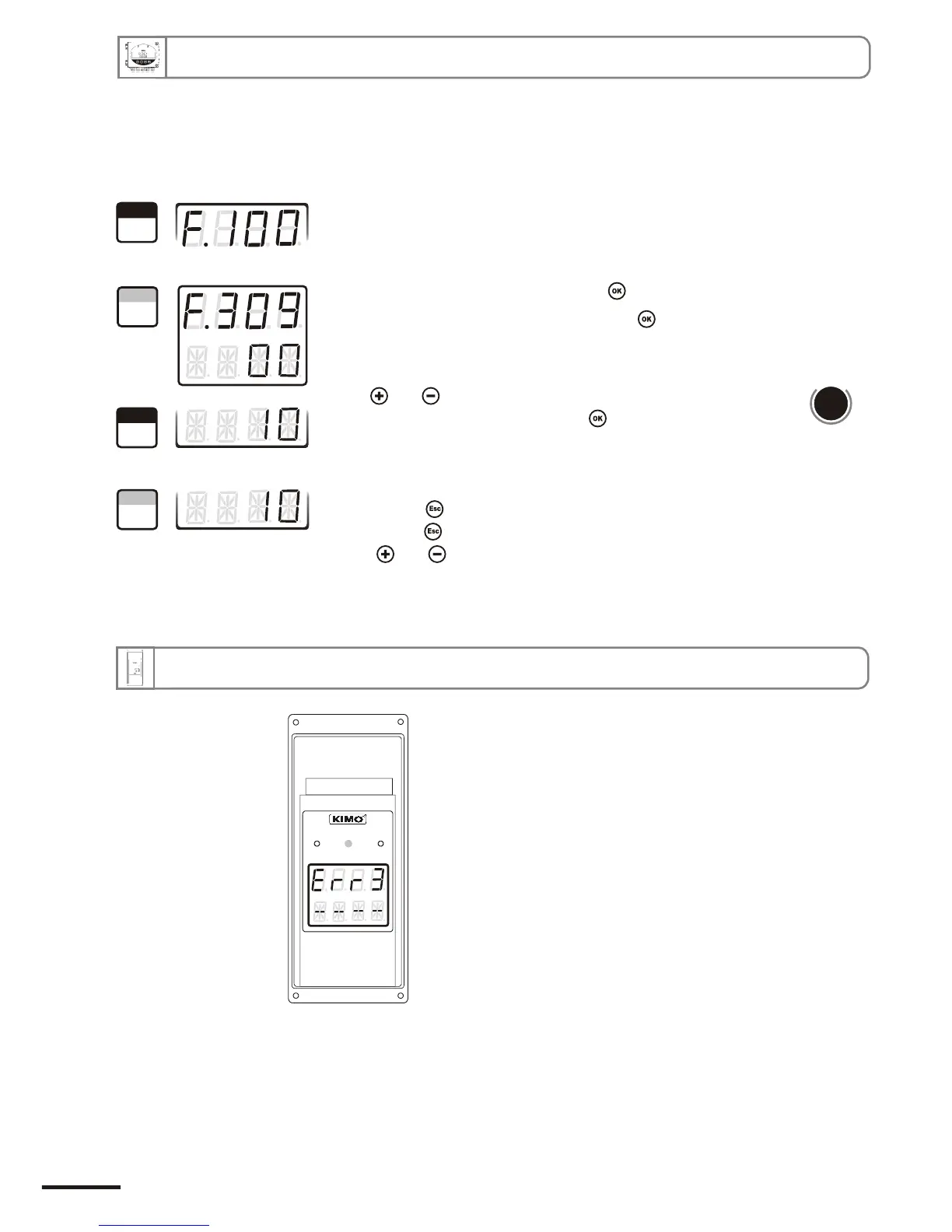
Go into configuration mode (see page 5). The folder number displayed
corresponds to the last configuration folder used.
Select the folder “300” and validate with .
Select the sub-folder “309” and validate with .
The cursor > returns to the sub-folders line.
• press twice to return to reading mode.
• press once to return to another folder selection.
• with and keys, choose another sub-folder from the folder 300.
d
b
u
o
s
M
618
With and keys, enter the value in seconds of the time-delay
required (from 00 to 60). Validate with .
Once the purge is finished, time-delay is a time period before the transmitter returns to measurement
mode and before the analogue outputs are reactivated.
9. Other functions
12.d.4 - Time-delay
10. Error codes
Problem :
• Interchangeable Measuring Sensor (SPI element)
not connected
Solution :
• Connect the probe / SPI (see SPI notice)
Page 24
CPE 300 transmitter configuration via remote control / Modbus


 To Next Page