9. Other functions
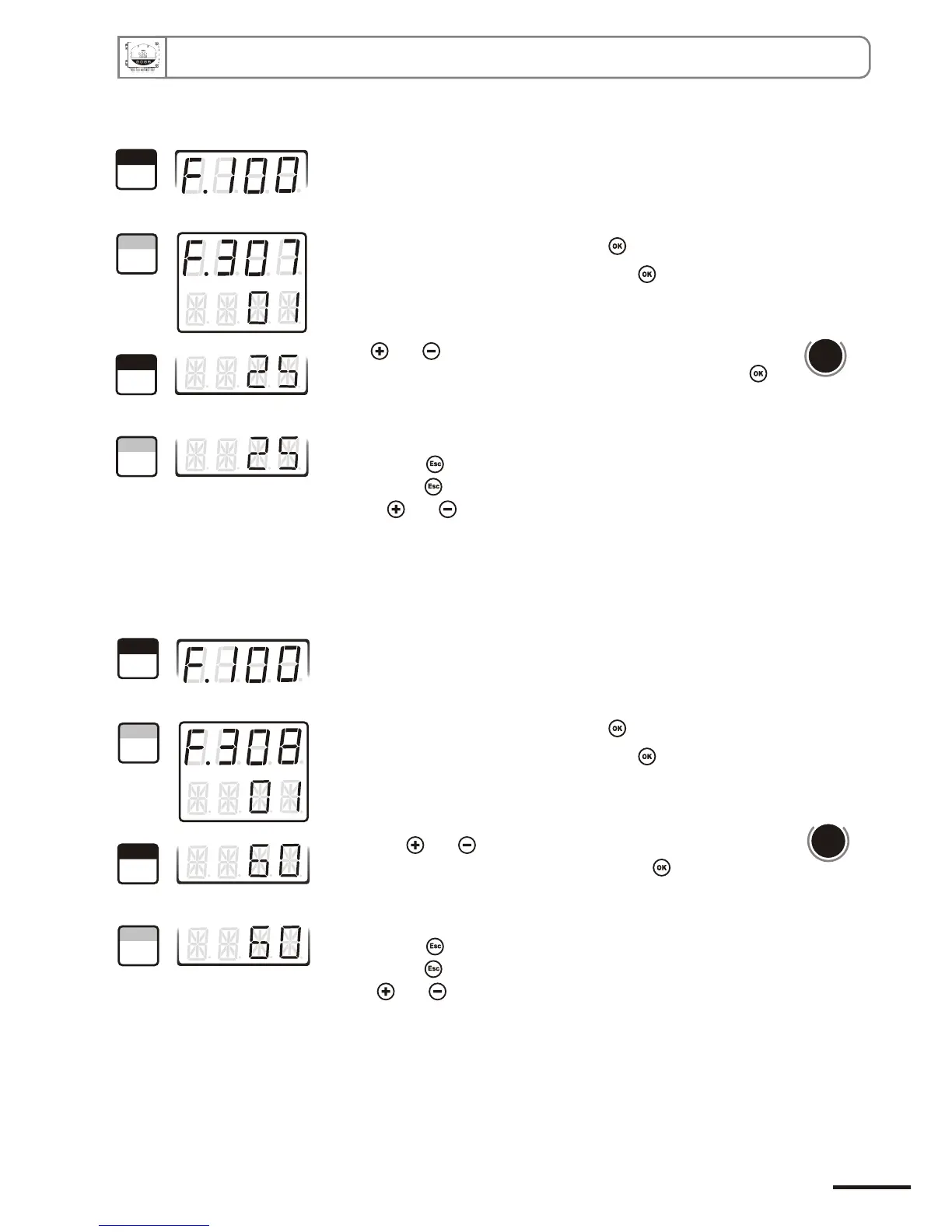
Go into configuration mode (see page 5). The folder number displayed
corresponds to the last configuration folder displayed.
Select the folder “300” and validate with .
Select the sub-folder “307” and validate with .
The cursor > returns to sub-folders line.
• press twice to return to reading mode.
• press once to return to another folder selection.
• press and to choose another sub-folder from the folder 300
With and keys, enter the value in seconds of the required
working duration of each purge (from 01 to 60). Validate with .
9.d.2 -Working duration of purge mode
d
b
u
o
s
M
614
1
Step
2
Step
3
Step
4
Step
1
Step
2
Step
3
Step
4
Step
Page 23
CPE 300 transmitter configuration via remote control / Modbus
Go into configuration mode (see page 5). The folder number displayed
corresponds to the last configuration folder used.
Select the folder “300” and validate with .
Select the sub-folder “308” and validate with .
The cursor > returns to sub-folders line.
• press twice to return to reading mode.
• press once to return to another folder selection.
• with and , choose another sub-folder from the folder 300.
d
b
u
o
s
M
616
With keys and , enter the value in minutes of the frequency
of each purge (from 01 to 9999). Validate with .
9.d.3 -Frequency


 To Next Page