8.b - Time-delay between 2 self-calibrations
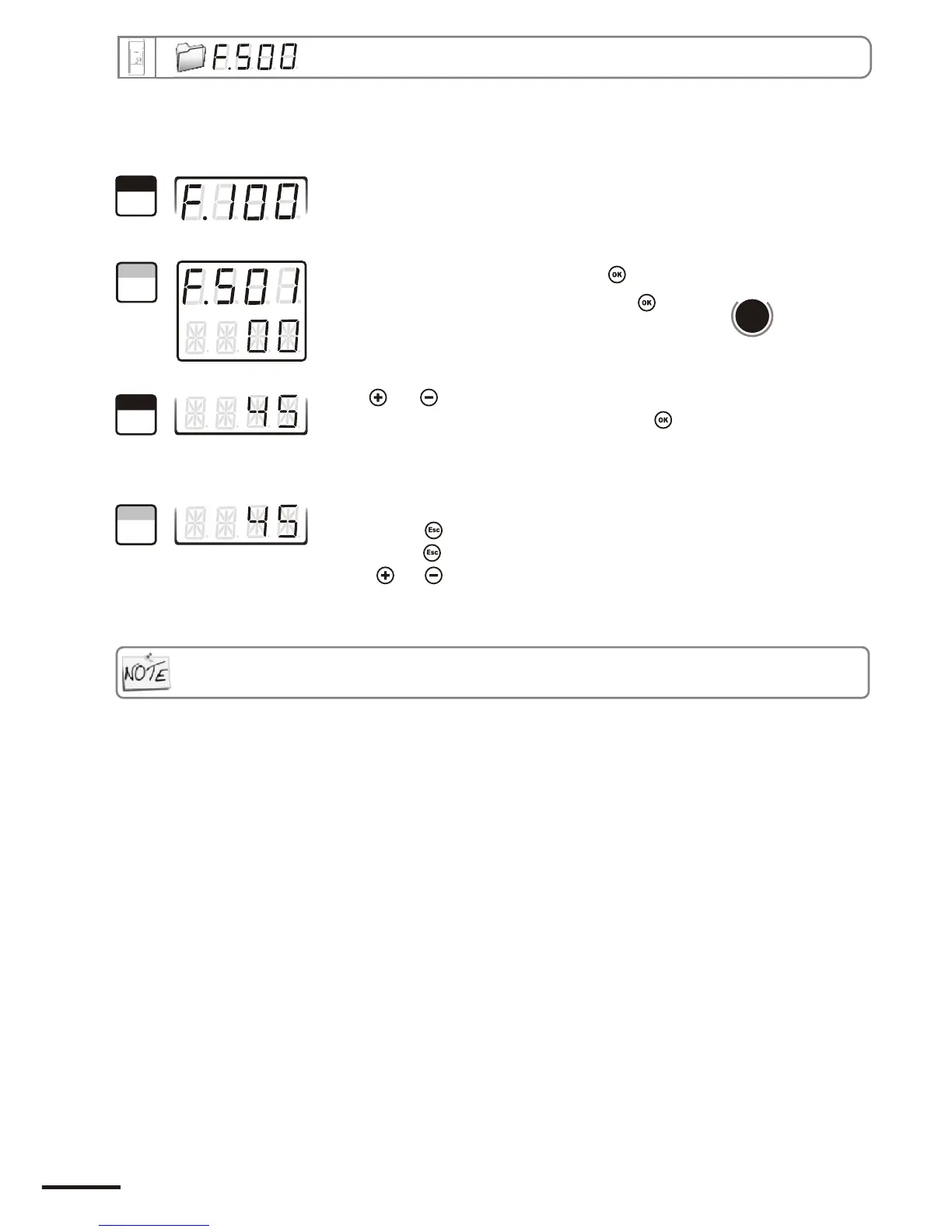
Go into configuration mode (see page 5). The folder number displayed
corresponds to the last configuration folder used.
Select the folder “500” and validate with .
Select the sub-folder “501” and validate with .
The cursor > goes to available choices.
With and keys, you can set the time-delay values between 2 self-
calibrations: from 0 to 60 minutes. Validate with .
Note : if the value is equal to 0, the transmitter will not carry out any self-calibration
d
b
u
o
s
M
1002
The cursor > returns to sub-folder line.
• press twice to return to reading mode.
• press once to return to another folder selection.
• with and keys , you can choose another sub-folder from the folder 500
Whenever you want, in reading mode, you can carry out a self-calibration by keeping “ESC” pressed
1
Step
2
Step
3
Step
4
Step
Page 20
8. Pressure measurement configuration
CPE 300 transmitter configuration via remote control / Modbus


 To Next Page