8. Pressure measurement configuration
8.a - Pressure measurement integration
+/- (
Example : CPE303 (0-1000 Pa) - First measurement: 120 Pa - New measurement : 125 Pa
The pressure source is stable, the user applied a low integration. Integration : 1, maximum variation allowed +/-10 Pa. Since the variation is less than
10 Pa, we apply the integration calculation formula. Next measurement displayed ((9 * 125) + (1 *120 ))/10 = 124.5 soit 124 Pa. If the new value had
been 131 Pa, the next value displayed would have been 100% of the new value, i.e 131 Pa.
The integration coefficient makes an average of the measurements: this helps to avoid any excessive variations
and guarantees a stable measurement.
ew
[((10 - Coef.) x N Value) + (Coef. x former value)]New value displayed = /10
This value is applicable when the variation is less than Coef. x 10 Pa)
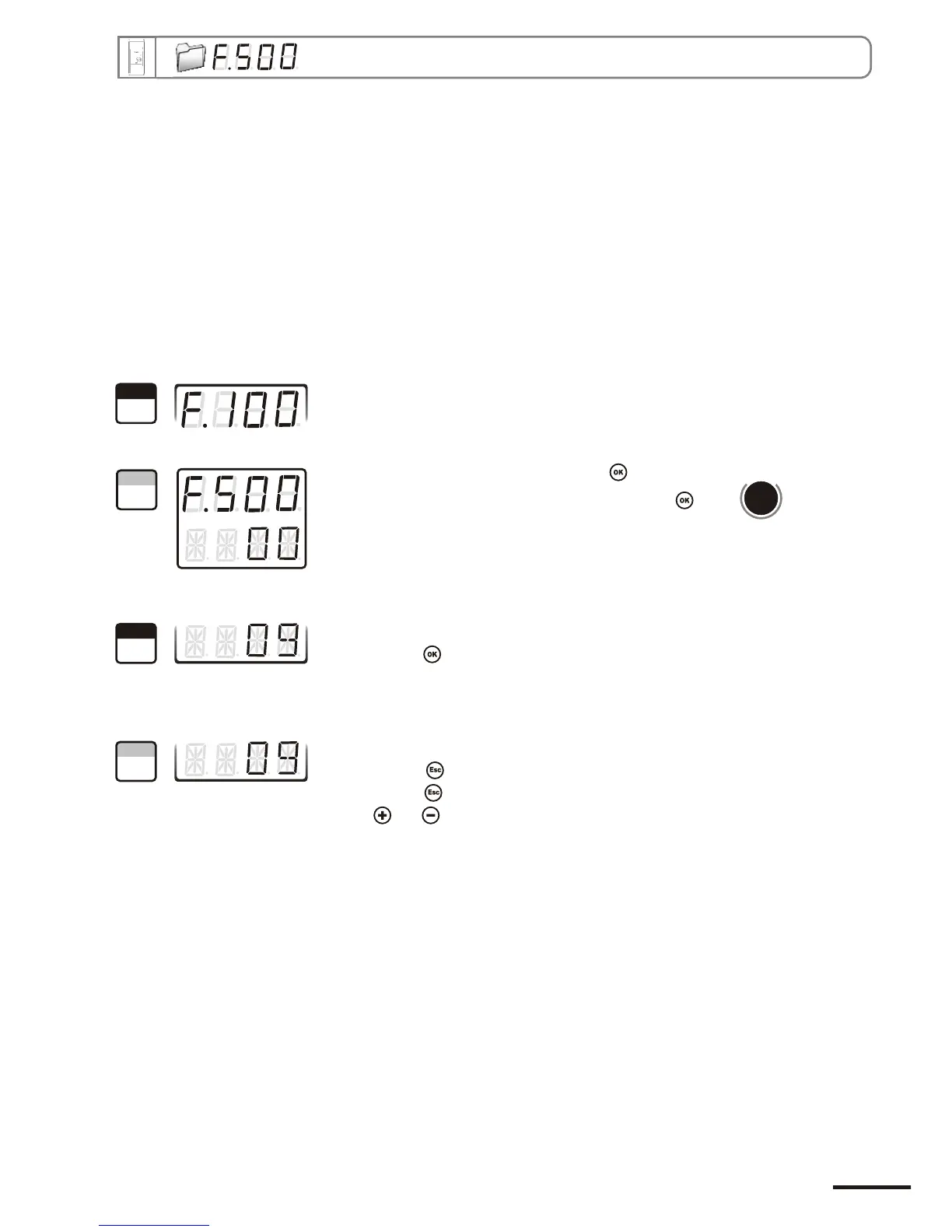
Go into configuration mode (see page 5). The folder number displayed
corresponds to the last configuration folder used.
Select the folder “500” and validate with .
Sélectionner le sous-dossier “500” et valider avec .
Le curseur descend sur la ligne des choix possibles.
you can set the integration value: from 00 to 09.
Validate with .
Coefficient 0 : no integration, large variation of the measurement displayed.
Coefficient 9 : maximum integration, more stable measurement display.
d
b
u
o
s
M
1000
The cursor > returns to sub-folders line.
• press twice to return to reading mode.
• press once to return to another folder selection.
• with and keys , you can choose another sub-folder from the folder 500.
1
Step
2
Step
3
Step
4
Step
Page 19
CPE 300 transmitter configuration via remote control / Modbus


 To Next Page