1616
GB
Use of the hand control Use of the hand control
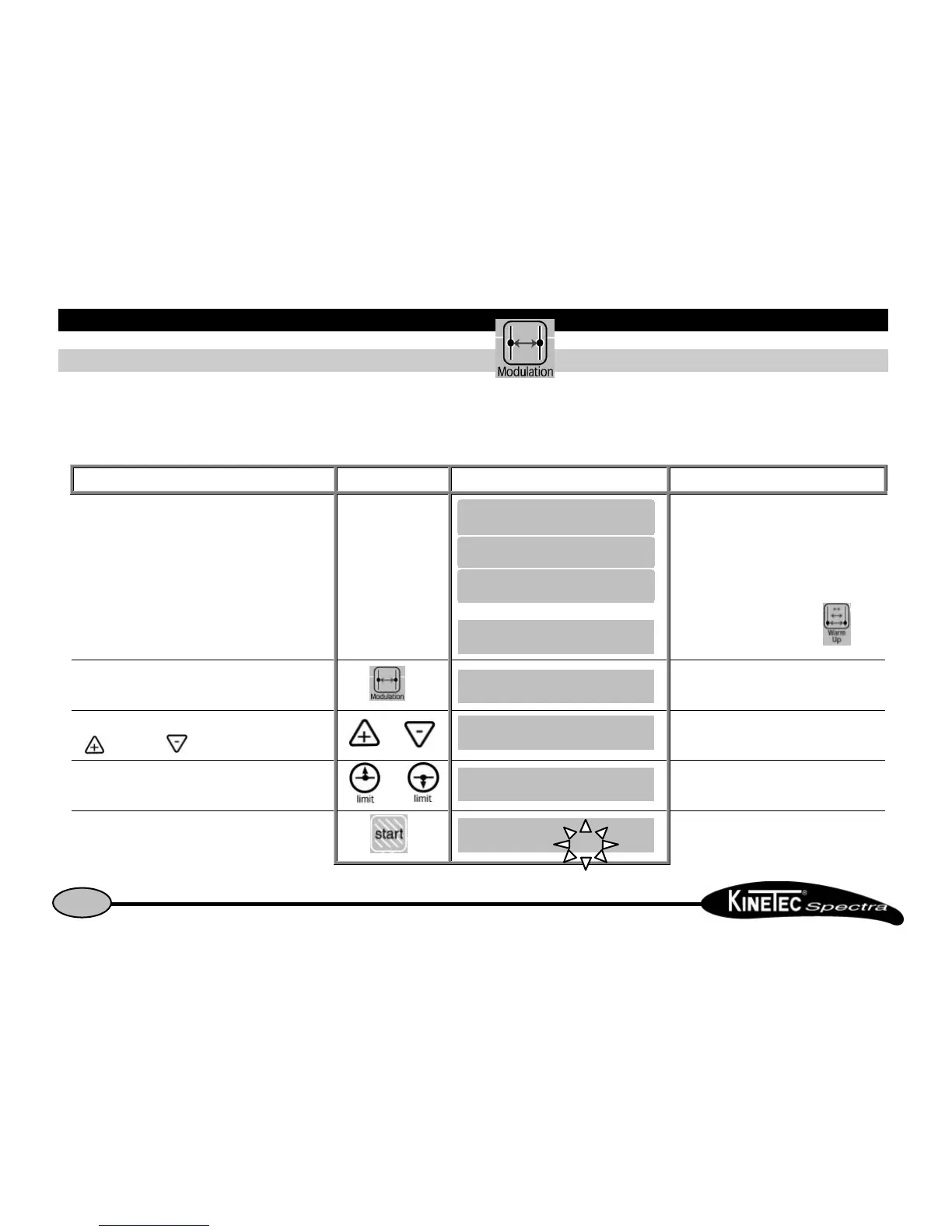
How to define the patient tolerance • At the start of a sessionHow to define the patient tolerance • At the start of a session
This function, MODULATION Mode is a way to set within the tolerance of a patient at the beginning of a session.
Set up the patient and proceed as below:
Beginning Keys to press Display Remarks
Switch the unit ON
Or
Check if the hand control is not blocked
(See page 7).
If the Warm Up mode is selected, switch OFF
this mode by pressing on the key
To select the MODULATION Mode
The display indicates the keys to be used to
drive the machine, this message is displayed 3
seconds.
To select the pain level
( for flexion, for extension)
or
The unit is moving to the selected way.
It is waiting for you to select new limits.
To set the pain level when reached, immediately press or The new limit of the movement is recorded
To start the session with the new movement limits
The angle display changes with current
movement.


 To Next Page