77
GB
Use of the hand controlUse of the hand control
Locking the hand control settingLocking the hand control setting
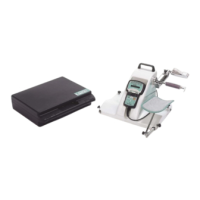
The hand control allows the patient to control the machine as appropriate.
Simultaneously press the and keys to lock the hand control,
The display reads "LOCK", you can not change the parameters, if you try the display reads "LOCK".
To unlock the hand control, simultaneously press the and keys, The display reads "UNLOCK".
We recommend that you lock the hand control when you give it to the patient.We recommend that you lock the hand control when you give it to the patient.
Comment: The hand control is unlocked when you switch the unit ON/OFF.
START/STOP/REVERSE functionSTART/STOP/REVERSE function
As with all KINETEC systems, KINETEC Spectra is equipped with a START/STOP/REVERSE function.
When the unit is running, the display reads RUN
Press the key of the hand control. The movement stops. The display reads STOP.
Press the key of the hand control. The movement starts in the opposite direction and the display reads RUN.
Caution:Caution:
For optimum safety, always give the hand control to the patient before starting the system.For optimum safety, always give the hand control to the patient before starting the system.


 To Next Page