4-19
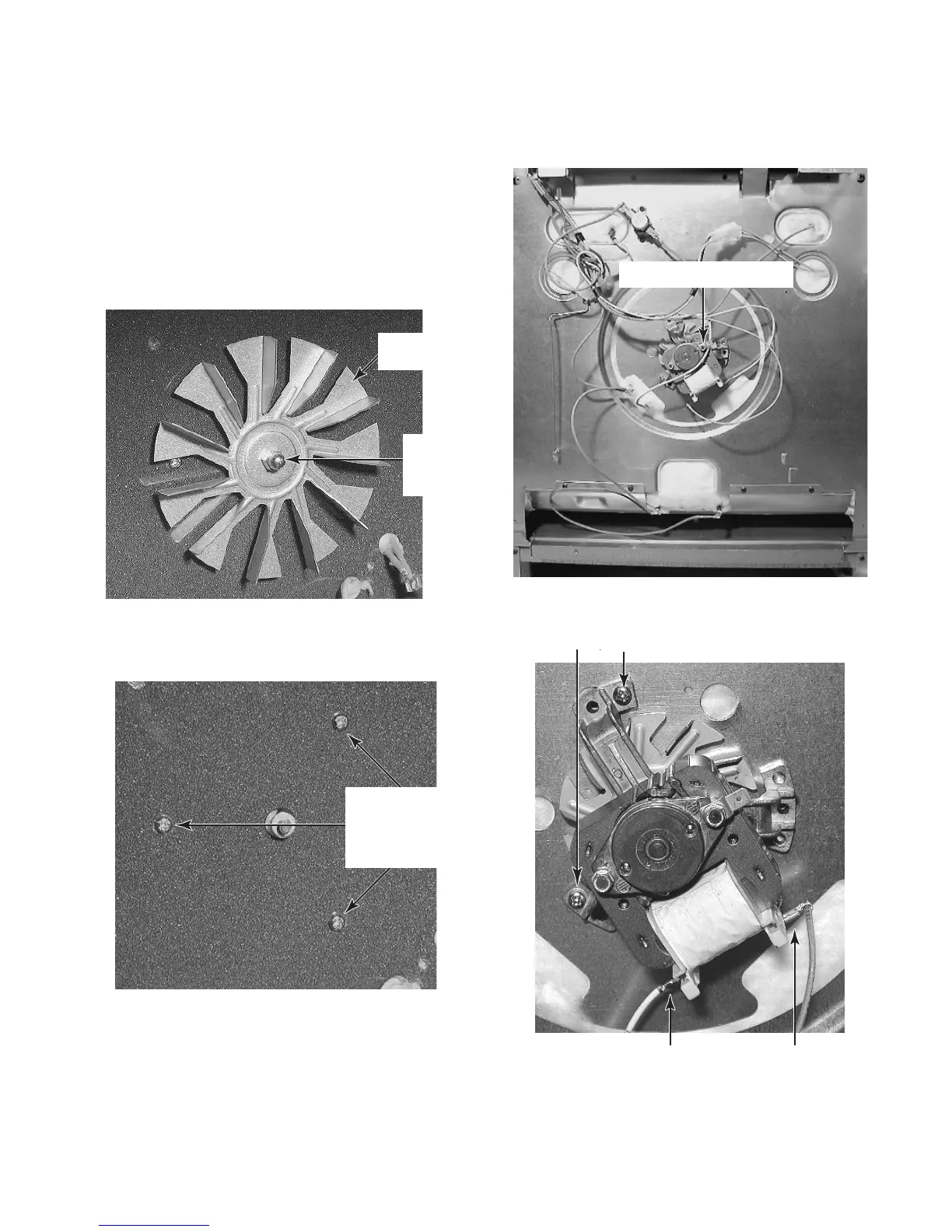
6. To remove a convection fan motor:
a) If not already done, remove the con-
vection cover and the convection bake
element from the rear of the oven liner
(see page 4-18 for the procedure).
b) Use a 10 mm (7/16″) socket and re-
move the hex nut from the convection
fan. NOTE: The nut has a left-rotation
thread for removal.
d) Pull the range out of its mounting loca-
tion so that you can access the rear of
the unit.
e) Remove the rear panel from the range
(see page 4-17 for the procedure ).
c) Remove the three front convection fan
motor screws from the rear of the oven
liner.
f) Remove the two convection fan motor
mounting screws and remove the mo-
tor from the rear of the range.
BACK OF RANGE
Convection Fan Motor Mounting Screws
Convection
Fan
10 mm
(7/16″)
Hex Nut
Convection
Fan Motor
Front Screw
(1 of 3)
Convection Fan Motor
Convection Fan Motor Terminals



 To Next Page