75
Digital Astronomic Timer
With interface program; the date, time, program, location, prayer settings can be congurated.
User can write the created programs to Infrared Remote Control (Meastro-R) and then user can
install it to Meastro.
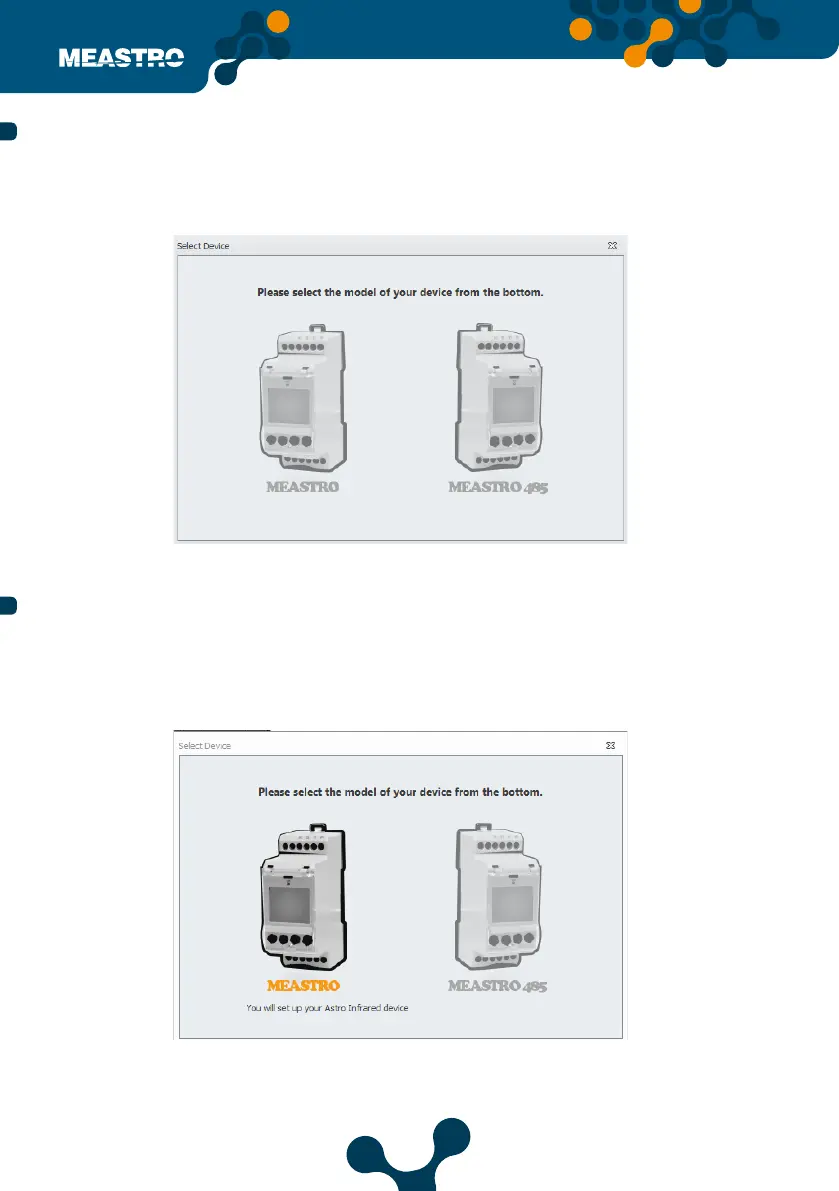
After clicking Meastro shortcut on your desktop, the following screen appears.
User can congure date time, program, location, prayer and device settings by connecting to
the maestro device via USB or TCP / IP.
To access the user interface program, connect the Meastro-R to your computer with a USB
cable. It is recommended to connect the device with the connecting cable.
5.2.1 Using Meastro User Interfacewith Meastro Device
5.2 Using Meastro User Interface
Meastro User Interface Program First Page
Figure 5-7 Select device
Figure 5-8 Select Meastro from Meastro User Interface Program


 To Next Page