90
Digital Astronomic Timer
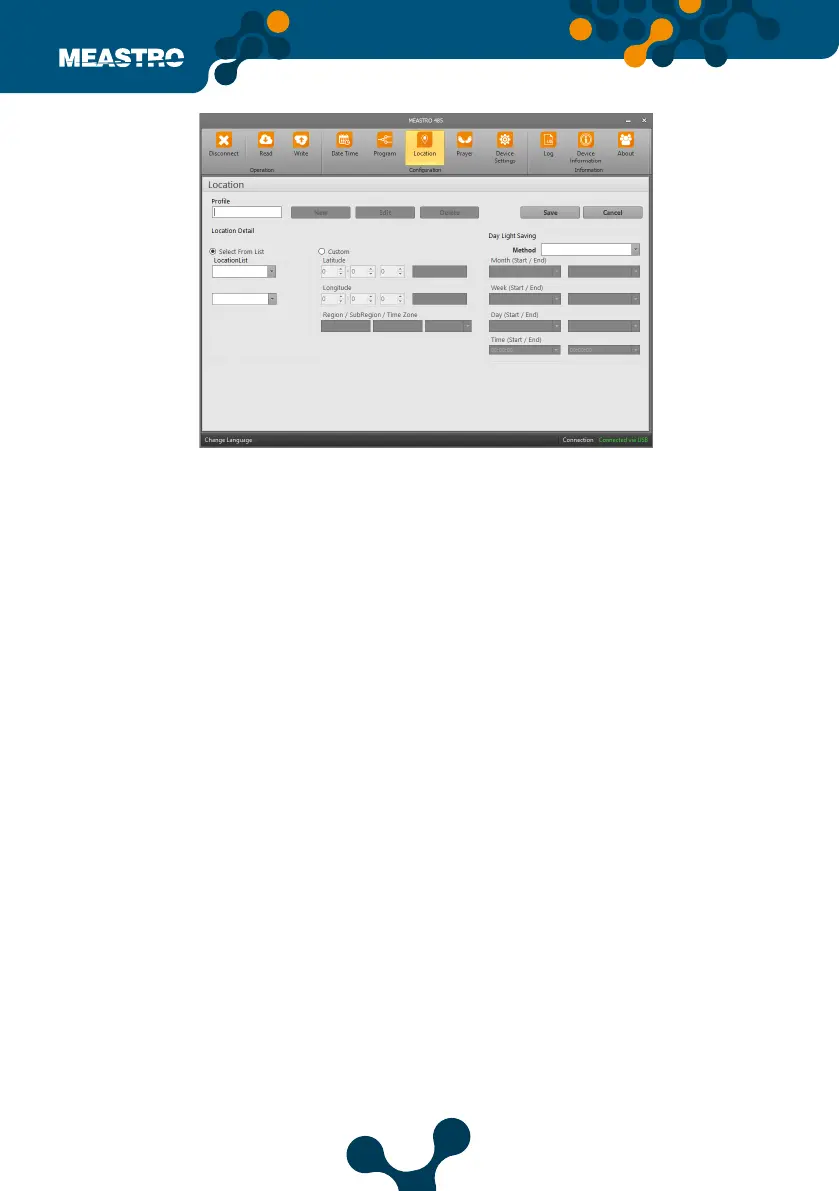
In this tab, Meastro-RS 485 Location Settings can congure. In this tab user can set location and
write on Meastro-RS 485.
The options under the Position tab consist of 3 parts: Selection from List, Custom and Daylight
Saving.
Position Settings are as follows,
Click the ‘New’ button and the setting buttons are activated.
Prole: The name of the location setting to be created is written.
Select from List: The names of provinces and districts are selected.
Custom: The latitute and longitude information are written by user.
• Region: City name is written.
• Sub-Region: The name of the district is written.
• Time zone: The UTC settings with the entered position are select ed from this section.
Day Light Saving: The method sections are as follows; O, Europe, America and Custom.
O: Daylight saving is turn o
Europe: It is set automatically when selected. Values cannot be changed by user.
America: It is set automatically when selected. Values cannot be changed by user.
Custom: Month, Week, Day and Time start and end settings are change by the user.
After settings, click on ‘Save’ button. Location settings are saved with the name written in
Prole section.
Figure 5-28 Meastro User Interface Program Location Tab


 To Next Page