87
Digital Astronomic Timer
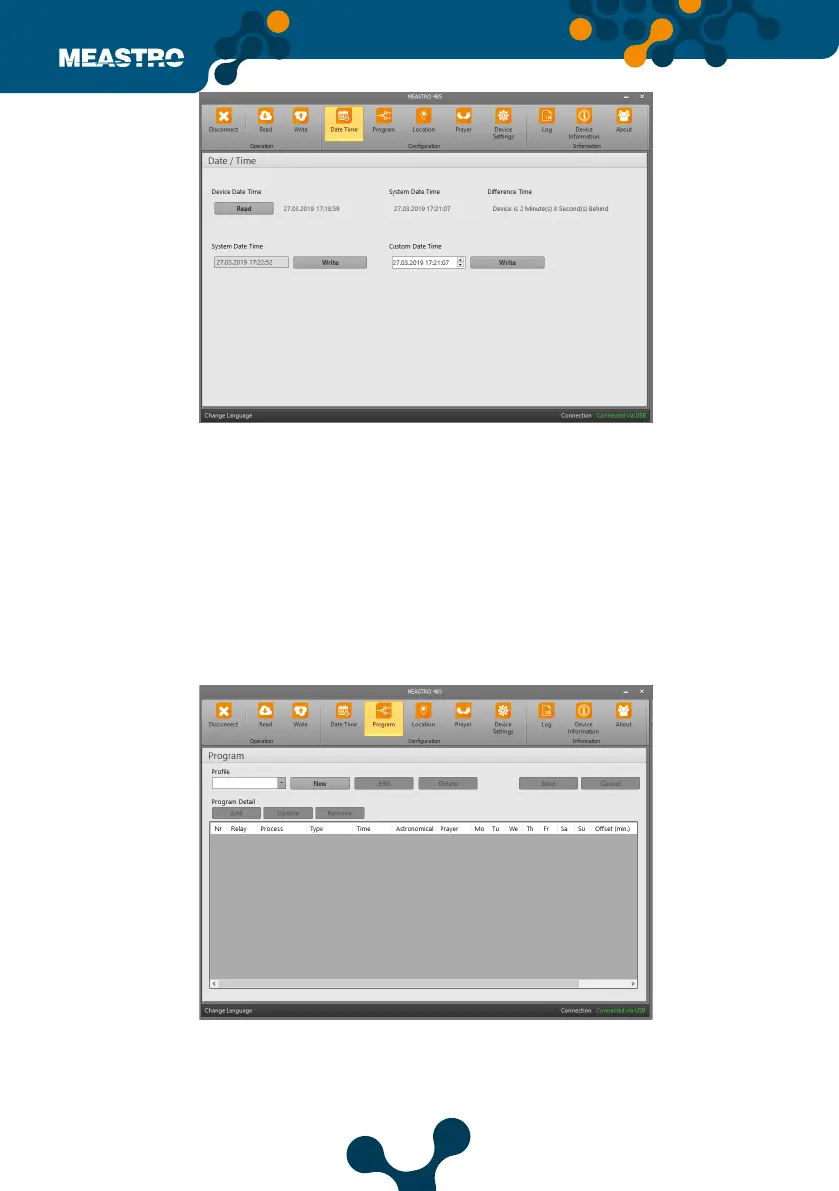
In this tab, Maestro-RS 485’s Date Time Settings are set.
Device Date Time: It shows the date and time on Meastro-RS485.
System Date Time: It shows the current date and time of the computer which communicated
with device.
Dierence Time: It shows the time dierence between the system and Meastro-RS485.
Custom Date Time: Date and time can be adjusted by user.
Click ‘Read’ button will read the date and time in Meatro-RS485
When clicked on the read button, the date and time in Meastro-RS 485 is read.
• In system date time setting, time and date cannot be changed by user. Date and time
information directly come from system.
• The values can be changed by the user in the Custom date and time setting.
By clicking Write button, the system date and time are written to Meastro-RS485.
In this tab, Meastro-RS 485 Program Settings are made. Programs to be saved in the Program tab
are created. Programs to set can be added, updated or removed via infrared control.
Program settings, desired days of the week Standard, Astro, Prayer time types Relay 1 (C1) - Relay 2
(C2) can be set as activate and passive.
Figure 5-24 Meastro User Interface Program Date&Time Tab
Figure 5-25 Meastro User Interface Program Program Tab


 To Next Page