79
Digital Astronomic Timer
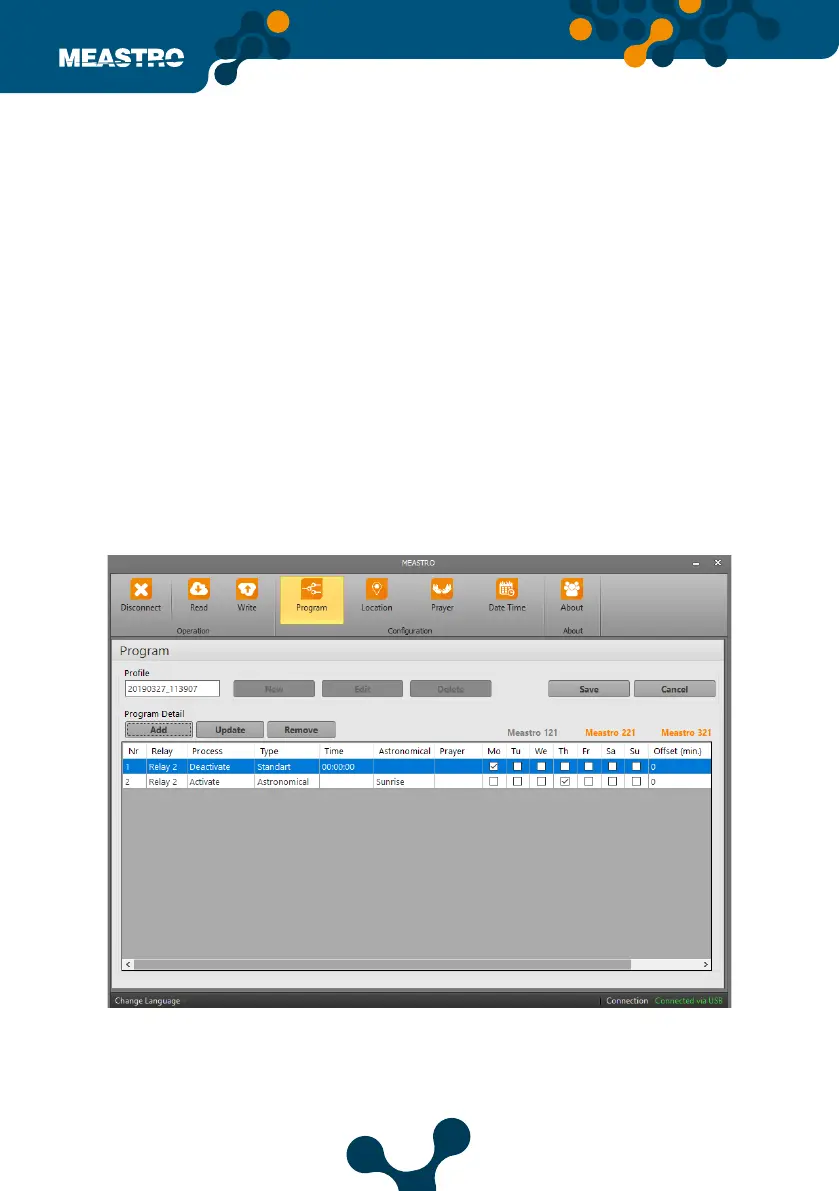
Click the Add box and the ‘Program Detail Page’ in the screenshot above appears.
Click ‘Save Program Detail’ button after setting the relevant relays.After registering the program
it will look like the following.
Nr: The created program number. It is possible to create up to 100 programs.
Relay: The relay is activated or deactivated when the relay is selected.
Process: Relay which is select before, set activate or deactivate.
Type: It is the part where selected relay is run in time. This part is divided in to 3 parts Standart,
Astronomical and Prayer.
• Standard, settings are made by the user in hours, minutes and seconds.
• Astronomical part runs depending on sunrise and sunset time.
• Prayer; device settings are made by selecting the time of Fajr-Dhuhr-Asr-Maghrib-Isha.
Oset (min): The time dierence of the set time type. This section applies to Astro and Prayer.
Week Days: The program created for marked days will run.
Description: The denition and notes of the program are written in this section.
Click ‘Save Program Detail’ button after setting the relevant relay. After registering the pro-
gram, the screen will appear as below.
Note: Depending on the type of program added, the device names in the upper right corner
will appear orange if the set type supports it. If the set program type does not support the
device will appear gray.
Figure 5-14 Meastro User Interface Program Program Tab


 To Next Page