80
Digital Astronomic Timer
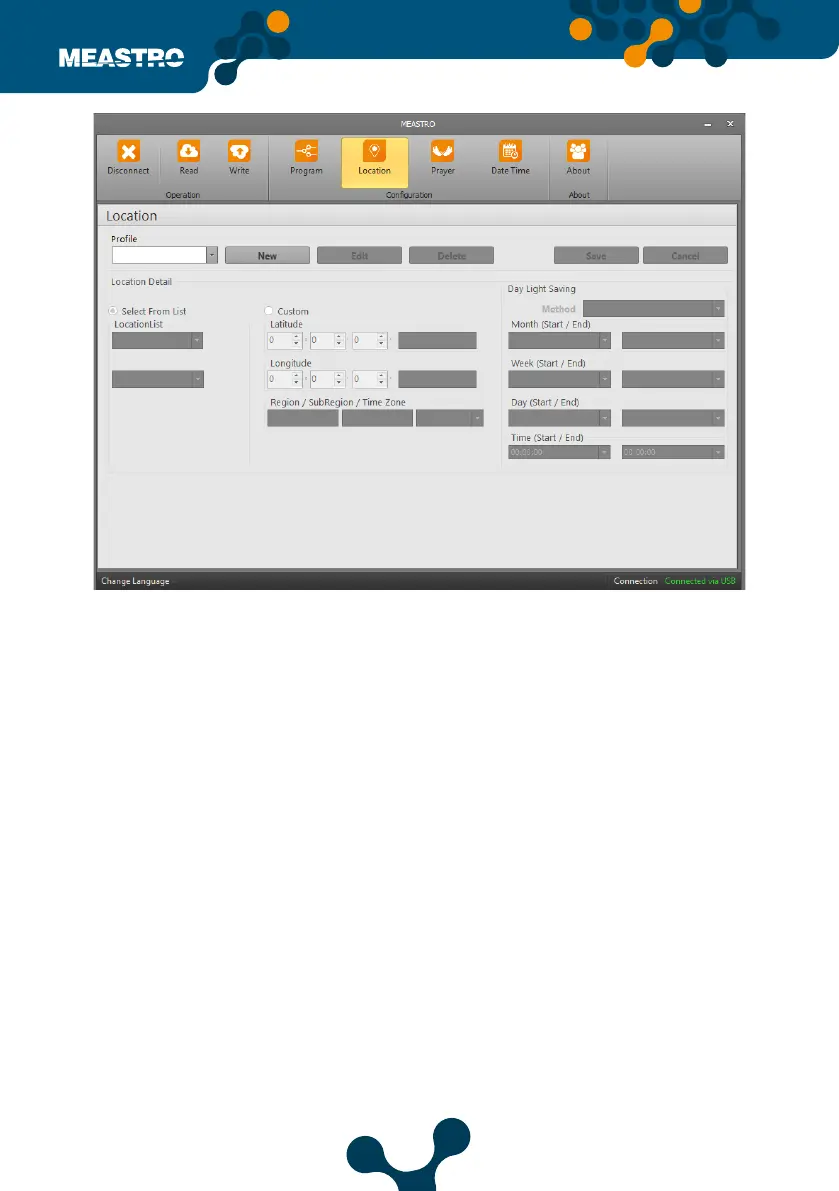
In this tab, Meastro, Location Settings are set.
On the Location tab, the desired location settings are saved to the device, written to Meatro-R
and transferred to the device.
The options under the ‘Location’ tab are divided into 3 sections: Selection, Custom and Daylight
Saving.
The ‘Location’ Settings are done as follows, the ‘New’ box is clicked and the setting buttons are
activated.
Prole: The name of the location setting to be created is written.
Select from List: The names of provinces and districts are selected.
Custom: The latitute and longitude information are written by user.
• Region: City name is written.
• Sub-Region: The name of the district is written.
• Time zone: The UTC settings with the entered position are selected from this section.
Day Light Saving: The method sections are as follows; O, Europe, America and Custom.
O: Daylight saving is turn o
Europe: It is set automatically when selected. Values cannot be changed by user.
America: It is set automatically when selected. Values cannot be changed by user.
Custom: Month, Week, Day and Time start and end settings are change by the user.
After settings, click on ‘Save’ button. Location settings are saved with the name written in
Prole section.
Figure 5-15 Meastro User Interface Program Location Tab


 To Next Page