82
Digital Astronomic Timer
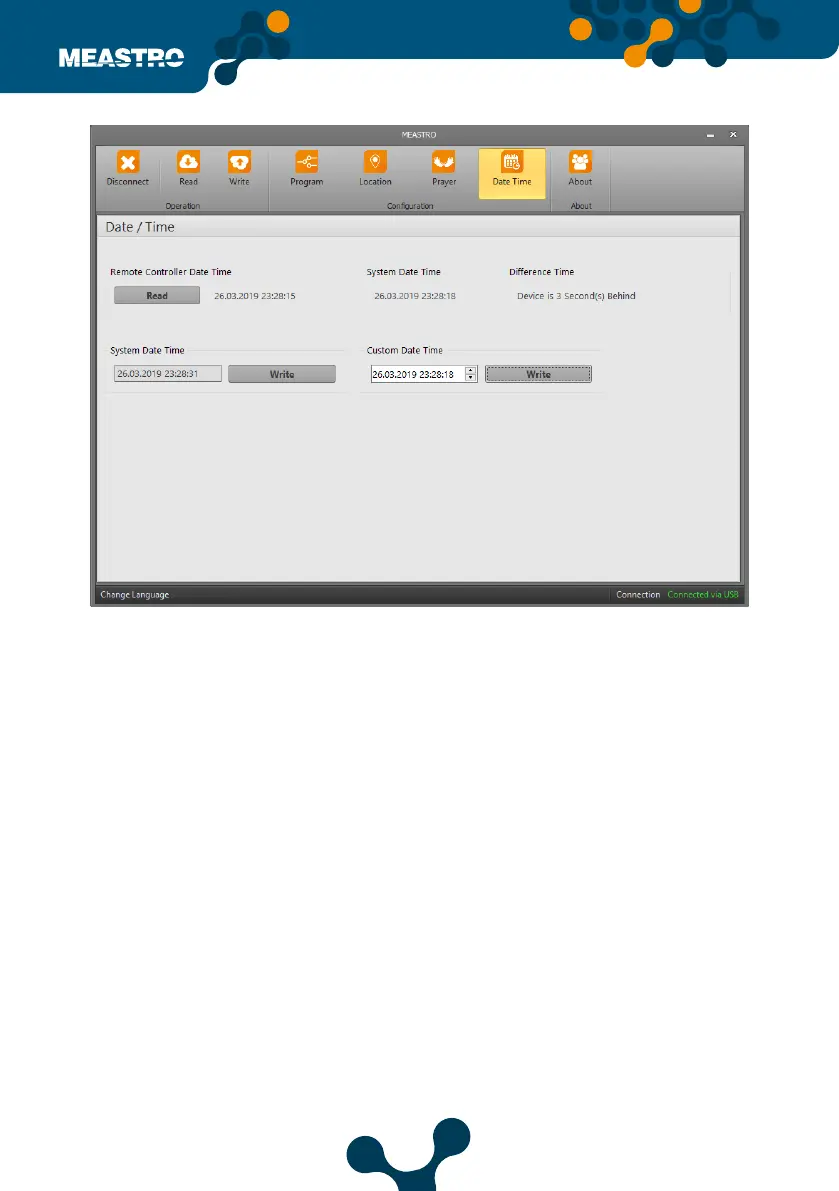
In this tab, Meastro’s Date Time Settings can congure.
Remote Controller Date Time: Displays the date and time in the infrared remote control and time
on Meastro-R .
System Date Time: It shows the current date and time of the computer to which the infrared con-
troller (Meastro-R) is connected.
Dierence Time: It shows the time dierence between the system and Infrared remote control
(Maestro-R).
Custom Date Time: Date and time can be adjusted by user.
When clicked on the read button, the date and time in the infrared remote control is read.
• In system date time setting, time and date cannot be changed by user. Date and time
information directly come from system.
• The values can be changed by the user in the Custom date and time setting.
By clicking Write button, the system date and time are written to the infrared control (Meastro-R).
Figure 5-17 Meastro User Interface Program Date&Time Tab


 To Next Page