92
Digital Astronomic Timer
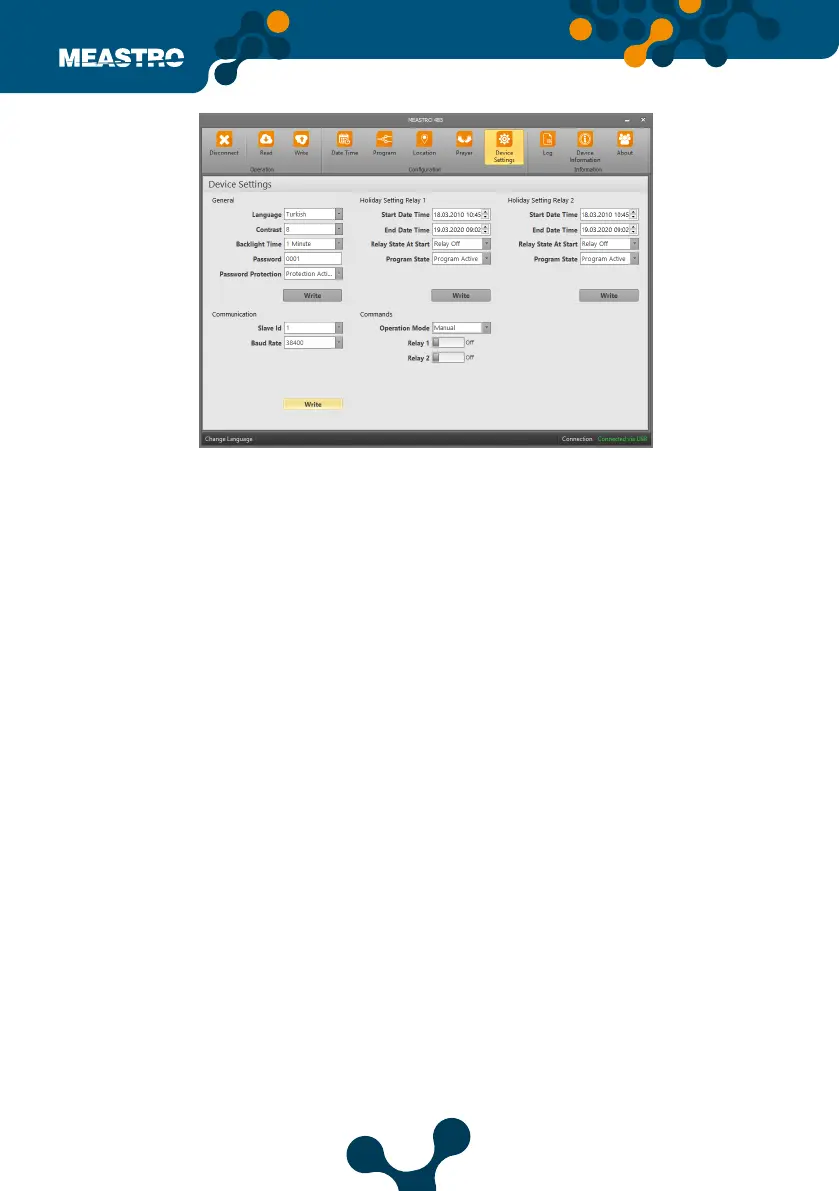
In this tab, Meastro-RS485’s Device Settings can congure.
Under the tab General, Communication, Holiday Settings Relay 1 - Holiday Settings - Relay 2 and
Commands consists of 4 adjustment parts.
General,
• Language: The language settings of the device can be set here.
Change Language button in the lower left corner of the interface screen is the language
setting of the interface program.
• Contrast: The device display contrast setting is set here.
• Backlight: This is the backlight setting of the device display.
• Password: The device password is created here.
• Password Protection: The device password protection is controlled to be active or inactive.
Holiday Settings Relay 1 and Holiday Settings Relay 2
The device is in the tab where holiday mode settings.
• Start Date Time: The date and time starts.
• End Date Time: This is the date and time when the set Holiday Program will end.
• Relay Status at Start: Holiday 1 mode is set to active or passive for Relay 1.
Holiday 2 mode is set to active or passive for relay 2.
• Program State: This is the section where the program is set to active or passive.
Figure 5-30 Meastro User Interface Program Device Setting Tab


 To Next Page