84
Digital Astronomic Timer
User can congure Meastro with interface. Easy conguration with interface program for write
date, time, program, location, prayer and device settings. User can load each setting via the
interface to Meastro-RS 485. Also contains Log, Device information and Klemsan information.
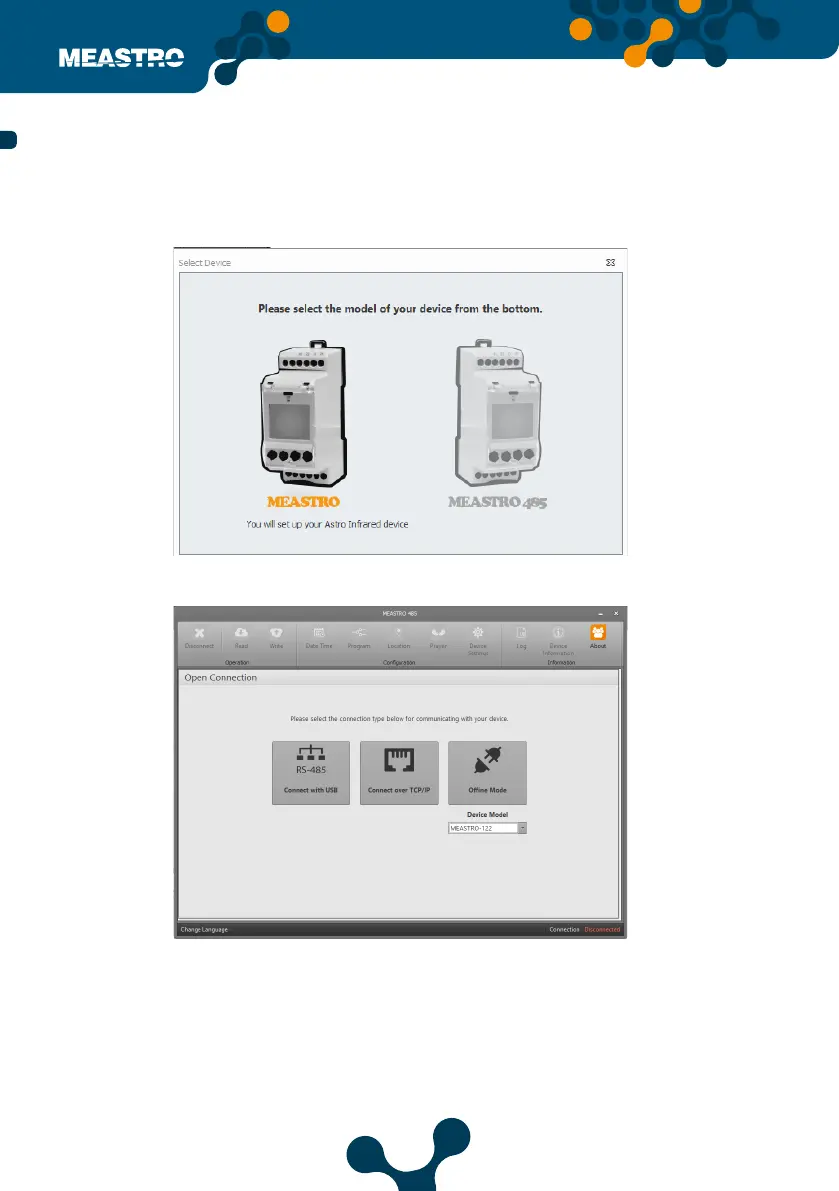
• Select Meastro-RS 485 from interface.
After clicking on the Maestro-RS485 icon, user will see the following screen.
Select your connection type to communicate with Meastro-RS 485.
Click ’Connect via USB’ if user wants to communicate via serial connection.
Click ‘Connect over TCP / IP’ if user wants to communicate via TCP/IP.
Oine Mode feature allows all settings be stored in the interface program without being con-
nect to the device.
Select the device model which you use.
5.2.2 Using Meastro User Interface Program with Meastro-RS485
Figure 5-20 Meastro RS-485 Select
Figure 5-21 Connection Types


 To Next Page