4-12 A-61550 February 2010
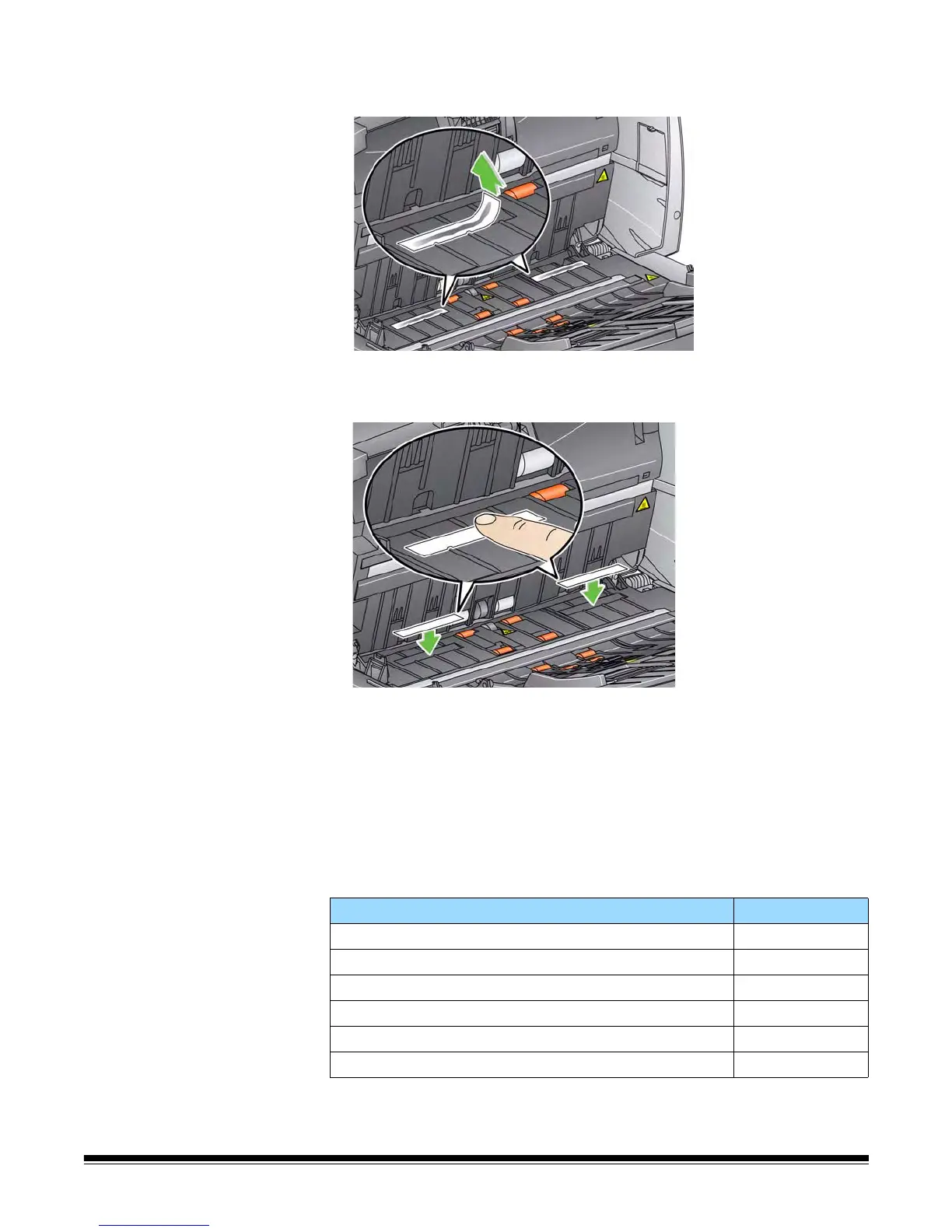
4. Grasp the blotter strip, carefully pull it off of the channel and discard
the soiled strip.
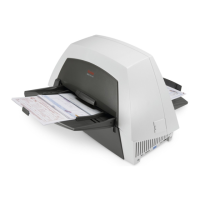
5. Remove the backing from a new blotter strip.
6. Align the blotter strip in one of the channels.
NOTE: Improperly aligned blotter strips may cause paper jams.
7. Press the adhesive side of the blotter strip down firmly into the
channel.
8. Repeat Steps 4-7 for the other strip.
9. Lower the scanner cover and press it firmly until it snaps into place.
Supplies The following supplies are available:
Description CAT No.
Document Printer: Printer Ink Cartridges / Black (Qty 10) 135 5155
Document Printer: Kodak Print Ink Blotters (Qty 60) 840 5425
Document Printer: Kodak Printer Ink Cartridge Carrier 826 7486
Enhanced Printer: Black Ink Cartridge (HP C6602A) 818 3386
Enhanced Printer: Red Ink Cartridge (HP C6602R) 159 6832
Enhanced Printer: Ink Cartridge Carrier 113 3842


 To Next Page