19
5 PCB settings
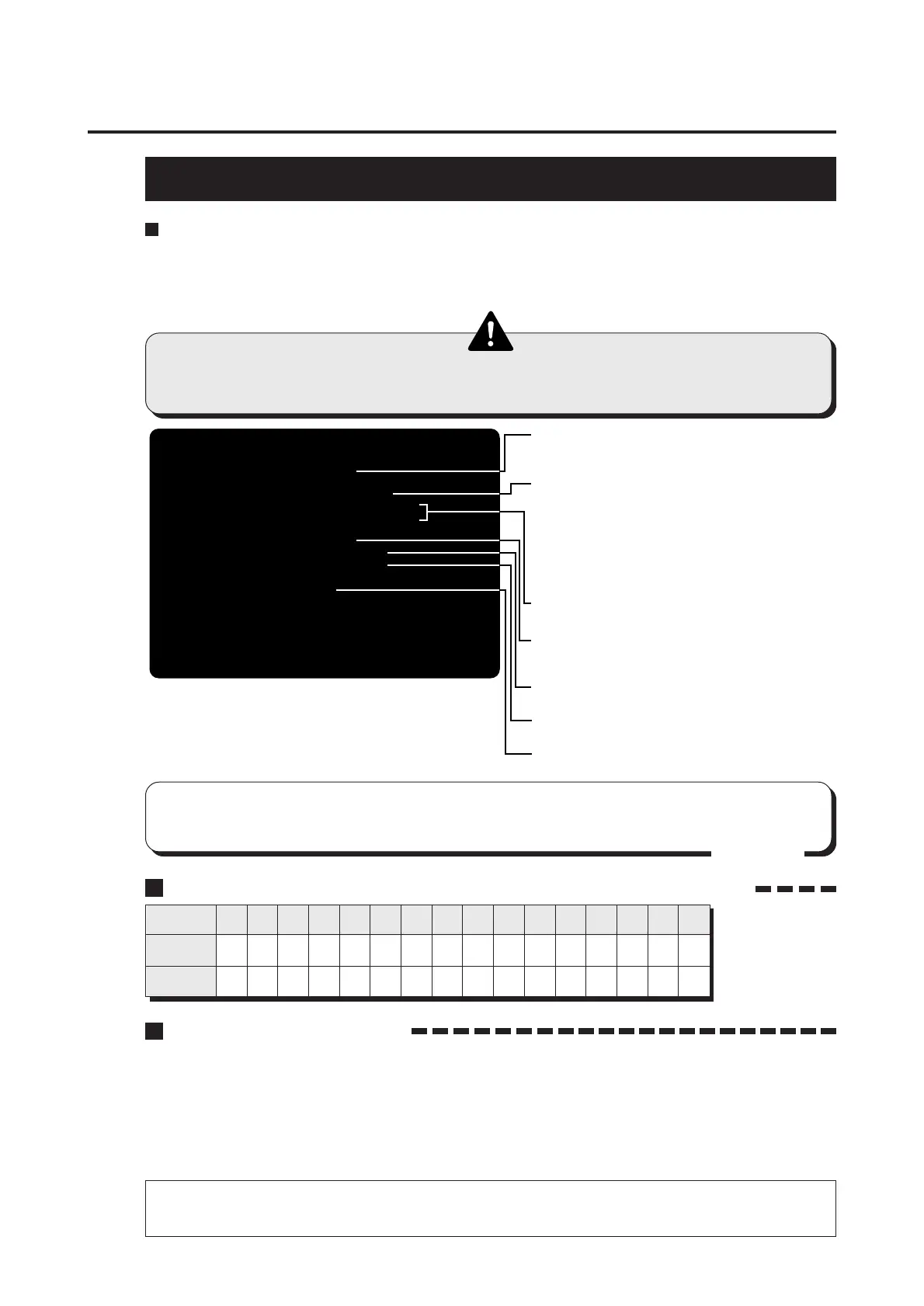
COIN OPTIONS
Mode for setting and checking the coin options.
Press the 1P start button to select an item. Pull the 1P gun trigger to change the
setting.
To return to the main menu screen, select “SAVE AND EXIT” or “EXIT” and pull the
trigger of the 1P gun.
Setting the coin options
•This screen is just an example.
•The coin setting options are not displayed when “FREE PLAY” is set to “YES”.
In such case, remember the games will be free.
FREE PLAY NO
COIN MECHANISM COMMON
COIN SLOT1 1COIN 1CREDIT
COIN SLOT2 1COIN 1CREDIT
PREMIUM START NO
TO START 1 CREDIT
TO CONTINUE 1 CREDIT
FACTORY SETTING
SAVE AND EXIT
EXIT
(NEED TO PULL 1PLYR TRIGGER)
1PLYR START = SELECT ITEM
1PLYR TRIGGER = MODIFY SETTING
COIN OPTIONS
•Selects a free play.
YES..........Available for free play.
NO............Not available for free play.
•Sets which mode the 1P, 2P and 3P credits are
common or independent in.
·COMMON .............. Total of all credits is counted
regardless of the number of
coin slots.
·INDEPENDENT ..... Each credit is counted separately
for each coin slot.
*Make the same setting for COIN SLOT1 and COIN
SLOT2 when COMMON is selected.
•Sets the number of credits for the coin.
(Make the settings referring to the table below.)
•Sets the premium start.
Choose from “NO”, “YES1”, “YES2”, “YES3” and “YES4”.
(See the figure below)
•Sets the number of credits (1 to 5) required to start
the game.
•Sets the number of credits (1 to 5) required to continue
the game.
•Pull the 1P gun trigger to see if all the settings in this
mode go back to the factory ones.
The relationship between the number of coins and the number of credits.
SETTING
COIN(S)
CREDIT(S)
1
1
1
2
1
2
3
1
3
4
1
4
5
1
5
6
1
6
7
1
7
8
2
1
9
2
3
10
2
5
11
3
1
12
3
2
13
3
4
14
4
1
15
4
3
16
4
5
“PREMIUM START” Setting
•It is possible to set the different numbers of credits for the start of the game and for its
continuation. First, select a difference in the number of credits between the start and the
continuation among “YES1” to “YES4”, and set the number of credits for continuation.
The number of credits for start is automatically set as the addition of the number of
credits for continuation and the above selected difference. When “PREMIUM START”
is not set, the number of credits required for start and that for continuation become
the same.
Example: “PREMIUM START YES1” selected
Credit 1 at continuation + Difference in the number 1 = Credit 2 at start
•This game machine is equipped with just one coin slot. Keep “COMMON” for the
“COIN MECHANISM” entry on the above screen. Also make the same setting
for the “COIN SLOT 1” and “COIN SLOT 2” entries.
MEMO














 To Next Page