5 Game settings
I
,
5-2 Setting and adjustment of game
qode
Manually check and change the settings for the screen displbys and game contents
and change them as required.
n
Sta~ingthetestmode-r~-~~~~~~~~~~~~~~~~~~~
I
1 Turn ON the power switch.
2 While the demonstration game is playing, press the te
‘t
button on the service
panel. (Do not turn ON the power switch with the test
:’
utton held down. The
current settings, the ranking record and the “BOOKKEEP NG” date will be erased
and the machine, will revert to the factory settings.)
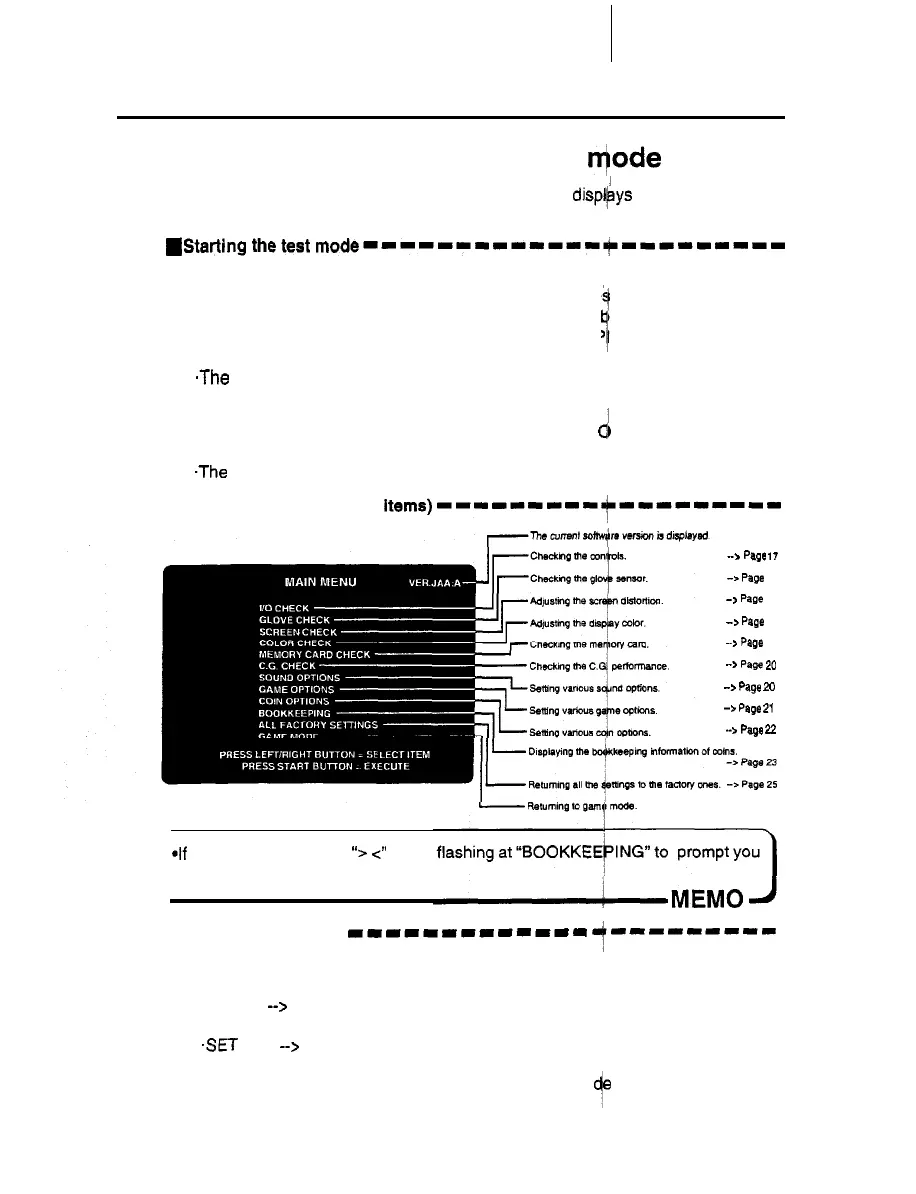
.The main menu is displayed on the screen.
)
I
n QUitthetestmode--------I-r---d---------
1
Press the right or left select button and select ‘GAME M
d
DE” on the main menu.
2 Press the start button.
.The screen goes back to the game mode.
n
Main menu screen (basic
items)---------~~--~-----
->
Page 17
-> Page 18
-> Page 19
->
Page 19
-->
Page 19
-> Page 20
-z. Page 20
-> Page 21
-->
Page 22
*If the time is not set yet, ‘5 4’ starts
to set the system clock.
n
Selecting each mode
111111111-111
7---------
How to select each mode from the main menu
SELECT --> Press either the right or left select button.
.SET
--> Press the start button.
After selecting a mode, refer to the page on which that mo
f
is described in details.
15













 To Next Page