7 Maintenance
7-5
Troubleshooting
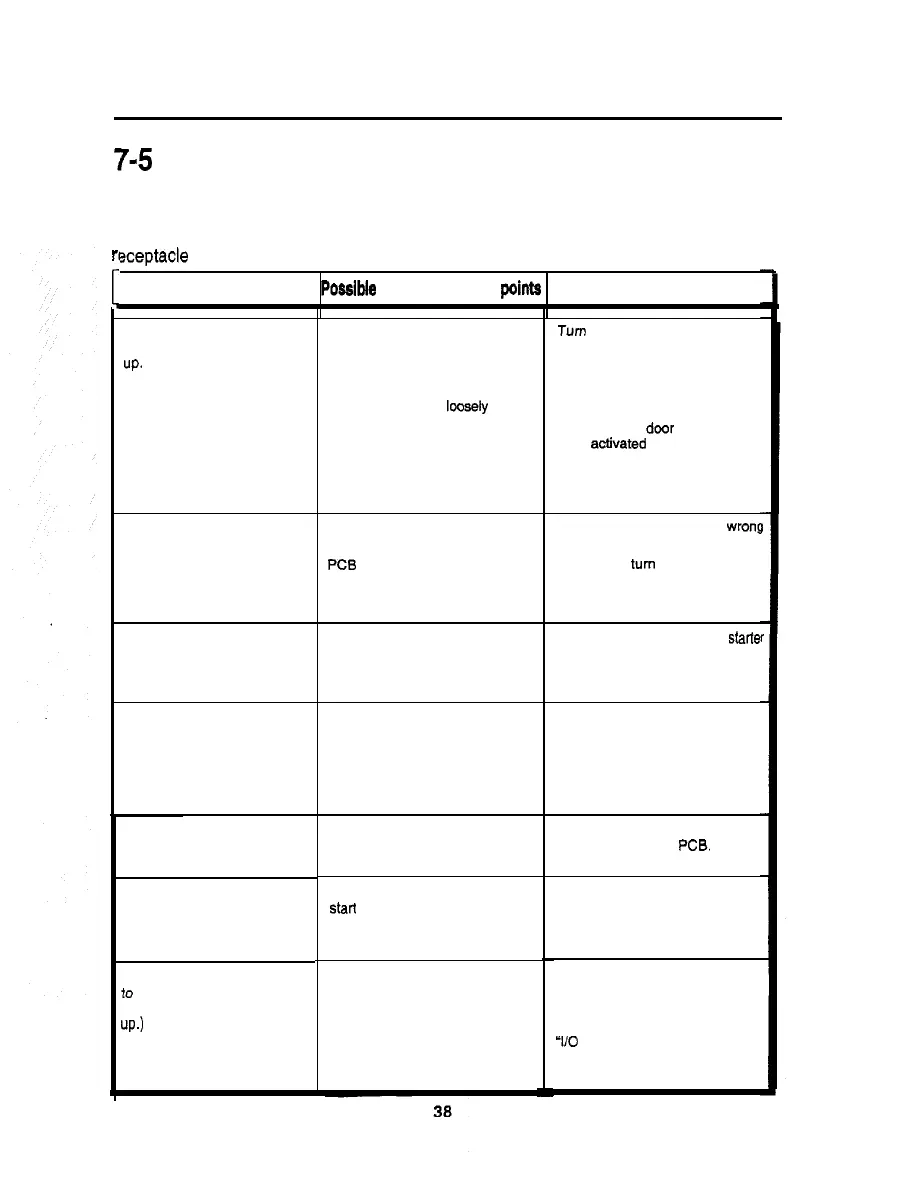
If the power switch is turned ON but the machine fails to start properly, take the following
measures. If the machine still malfunctions or any other problem than described below
occurs, immediately turn OFF the main power switch, unplug the power cord from the
rt
[
zeptacle and contact your nearest dealer.
Trouble
Poeelbie
causes and check
points
Measures
No image on screen,
fluorescent light failure to light
up.
No image on screen:
fluorescent light on.
Fluorescent light failure to
light up.
Rotating light failure to light
up or rotate.
Screen too dark or too bright.
Start button or select button
malfunctioning.
Button functioning, but failure
io
light up.
(Select button does not light
up.)
No power turned ON.
(Main power switch,
Power cord disconnected from
the machine or wall outlet.
Back door open or loosely closed.
Circuit protector activated.
Memory card not inserted.
PC6 unit defective.
Monitor defective.
Fluorescent fight or starter
broken.
Rotating light lamp broken.
Rotating light control PCB in
trouble.
Monitor maladjusted.
Switch wires disconnected from
starl button.
Start button defective.
Lamp wires disconnected from
button socket, or reversely
connected.
Button lamp (LED) defective.
Turn
ON the power switch.
Check also the shop’s circuit
breaker.
Reconnect the power cord
tightly.
Screw down the back door
tightly. (The
door
switch has
been aotivated to cut off the
power.)
Take an appropriate measure.
Check the memory card for
wron(
position.
Immediately turn OFF the main
power switch, unplug the power
cord from the receptacle and
contact your nearest dealer.
Replace the fluorescent light or starte
with new one of the same type.
Replace the lamp with new one
of the same type.
Immediately turn OFF the main
power switch, unplug the power
cord frotn the receptacle and
contact your nearest dealer.
Readjust the brightness on the
monitor adjustment PCB.
Reconnect the switch wires to the
socket.
Replace the start button with new
one.
Reconnect the lamp wires to the
socket.
Check the performance on the
‘I/O
CHECK” screens. Replace
the button as required.













 To Next Page