5 Game settings
-
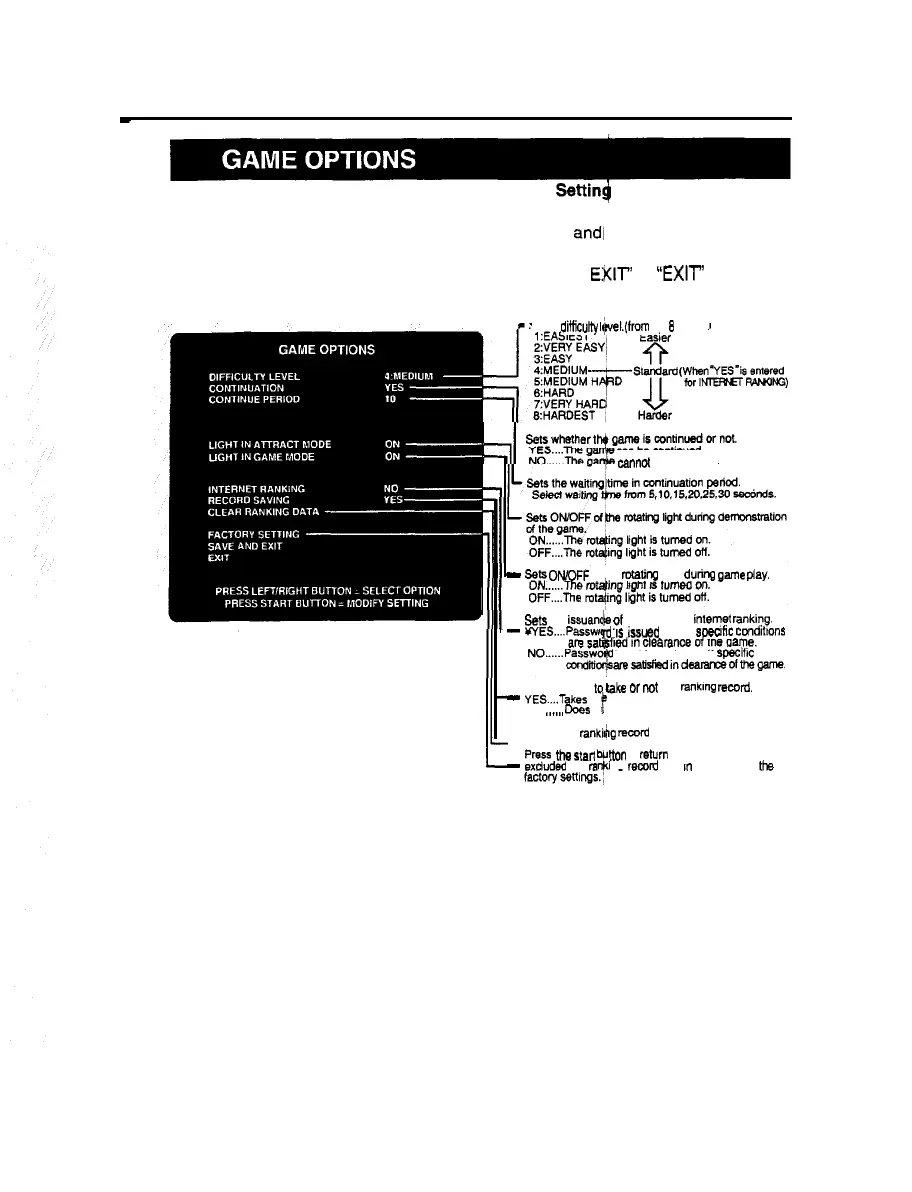
Setting various game options
n
Mode for setting and checking the game options.
~
Press the right or left select button to select an item,
and1
press the start button to
change the setting.
To return to the main menu screen, select “SAVE AND ENIT’ or “EXIT’ and press
the start button.
Sets a
diffbuiiy
Il/vel.(from
the
8
levels)
*This screen is just an example.
21
L
can be continued.
cannot
be continued.
-
Sets OfVOFF of/the
rotating
light dunq
game
play.
Sets the issuancj qf password for intetyt
rankIng.
-
WES....Passw
rd
IS
issued
when spwhc
ccnditlons
is not issued even if
specific
am?atisfMindeararcetithsgame
Sets whether ,oCke
or
not
the
ranklng
RMrd.
-
YES....Takes th
NO .._... Does
t
ranking record.
no
take the ranking record.
Clears the ankijlg remrd data.
Press
the
stan don
to
mturn
all the settings
-
exduded
the
rs
z
no
record
date I” this mode to
the













 To Next Page