5 Game settings
Displaying the
bookkeeping information of coins
n
Mode for displaying the total data on the number of coins put in the machine.
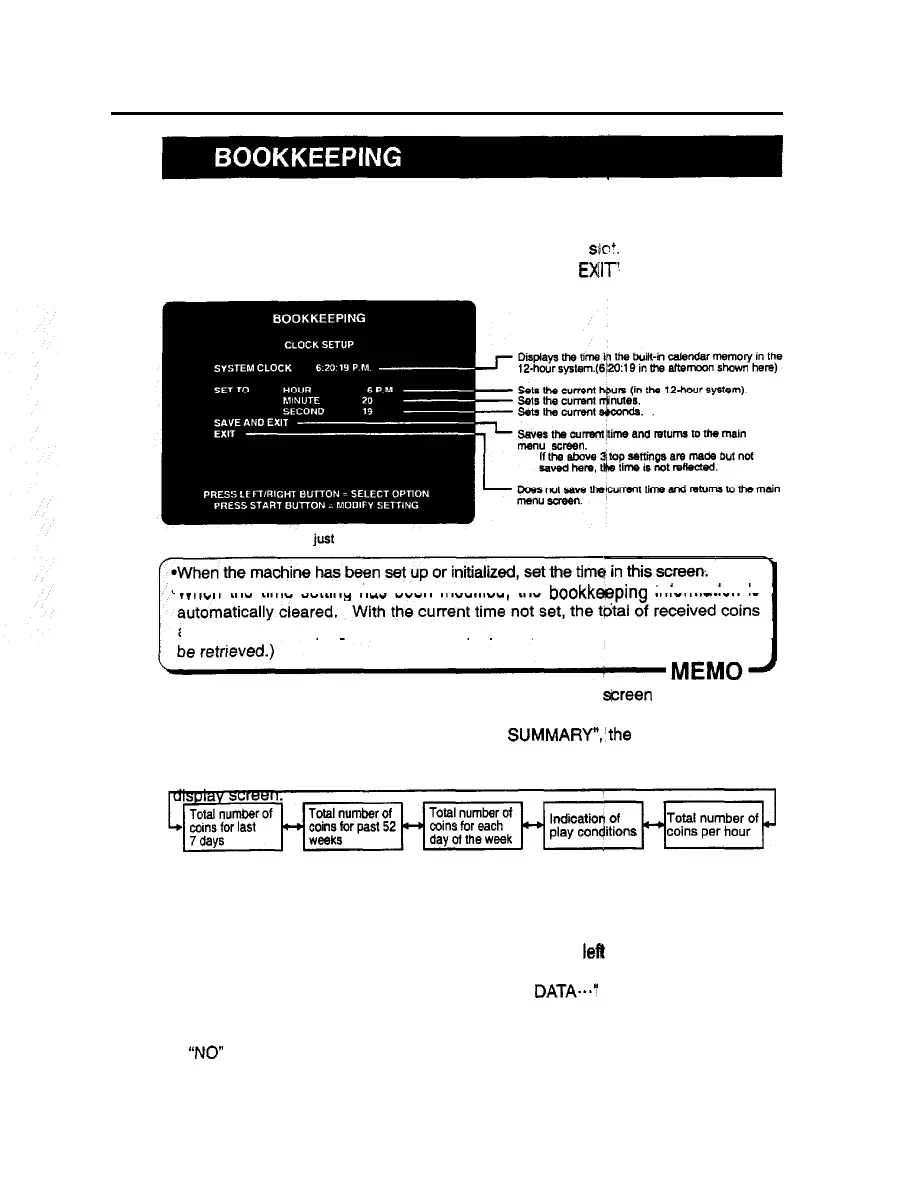
If the time is preset on the “CLOCK SETUP” screen, the total data on the number of
coins put into the machine can be checked for each coin slot.
To return to the main menu screen, select ‘SAVE AND
EXIT!
or “EXIT’ and press
the start button.
*This screen is just an example.
-When the time setting has been modified, the bookkeeping information is
and other bookkeeping data are not displayed.
(The data once erased can not
n When the time has been preset on the “CLOCK SETUP” green as shown above,
the following “BOOKKEEPING DATA” is displayed on the screen. When pressing
the right or left select button to select ‘NEXT SUMMARY”,‘the screen changes as
follows.
To return to the main menu screen, press the start button to select “EXIT” in individual
When the current time has been set, the current time and coin collection summary
data can be cleared by pressing the start button after selecting “CLEAR INCOME
DATA” on each display screen.
At this time, the question “DO YOU WANT TO CLEAR BOOKKEEPING DATA?
YES/NO” is indicated on the screen. Press the right or
left
select button to select
“YES” or “NO” first and then the start button to enter the decision.
If ‘YES” is selected, “CLEANING BOOKKEEPING DATA--.” appears on the screen
and all the bookkeeping data are deleted. The data is saved as was set at the time
of shipment and the main menu appears again automatically.
If “NO” is selected, “NO MODIFICATION” is indicated and the main menu appears
again without deletion of the data.
23













 To Next Page