7 Maintenance
6
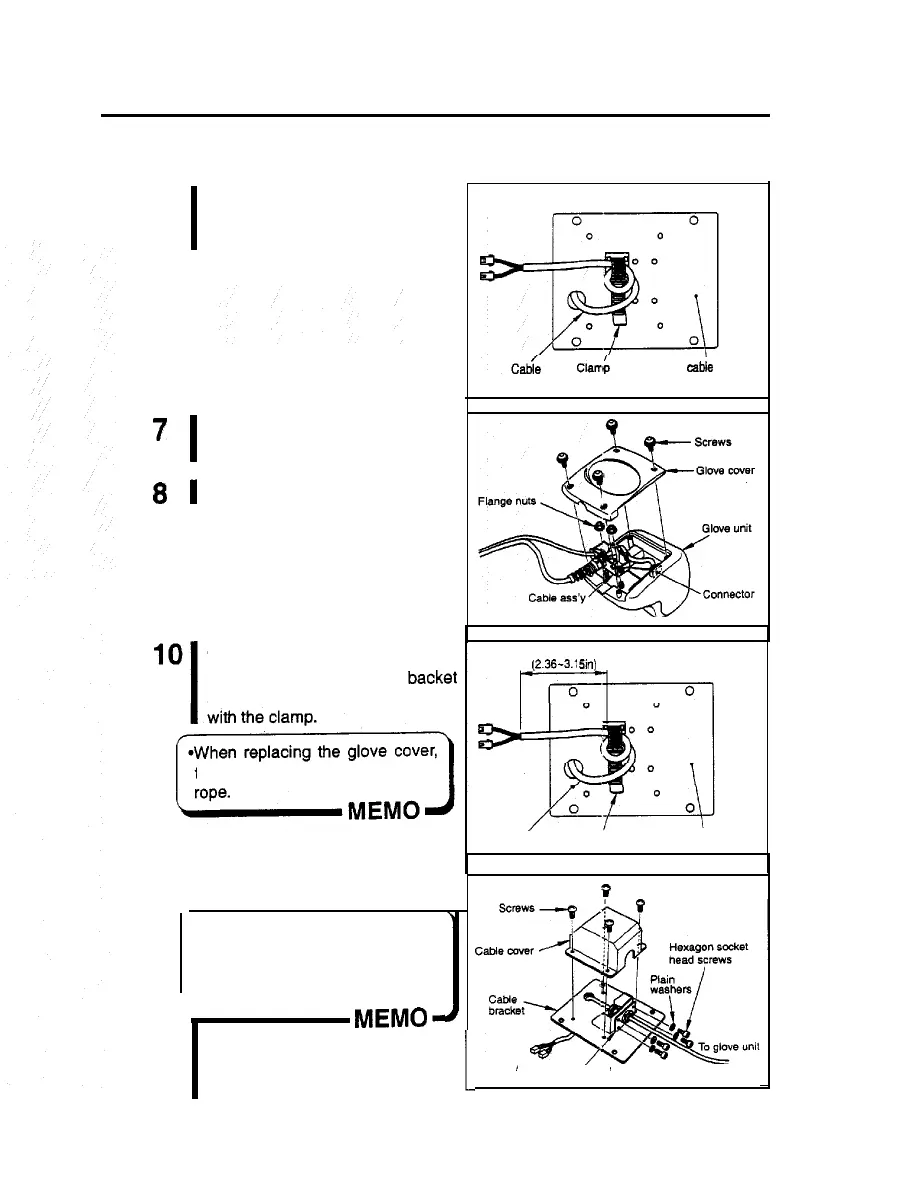
Loosen the clamp at the back of the
cable bracket, and draw out the
cable.
7
I
Remove the screws and detach the
glove cover.
8
1
Disconnect the connector.
9
I
Detach the flange nuts fixing the
cable ass’y and take out it. Now
the glove unit and the cable ass’y
are disconnected.
r
I-
Cl&
Back of the
cable
bracket
To fit a new cable
Lay the cable to the cable backet
as shown here. Secure the cable
60-60mm
(X36-3.1
sin)
take care not to pinch the
cable or
11
I
Cable Clamp Back of the cable bracket
Fix the cable ass’y to the cable .
bracket, and attach the cable cover
into position.
r
P
*Even when the cable ass’y bracket
lock screws are tightened up, the
cable ass’y bracket itself remains
somewhat loose. This is normal,
not a trouble.
MEMO-
12
Cable ass’y bracket
For the remaining steps, take the
reverse order of removal procedure.
1
34













 To Next Page