1.5
Getting started
Pick an installation spot
Where should you install your fax machine? The location should be:
• Clean — Dust buildup can damage your machine. (However, do not use a cover!)
• In the open — Allow at least 30 cm of clearance around your machine. Be sure
that you never cover the machine. Its vents must be able to “breathe.”
• Away from direct sunlight — This helps avoid overheating.
• Dry — Avoid any location where splatters or sprays (such as from a water foun-
tain) could reach your fax machine.
• Level, and vibration-free.
• Near a phone jack — Your fax machine uses a standard (modular) telephone
jack, also known as an
LJU
.
• Near an
AC
power outlet — The
AC
power cord is about 1.8 m long when
stretched to its limit, and the power cord should never be stretched to its limit.
Power tips
• Use a standard three-pronged 230
VAC
outlet.
• Make sure the outlet isn’t controlled by a wall switch.
If it is, you’ll risk occasional shutoffs to the machine, causing you
to lose fax messages.
• Don’t use an outlet which also is supplying power to a
large appliance, such as a refrigerator or air conditioner.
Such high-consumption appliances can cause “draw-downs”
(temporary drops in the power available for other equipment on
the circuit) which could damage your fax machine.
• Use an electrical surge suppressor, preferably one which guards both tele-
phone and electrical lines. This device helps to shield your fax machine from
damaging high-voltage electrical surges.
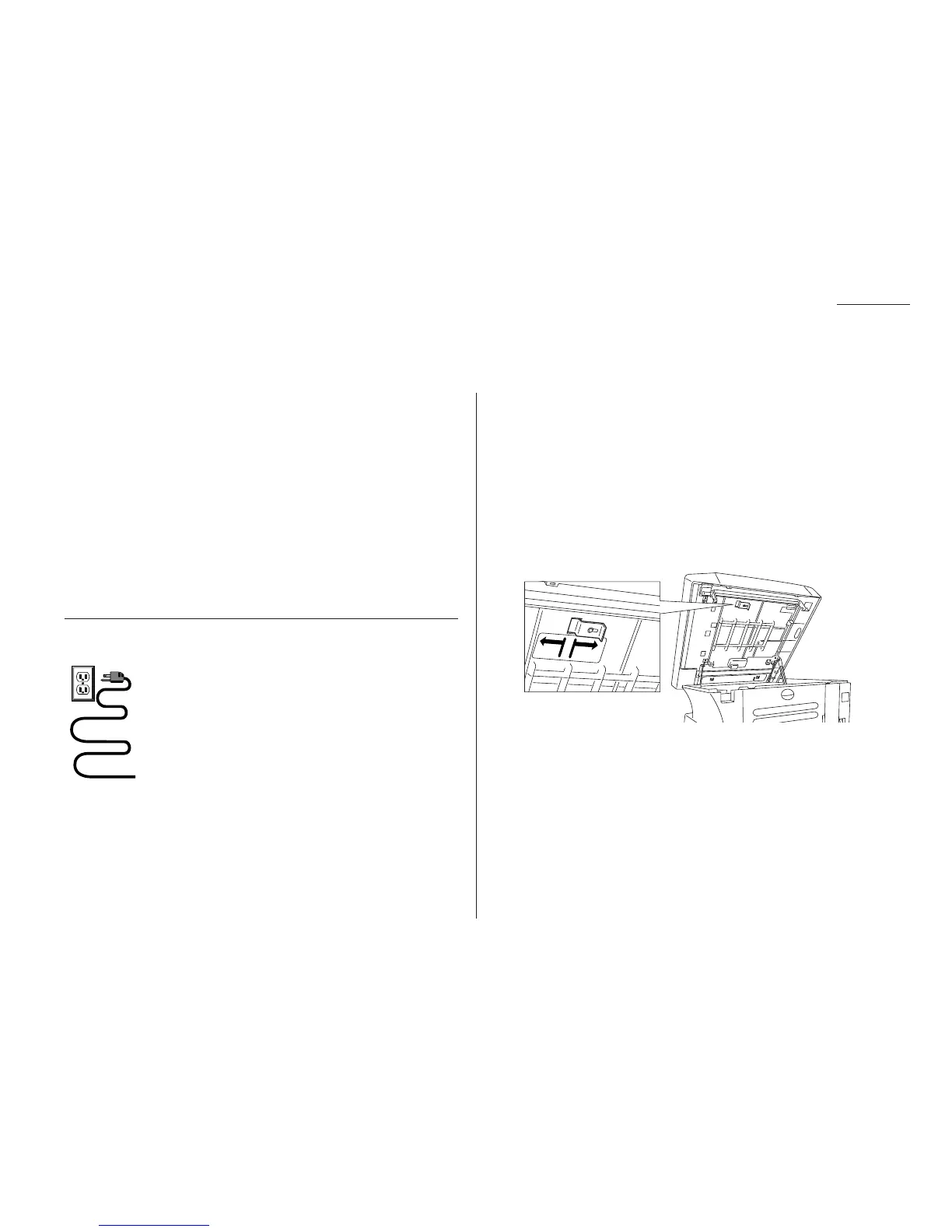
Unlocking the mirror carriage
Your fax machine is shipped with mirror carriage locking plate for protecting your
machine’s mirror carriage during shipping.
Important: Do not turn the power on until after you have unlocked the mirror
carriage. Otherwise, damage could result.
Important: Gently close the top cover so that you don’t catch your hands, possibly
injuring them.
1
Open the top cover. Loosen the screw which secures the mirror carriage lock-
ing plate, and then slide the plate.
2
After unlocking the mirror carriage, secure the mirror carriage locking plate
mounting screw.
IMPORTANT: BEFORE YOU USE THE MACHINE, YOU MUST
TURN OFF THE TRANSPORT MODE (see page 1.8).
Note: If you must ship your machine for some reason, turn on the transport mode,
turn the power off and then lock the mirror carriage (undo the above proce-
dure).










 To Next Page