52 OIO 14en Edition 07/2017 Operating Instructions
Accessories
Appendix
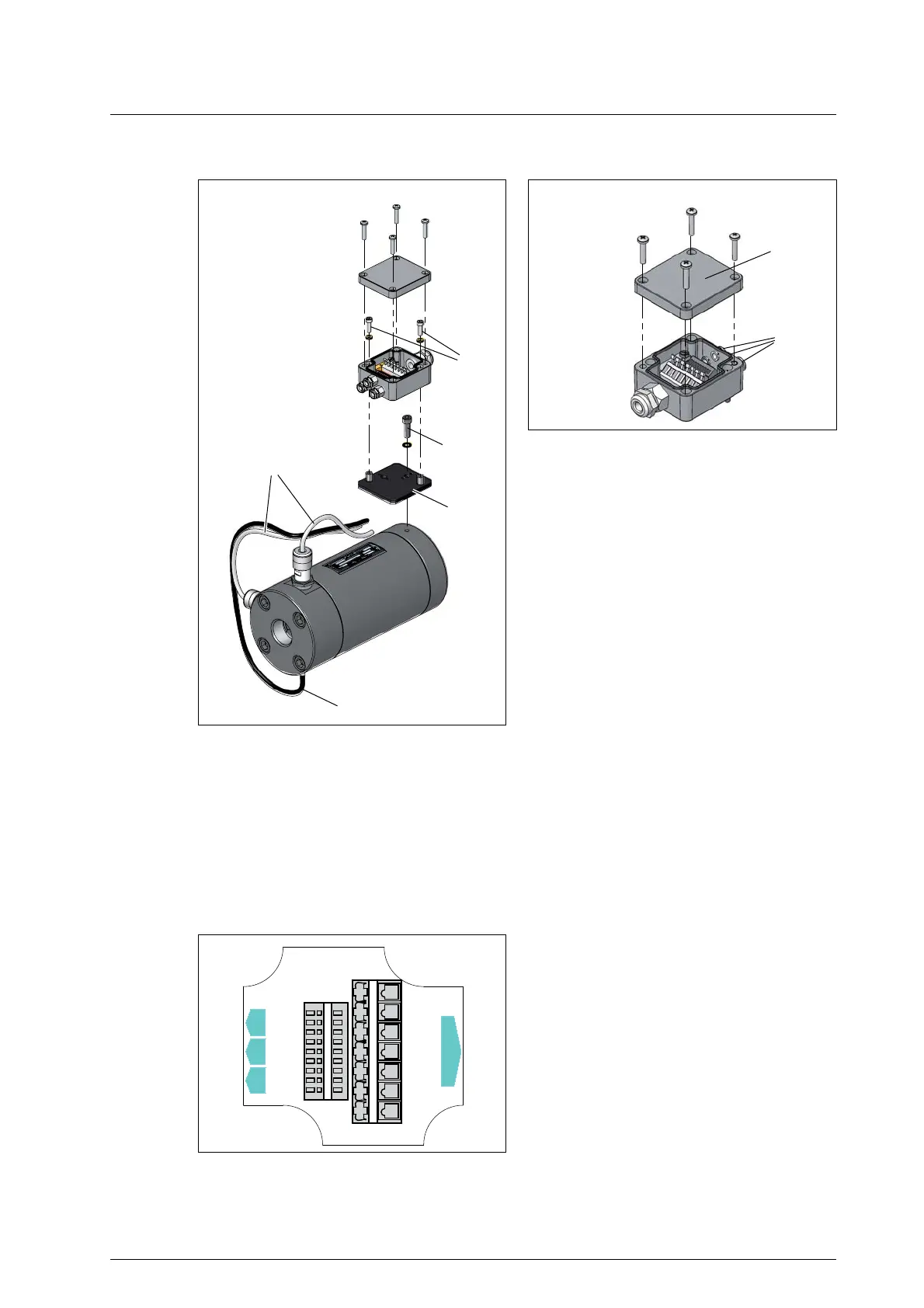
Mounting and connecting the junction box
Fig. 7 Junction box
1 Temperature sensor cable
2 Pick up cable
3 Base plate junction box
4 Socket screw and washer
5 Socket screws and washers
6 Cable gland sensor inputs
7 Junction box lid
Fig. 8 Mounting the junction box
1. Disconnect the cables of the pick up 2 and the temperature sensor 1. Ensure that the cable length is
sufficient.
2. Fasten the base plate of the junction box 3 to the flowmeter using the screw 4.
3. Fasten the lower part of the junction box to the base plate 3 using the screws 5.
4. Carry out the cabling through the cable gland 6, using the connection circuit diagram, see Fig. 9,
page 52.
5. Screw tight the lid of the junction box 7.
Fig. 9 Connection circuit diagram junction box
BEG 1 BEG 2 EET
BEM
1
0 V Q
1
24 V Q
298
Com. t
34 675
26345 7
Sig.2 Q
Sig. t
Com. t
24 V Q
Sig.1 Q
0 V Q
Sig. t
24 V Q
Com. t
Com. t
Sig.1 Q
Sig.2 Q
0 V Q


 To Next Page