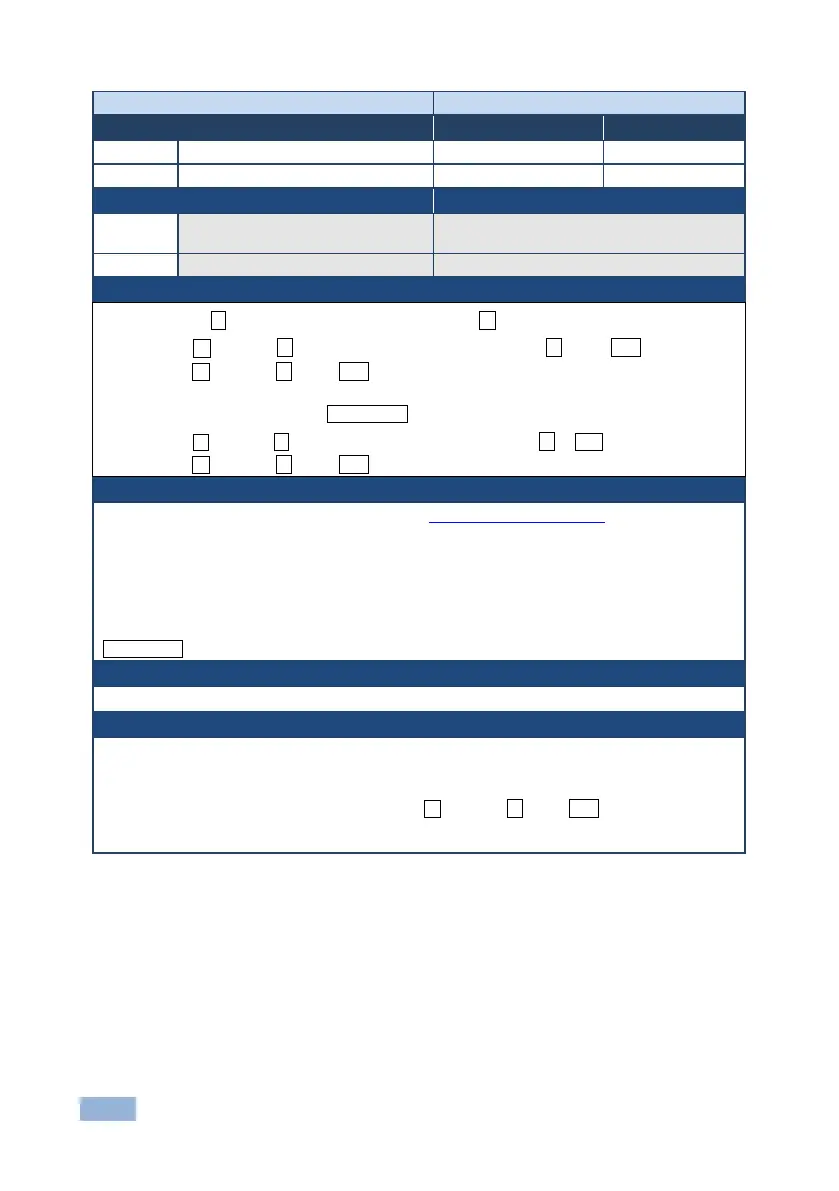
Write EDID data from external
application to device
Multi-step syntax (see following steps)
Communication Steps (Command and Response)
Step 1: #LDEDID␠ dst_type, dest_bitmask, size, safe_mode␍
Response 1: ~nn@LDEDID␠ dst_type, dest_bitmask, size, safe_mode␠READY␍␊ or
~nn@LDEDID␠ ERRnn␍␊
Step 2: If ready was received, send EDID_DATA
Response 2: ~ nn@LDEDID␠dst_type, dest_bitmask, size, safe_mode␠OK␍␊ or
~nn@LDEDID␠ ERRnn␍␊
dst_type - EDID destination type (usually input) (see Section 13.2.1 EDID Source)
dest_bitmask - bitmap representing destination IDs. Format: 0x********, where * is ASCII presentation
of hex digit. The binary presentation of this number is a bit mask for destinations. Setting ‘1’ means
EDID data has to be copied to this destination
size - EDID data size
safe_mode - 0 - Device accepts the EDID as is without trying to adjust
1 - Device tries to adjust the EDID
EDID_DATA - data in protocol packets
Response is sent to the com port from which the Set (before execution)
When the unit receives the LDEDID command it replies with READY and enters the special EDID
packet wait mode. In this mode the unit can receive only packets and not regular protocol commands.
If the unit does not receive correct packets for 30 seconds or is interrupted for more than 30 seconds
before receiving all packets, it sends timeout error ~nn@LDEDID␠ERR01␍␊ and returns to the
regular protocol mode. If the unit received data that is not a correct packet, it sends the corresponding
error and returns to the regular protocol mode.



 To Next Page