5
Extension Wings
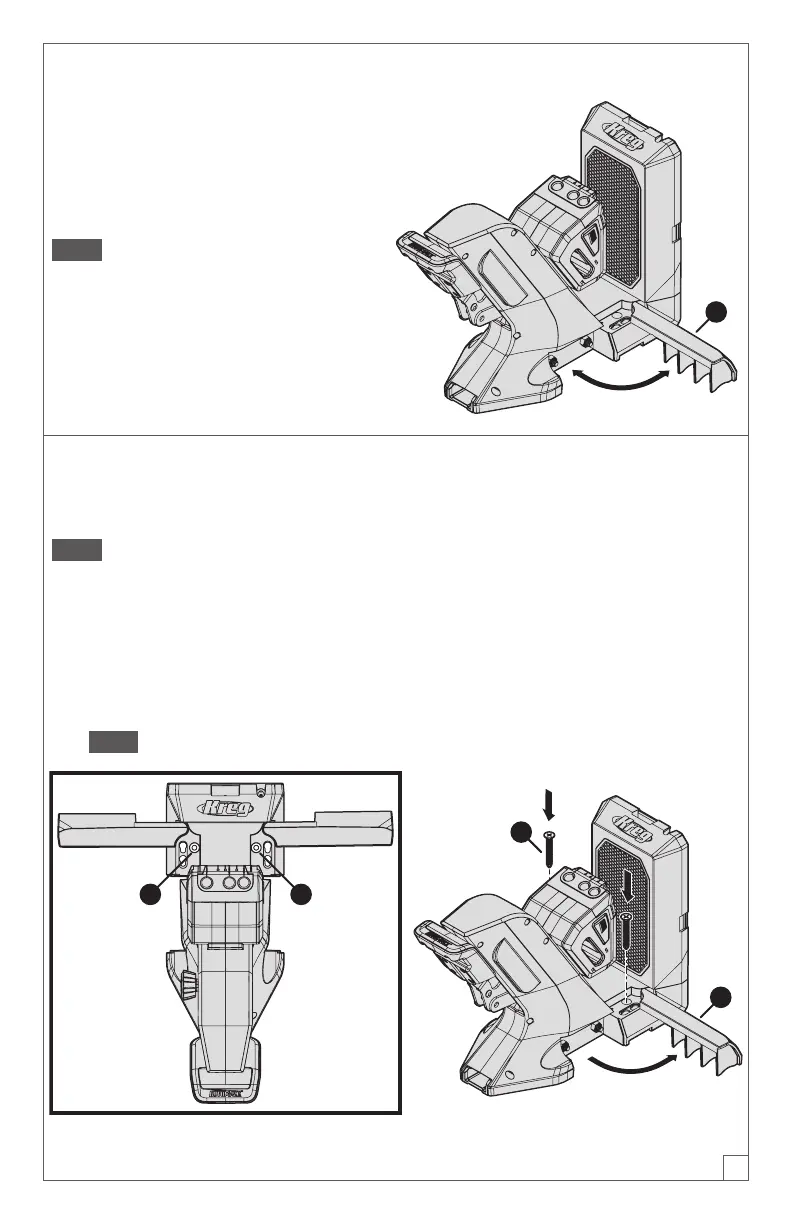
The KPHJ720 Jig has two extension
wings, one (1) on each side of the jig
base. You can rotate one or both wings
out to 90 degrees to provide added
stability and material support.
Note If you use the optional docking
station with the jig, you will use the
docking station’s material support wings
instead of the extension wings shown
here. See Docking Station Assembly
onpage7.
1
Mounting Option
If desired, you can mount the KPHJ720 Jig to your work surface for added stability.
Note These instructions apply to a jig that is used without the optional docking
station.
a. Place the jig in the desired position on your workbench.
b. Rotate the extension wing (1) on each side of the jig to 90 degrees.
Two mounting holes (2) are now accessible (one hole on each side of the jig).
c. Drive one Kreg pocket-hole screw (3) through each mounting hole(2).
Note You can use Kreg SML-C125 screws or any other Kreg pocket-hole screw.
22
3
1


 To Next Page