10
2-2-4 Connecting Control Input Terminal
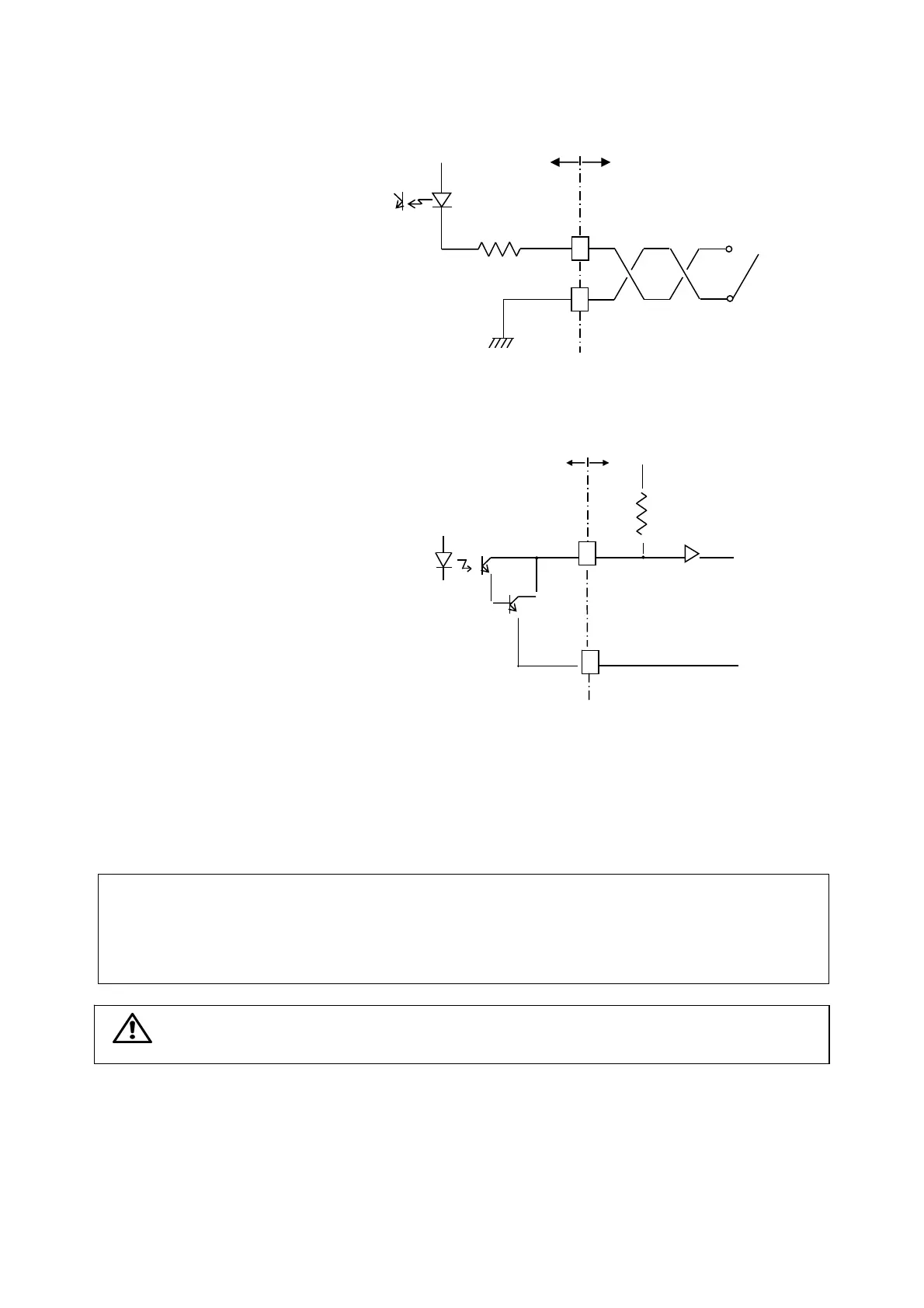
• Connection of control input terminal (INPUT)
is described in the following.
COM: Common
1: Digital command
2: Level test command
3: Pattern select command 1
4: Pattern select command 2
• When using the external switch, connect as shown in
the right figure. In addition, connect the open
collector in the same manner.
2-2-5 Connecting Control Output Terminal
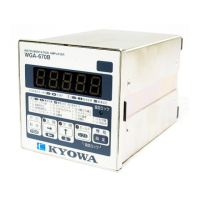
• Connection of control output terminal (OUTPUT)
is described in the following.
COM: Common
1: High limit output (HIGH)
2: OK output (OK)
3: Low limit output (LOW)
• Connect by referring to the right figure.
2-2-6 Connecting Analog Output Terminal
• Connection of analog output terminal (ANALOG
OUTPUT) is described in the following.
COM: Common
V: Voltage output terminal (±10 V)
I: Current output terminal (4 to 20 mA)
• Always set the current output to load resistance 500 Ω or less and voltage output to 2 kΩ or more.
Reference: Countermeasures against noise for control input/output and analog output terminals
• For more than 1-m long wiring, use twisted cable.
• For more than 3-m long wiring, use 2-conductor shield cable and connect the shield cable to the
ground terminal.
Note: Control input/output and analog output terminals has a tightening torque of 0.5 N・m or
less.
2-2-7 Connecting BCD Output
For connection of BDC output, see the WGI-400A Instruction Manual for Optional Functions.
2-2-8 Connecting RS Output
For connection of RS output, see the WGI-400A Instruction Manual for Optional Functions.
Input Connection Diagram
External
Interna
l
12V
Switch or open collector
2.4 KΩ
1 t
mA→
Out
ut Connection Dia
ra
30 Vmax
COM
External
Internal
10KΩ



 To Next Page